Skip to content
  • Recent
  • Tags
  • Popular
  • Users
  • Search
Skins
  • Light
  • Brite
  • Cerulean
  • Cosmo
  • Flatly
  • Journal
  • Litera
  • Lumen
  • Lux
  • Materia
  • Minty
  • Morph
  • Pulse
  • Sandstone
  • Simplex
  • Sketchy
  • Spacelab
  • United
  • Yeti
  • Zephyr
  • Dark
  • Cyborg
  • Darkly
  • Quartz
  • Slate
  • Solar
  • Superhero
  • Vapor

  • Default (No Skin)
  • No Skin
Collapse

Lay Theme Forum

  1. Home
  2. Bug Reports
  3. Uploaded webfonts are not available in font manager

Uploaded webfonts are not available in font manager

Scheduled Pinned Locked Moved Bug Reports
15 Posts 7 Posters 2.0k Views 3 Watching
  • Oldest to Newest
  • Newest to Oldest
  • Most Votes
Reply
  • Reply as topic
Log in to reply
This topic has been deleted. Only users with topic management privileges can see it.
  • P
    P
    prazzo101
    wrote on last edited by
    #1

    Hello,

    I tried to upload .woff-files which worked without problems, they are visible in my media manager, but they don’t show up in my fonts manager. I used the same fonts in an earlier project without any issues, but I deleted my uploads to start fresh and I accidentally deleted all webfonts too. Now I can’t use them again because they don’t show up in the fonts manager.

    How can I fix this?

    Thanks!

    1 Reply Last reply
    0
    • A
      A
      adrienchevalier
      wrote on last edited by adrienchevalier
      #2

      Hi @mariusjopen and @arminunruh,

      I've just tried and I also have the same issue.

      When I add the font by clicking on "Add by file (.woff/...)"
      the font is uploading but nothing happen after, and the font doesn't appear on the font list. However when I go in Media, I can see that the file has been uploaded. And the font doesn't appear in the list in a text field.

      May be an issue with the last Lay update ?

      1 Reply Last reply
      0
      • P
        P
        prazzo101
        wrote on last edited by
        #3

        Yeah, it happened for me after the latest update as well, I had no issues prior to that.

        1 Reply Last reply
        0
        • mariusjopenM
          mariusjopenM
          mariusjopen
          Global Moderator
          wrote on last edited by
          #4

          Dear,

          there seems to be an issue. We are looking onto that!

          Best!

          Marius

          www.mariusjopen.world

          1 Reply Last reply
          0
          • A
            A
            annalaroe
            wrote on last edited by
            #5

            Same issue here! Looking forward to the solution...

            P 1 Reply Last reply
            0
            • A annalaroe

              Same issue here! Looking forward to the solution...

              P
              P
              prazzo101
              wrote on last edited by
              #6

              @annalaroe While waiting for a fixed font manager, I just did it the oldschool way and embedded the fonts with @font-face.

              But I hope a fix is coming soon, using the font manager and being able to change text formats on the fly and actually seeing what you’re doing is so good.

              Fingers crossed!

              1 Reply Last reply
              0
              • A
                A
                annalaroe
                wrote on last edited by
                #7

                Thanks @piero101 ! Might look into it if there is no fast fix. I uploaded a font maybe two weeks ago and that works fine. Now all the new uploads go into the Media folder and don't show in the font manager.

                1 Reply Last reply
                0
                • arminunruhA
                  arminunruhA
                  arminunruh
                  Global Moderator
                  wrote on last edited by
                  #8

                  update lay theme to 2.6.4 and re-add the webfonts in the webfontmanager

                  P 1 Reply Last reply
                  0
                  • A
                    A
                    annalaroe
                    wrote on last edited by
                    #9

                    Thank you so much for fixing this so fast :) Works fine now!

                    1 Reply Last reply
                    0
                    • arminunruhA arminunruh

                      update lay theme to 2.6.4 and re-add the webfonts in the webfontmanager

                      P
                      P
                      prazzo101
                      wrote on last edited by
                      #10

                      @arminunruh Thanks Armin!!

                      1 Reply Last reply
                      0
                      • mariusjopenM
                        mariusjopenM
                        mariusjopen
                        Global Moderator
                        wrote on last edited by
                        #11

                        Perfect!

                        www.mariusjopen.world

                        1 Reply Last reply
                        0
                        • S
                          S
                          schneiderbrett
                          wrote on last edited by
                          #12

                          The problem appears to be back? Can't see any fonts in Media Manager when adding via Font Manager, but can see them when looking up files directly via the Media Manager.

                          Apart from that getting started with lay theme! woop!

                          Kind regards,
                          Amadeus

                          1 Reply Last reply
                          0
                          • RichardR
                            RichardR
                            Richard
                            Global Moderator
                            wrote on last edited by
                            #13

                            Dear Amadeus

                            @schneiderbrett

                            I am unable to recreate this bug:
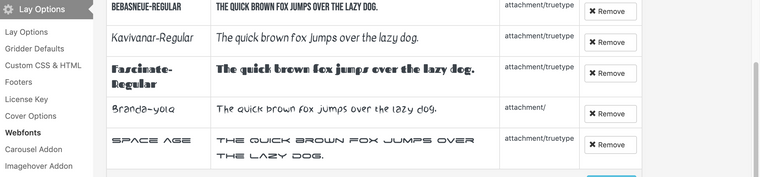
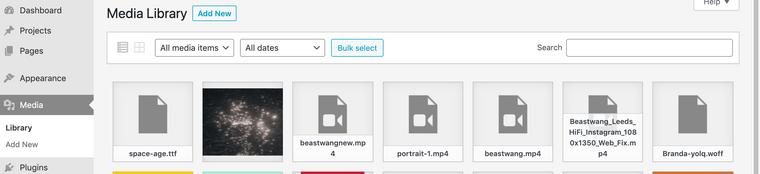
                            Screen Shot 2022-01-06 at 8.31.11 AM.png
                            Screen Shot 2022-01-06 at 8.31.55 AM.png


                            Wordpress, Lay Theme & Laytheme's Addons are all up to date ?


                            Any custom CSS or JS that may interfere is temporarily removed.


                            Any third-party plugins are de-activated to see if this resolves the issue.


                            Talk soon & happy new year! 🌻
                            Richard
                            1 Reply Last reply
                            0
                            • S
                              S
                              schneiderbrett
                              wrote on last edited by
                              #14

                              Tested it with different browsers now. The problem seems to lie within firefox.

                              Chrome: Working!
                              Safari: Working!
                              Brave: Working!
                              Firefox: meh..!
                              Other browsers: to be tested.

                              woff2 format seems to work a bit better with firefox thought.

                              Regards,
                              Amadeus

                              1 Reply Last reply
                              0
                              • RichardR
                                RichardR
                                Richard
                                Global Moderator
                                wrote on last edited by
                                #15
                                @schneiderbrett

                                Thanks Amadeus, will let Armin know about these tests ✅

                                1 Reply Last reply
                                0

                                Hello! It looks like you're interested in this conversation, but you don't have an account yet.

                                Getting fed up of having to scroll through the same posts each visit? When you register for an account, you'll always come back to exactly where you were before, and choose to be notified of new replies (either via email, or push notification). You'll also be able to save bookmarks and upvote posts to show your appreciation to other community members.

                                With your input, this post could be even better 💗

                                Register Login
                                Reply
                                • Reply as topic
                                Log in to reply
                                • Oldest to Newest
                                • Newest to Oldest
                                • Most Votes


                                Online Users
                                K
                                kp-hb
                                Forgot your key, lost your files, need a previous Lay Theme or Addon version? Go to www.laykeymanager.com
                                laytheme.com
                                • Login

                                • Don't have an account? Register

                                • Login or register to search.
                                • First post
                                  Last post
                                0
                                • Recent
                                • Tags
                                • Popular
                                • Users
                                • Search