Skip to content
  • Recent
  • Tags
  • Popular
  • Users
  • Search
Skins
  • Light
  • Brite
  • Cerulean
  • Cosmo
  • Flatly
  • Journal
  • Litera
  • Lumen
  • Lux
  • Materia
  • Minty
  • Morph
  • Pulse
  • Sandstone
  • Simplex
  • Sketchy
  • Spacelab
  • United
  • Yeti
  • Zephyr
  • Dark
  • Cyborg
  • Darkly
  • Quartz
  • Slate
  • Solar
  • Superhero
  • Vapor

  • Default (No Skin)
  • No Skin
Collapse

Lay Theme Forum

  1. Home
  2. Bug Reports
  3. Tumbnail Grid shows all categories although set otherwise
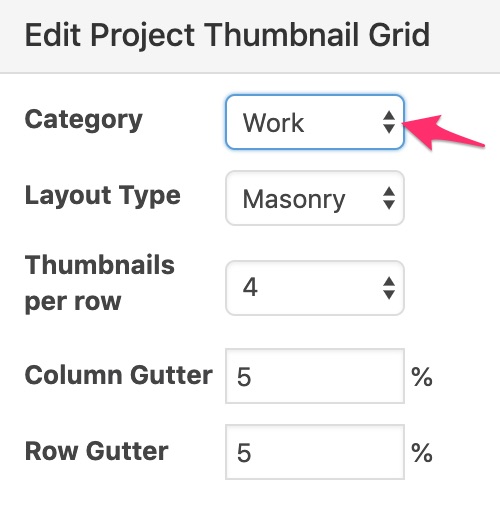
Tumbnail Grid shows all categories although set otherwise

Scheduled Pinned Locked Moved Bug Reports
15 Posts 3 Posters 2.2k Views 1 Watching
  • Oldest to Newest
  • Newest to Oldest
  • Most Votes
Reply
  • Reply as topic
Log in to reply
This topic has been deleted. Only users with topic management privileges can see it.
  • edgrbnzE
    edgrbnzE
    edgrbnz
    wrote on last edited by edgrbnz
    #5

    🤔

    Weird,… there is a project called LC77509 Hoodies that’s currently a draft and in the category Drafts. As soon as I publish it it shows up on the front page although the frontpage is set to category Work.

    Could you have a look?

    ✦ ✦ ✦

    1 Reply Last reply
    0
    • mariusjopenM
      mariusjopenM
      mariusjopen
      Global Moderator
      wrote on last edited by
      #6

      Dear @edgrbnz
      is it possible to make a copy of that project?
      Maybe the problem is only with that project.

      Best!

      Marius

      www.mariusjopen.world

      1 Reply Last reply
      0
      • edgrbnzE
        edgrbnzE
        edgrbnz
        wrote on last edited by
        #7

        Will try to just make a new, blank project and work my way around that way.

        I guess it has to do with the fact, that I copied it form an existing project (Black Mayo) in category Work. I’m guessing, that while copying there’s a database related bug / issue with LayTheme.

        Could that be it?

        If so: Let’s add that to the list to investigate.

        ✦ ✦ ✦

        1 Reply Last reply
        0
        • edgrbnzE
          edgrbnzE
          edgrbnz
          wrote on last edited by edgrbnz
          #8

          Well! Hi @mariusjopen & @arminunruh it’s me again :)

          I was able to find out how this error occurs:
          As soon as I create a new project I can set it to Drafts and then publish it and it won’t appear on my category page Work as desired.

          Although I can change any of the existing projects in Work to the category Drafts and publish the changes, these stay on the category page for Work.
          It’s the same behaviour if I duplicate any of the projects in Work and set the duplicate to Drafts afterwards.

          Also if I publish a project in my category Drafts and then change the category to Work I'm able to set it back to Drafts again but it stays visible in the category Work.

          Work also is the default category, thus it cannot be canged…

          0_1557763100781_Categories_‹Moritz_Welker—_WordPress.jpg

          In my All Projects overview it says that the project in question is in category Drafts:
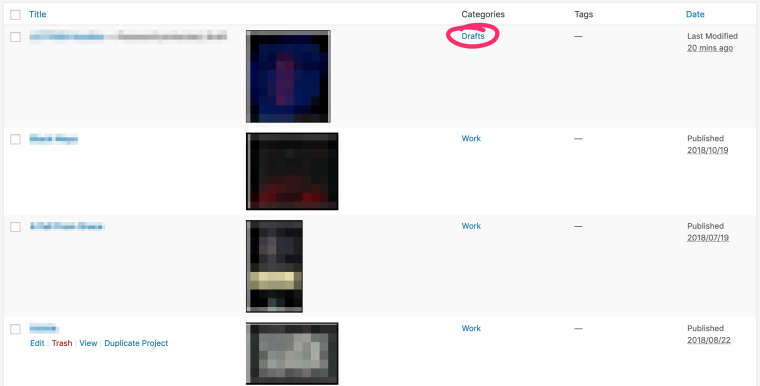
          0_1557761128379_Window_and_Projects_‹Moritz_Welker—_WordPress.jpg

          But if I switch to Categories it says, that there are 0 projects inside this category:
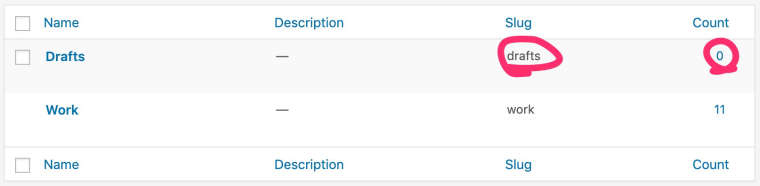
          0_1557760971437_Categories_‹Moritz_Welker—_WordPress.jpg

          Is it possible, that there’s something wrong with the Database entries lay creates / changes when categories get edited?
          Is there any way to fix this?

          ✦ ✦ ✦

          1 Reply Last reply
          0
          • mariusjopenM
            mariusjopenM
            mariusjopen
            Global Moderator
            wrote on last edited by
            #9

            Dear @edgrbnz
            thank you for the detailed reply.
            I will look with Armin into this.

            Best!

            Marius

            www.mariusjopen.world

            1 Reply Last reply
            1
            • edgrbnzE
              edgrbnzE
              edgrbnz
              wrote on last edited by
              #10

              THANK YOU! for all the hard work over there!

              ✦ ✦ ✦

              1 Reply Last reply
              0
              • edgrbnzE
                edgrbnzE
                edgrbnz
                wrote on last edited by
                #11

                Any news on that one?

                ✦ ✦ ✦

                1 Reply Last reply
                0
                • mariusjopenM
                  mariusjopenM
                  mariusjopen
                  Global Moderator
                  wrote on last edited by
                  #12

                  Dear @edgrbnz
                  I will ask Armin if he had time to check.

                  Best!

                  Marius

                  www.mariusjopen.world

                  1 Reply Last reply
                  0
                  • arminunruhA
                    arminunruhA
                    arminunruh
                    Global Moderator
                    wrote on last edited by
                    #13

                    Ok seems like a bug, will work on this one day. Please send your /wp-admin/ login data to info@laytheme.com with a link to this topic.

                    1 Reply Last reply
                    0
                    • edgrbnzE
                      edgrbnzE
                      edgrbnz
                      wrote on last edited by
                      #14

                      Sent! 👍

                      ✦ ✦ ✦

                      1 Reply Last reply
                      0
                      • arminunruhA
                        arminunruhA
                        arminunruh
                        Global Moderator
                        wrote on last edited by
                        #15

                        hi with the new update this is fixed.
                        however, you need to follow these steps to make it work:

                        • go to your /wp-admin/ and login
                        • now open all of the projects that should not be in a certain thumbnailgrid
                        • click on "update" in each of these projects

                        1 Reply Last reply
                        1

                        Hello! It looks like you're interested in this conversation, but you don't have an account yet.

                        Getting fed up of having to scroll through the same posts each visit? When you register for an account, you'll always come back to exactly where you were before, and choose to be notified of new replies (either via email, or push notification). You'll also be able to save bookmarks and upvote posts to show your appreciation to other community members.

                        With your input, this post could be even better đź’—

                        Register Login
                        Reply
                        • Reply as topic
                        Log in to reply
                        • Oldest to Newest
                        • Newest to Oldest
                        • Most Votes


                        Online Users
                        Forgot your key, lost your files, need a previous Lay Theme or Addon version? Go to www.laykeymanager.com
                        laytheme.com
                        • Login

                        • Don't have an account? Register

                        • Login or register to search.
                        • First post
                          Last post
                        0
                        • Recent
                        • Tags
                        • Popular
                        • Users
                        • Search