Layout max-width
-
It works!
Thanks! -
Right now thats not possible no :/
will write that down and code it as a feature one day! -
Hey MAN, nah this one's not really easy to do with a quick css fix :/
-
-
hey MAN for me it works but yea maybe there is a bug.
What is your website address? Which browser are you using?
-
hey hellllo!
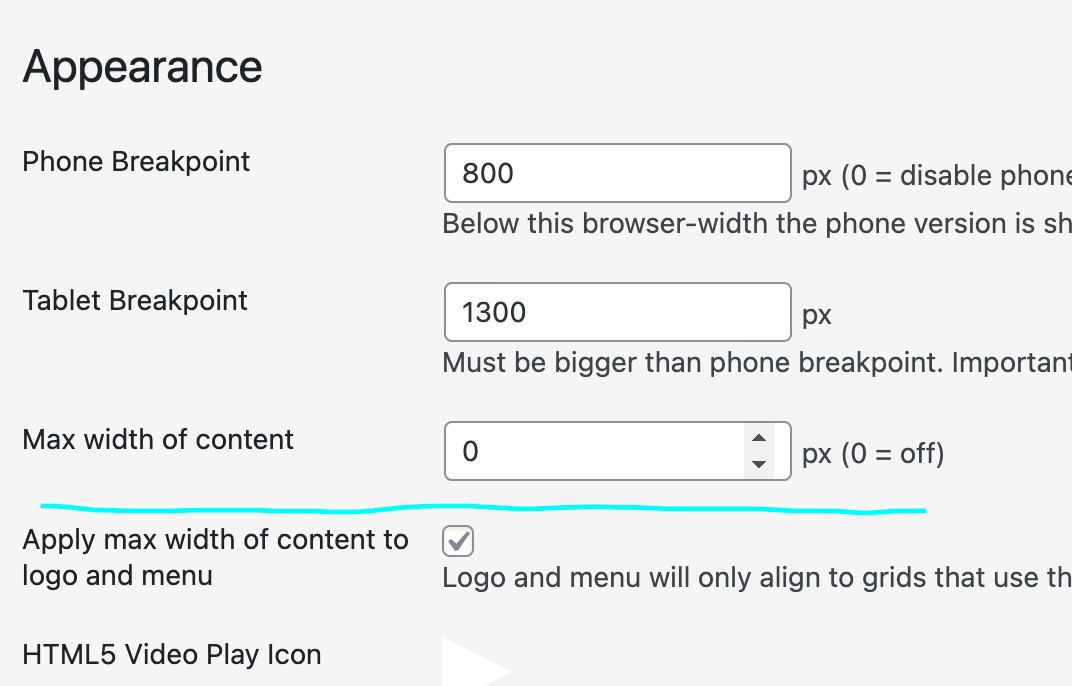
In "lay options" -> "misc options" there u have these two options:
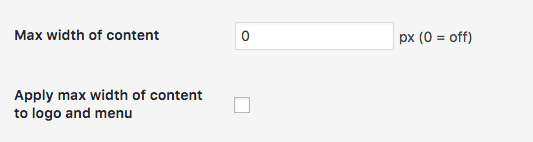
Did you use these two options? Meaning did you enter "1200" in the "Max width of content" field and checked "Apply max width of content to logo and menu"?
Can I have a link to your website to see the problem? -
hey hellllo!
In "lay options" -> "misc options" there u have these two options:
Did you use these two options? Meaning did you enter "1200" in the "Max width of content" field and checked "Apply max width of content to logo and menu"?
Can I have a link to your website to see the problem?hey armin,
i just found out why it didn't work.
the max-width somehow messed up with the margins of title image menu bar and gridder defaults ( it was all put to 2%). The contend scaled in the right way but the menu bar didn’t – it was still stuck at the 2%.I put everything to zero.
Now it’s neatly aligned left an right and the max-width is applied correctly.thanksalot
you are doing great work! -
ah yea, now i see it. the problem is the max-width includes the left and right frame of the layout :/
hmmm i need to fix this -
hey hellllo!
In "lay options" -> "misc options" there u have these two options:
Did you use these two options? Meaning did you enter "1200" in the "Max width of content" field and checked "Apply max width of content to logo and menu"?
Can I have a link to your website to see the problem?@arminunruh hi armin, is this possibility to define the max. width still in the new version 5.2.4 I can´t find it and tried also put the code #main-region {
max-width: 1200px;
margin-left: auto;
margin-right: auto;
}to CSS without success. thanks
-
its in lay options