Shake/move project title on thumbnail on hover
-
Hey Armin,
once again I'd need a little push in the right direction.
I would love to modify the hover effect of the project title on my project thumbnails. I would like to add a little movement to the text when you hover over the thumbnail. Pretty much like Thomas does it here: http://thomaskorf.com/
So what would be the right class to modify the text? I tried finding out with the inspector but had no luck.
Thanks!
-
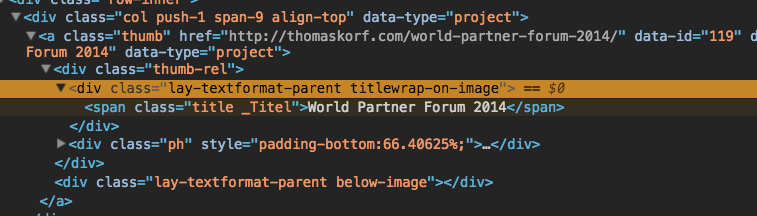
Hey!
I think you can work with .titlewrap-on-image or .title -
Hey Armin,
Thanks! Got it to work.
That's the css I use:
.title {
  display: inline-block;
  vertical-align: middle;
  -webkit-transform: translateZ(0);
  transform: translateZ(0);
  box-shadow: 0 0 1px rgba(0, 0, 0, 0);
  -webkit-backface-visibility: hidden;
  backface-visibility: hidden;
  -moz-osx-font-smoothing: grayscale;
  -webkit-transition-duration: 0.1s;
  transition-duration: 0.1s;
  -webkit-transition-property: transform;
  transition-property: transform;
}
.title:hover, .title:focus, .title:active {
  -webkit-transform: scale(2) rotate(15deg);
  transform: scale(2) rotate(15deg);
}
I was wondering if there is a chance to make the title move when I'm hovering over the thumbnail instead of the specific title/text? What would be the right class here? I tried a few but couldn't get it to work.
Thanks again!
-
.thumb:hover .title{}That should work
-

Hello! It looks like you're interested in this conversation, but you don't have an account yet.
Getting fed up of having to scroll through the same posts each visit? When you register for an account, you'll always come back to exactly where you were before, and choose to be notified of new replies (either via email, or push notification). You'll also be able to save bookmarks and upvote posts to show your appreciation to other community members.
With your input, this post could be even better 💗
Register Login