Hide menu and footer on certain (mobile) pages
-
-
Dear @Micha
Here in the documentary you can find how to use CSS only on a specific page: http://laytheme.com/documentation.html#custom-css-styling
Hope I could help!
Best!
Marius -
Hey @mariusjopen ,
thanks, i checked the documentary, but i know to little css.
i dont know how to hide the footer and how to hide the menu.
and to adress the specific page (id=1321) via css…i just need to hide it on this single mobile page here:
https://welcome-new-silence.de/cdThanks for any hint!
Micha -
Dear @Micha
it is weird that I cannot see the page slug or id.
I will check with Armin.
Best!
Marius -
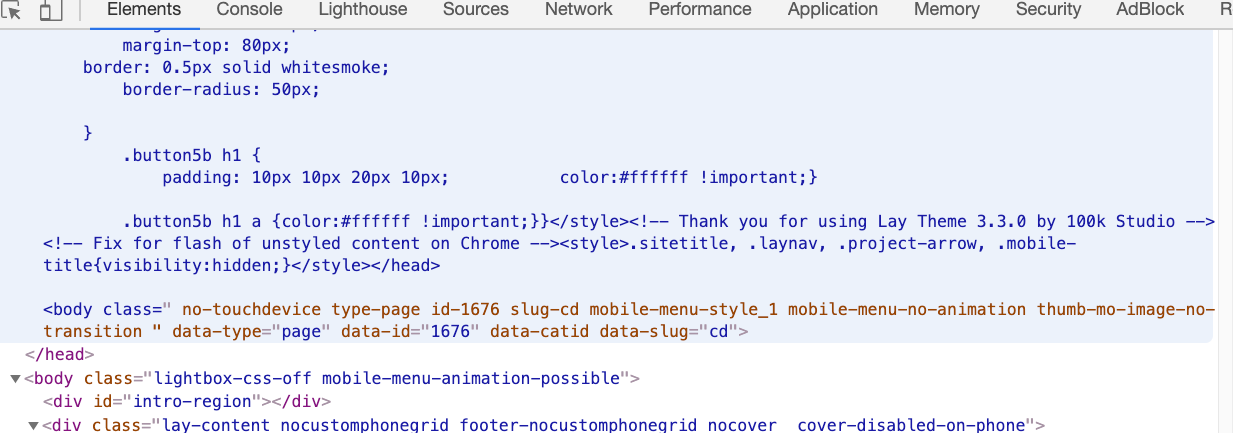
@Micha uses some custom code in his <head> that is malformed, causing the html that comes next to be malformed too…
my guess is he put </head> into "lay options" → custom css & html → custom code in <head>
xD -
@Micha uses some custom code in his <head> that is malformed, causing the html that comes next to be malformed too…
my guess is he put </head> into "lay options" → custom css & html → custom code in <head>
xDHey, @arminunruh @mariusjopen
thanks for the help.
I just copied the Pinterest verification code in the Custom <head> content:it looke something like that.
<meta name="p:domain_verify" content="1fcxe6bx17dx192dx63dx49cxca6x069“/>is something wrong with this?
or might be the css i added be wrong to?
Thanks!Micha
-
Dear @Micha
it is weird that I cannot see the page slug or id.
I will check with Armin.
Best!
Marius@mariusjopen Okay, i checked the CSS Code and there have been some issues. Sorry!
Now i can find page slug and id with the developer-tools, but what is the code to hide the menu on that page? i cannot find anything in the forums?
Thanks!
Micha -
Dear @Micha
with the link I posted before and display: none !important you can hide every element you wish on each page you wish.
Best!
Marius


Hello! It looks like you're interested in this conversation, but you don't have an account yet.
Getting fed up of having to scroll through the same posts each visit? When you register for an account, you'll always come back to exactly where you were before, and choose to be notified of new replies (either via email, or push notification). You'll also be able to save bookmarks and upvote posts to show your appreciation to other community members.
With your input, this post could be even better 💗
Register Login