Skip to content
  • Recent
  • Tags
  • Popular
  • Users
  • Search
Skins
  • Light
  • Brite
  • Cerulean
  • Cosmo
  • Flatly
  • Journal
  • Litera
  • Lumen
  • Lux
  • Materia
  • Minty
  • Morph
  • Pulse
  • Sandstone
  • Simplex
  • Sketchy
  • Spacelab
  • United
  • Yeti
  • Zephyr
  • Dark
  • Cyborg
  • Darkly
  • Quartz
  • Slate
  • Solar
  • Superhero
  • Vapor

  • Default (No Skin)
  • No Skin
Collapse

Lay Theme Forum

  1. Home
  2. Bug Reports
  3. Parts of the customizer don't show up

Parts of the customizer don't show up

Scheduled Pinned Locked Moved Bug Reports
7 Posts 3 Posters 634 Views 1 Watching
  • Oldest to Newest
  • Newest to Oldest
  • Most Votes
Reply
  • Reply as topic
Log in to reply
This topic has been deleted. Only users with topic management privileges can see it.
  • C
    C
    ChrisLevitate
    wrote on last edited by
    #1

    Hello,

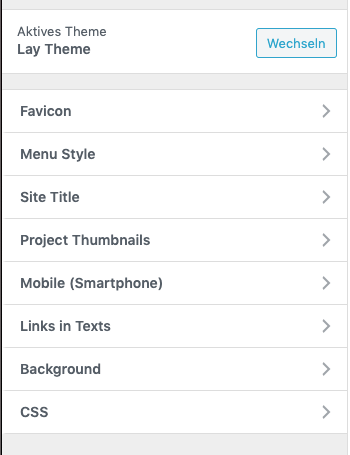
    Parts of the coustomizer are not displayed. Unfortunately, these instructions did not help either.

    http://laytheme.com/troubleshooting.html#customizer-does-not-show-up

    I tried different languages, unfortunately without success.

    Do you have another solution here?
    Bildschirmfoto 2020-09-14 um 22.56.38.png

    1 Reply Last reply
    0
    • RichardR
      RichardR
      Richard
      Global Moderator
      wrote on last edited by Richard
      #2

      Dear @ChrisLevitate

      Some first de-bugging steps if you are able:

      Are both your Lay 'Theme' and also Lay Theme's Addon's up to date?

      Do you have any third-party plugins that when de-activated resolve the issue?

      Additionally do you have any Custom HTML, CSS or Javascript that when temporarily removed resolves the issue?

      Recently a user: @schmarcopolo
      Had a similar problem but a solution was found, does this relate to you?

      """"Hey Richard
      problem is solved.
      it was a problem with a password protection add on

      https://passwordprotectwp.com/?utm_source=user-website&utm_medium=author_link&utm_campaign=ppwp_lite

      deactivated it and now everything works fine."

      http://laythemeforum.com/topic/6012/customizer-is-not-loading-uncaught-syntaxerror-invalid-or-unexpected-token/4

      '''''

      If none of the above work for you and you do believe it is a Bug we would love to know as we can then resolve it quickly for you as well as other users who have this issue,

      If so,
      could you please send your website address, /wp-admin/ username and password and a link to this topic to info@laytheme.com?

      And we will get back to you shortly,

      In the meantime thank you for using Lay Theme and your patience with these issues,

      Best wishes

      Sincerely
      Richard

      1 Reply Last reply
      0
      • RichardR
        RichardR
        Richard
        Global Moderator
        wrote on last edited by
        #3
        This post is deleted!
        1 Reply Last reply
        0
        • C
          C
          ChrisLevitate
          wrote on last edited by
          #4

          In fact I haven't installed any other plugins. Only one, but I also temporarily deactivated this. No change.

          All plugins and the theme are up to date. I will send you the access data.

          1 Reply Last reply
          0
          • RichardR
            RichardR
            Richard
            Global Moderator
            wrote on last edited by Richard
            #5

            Dear @ChrisLevitate

            Thank you for first trying the de-bugging steps, & then sending your information,

            I have forwarded your thread for further inspection.

            Best
            Richard

            1 Reply Last reply
            0
            • arminunruhA
              arminunruhA
              arminunruh
              Global Moderator
              wrote on last edited by arminunruh
              #6

              Hey Marc

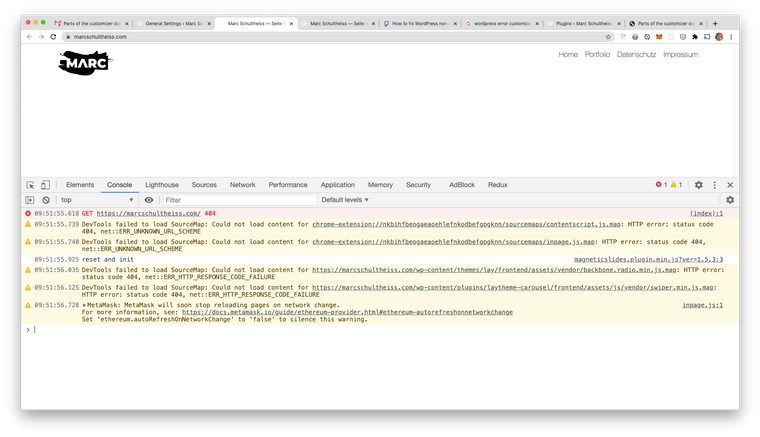
              So if I look at the customizer and your frontpage and open the console, I see there's a 404 error.
              Screenshot 2020-09-16 at 09.53.15.png

              @Richard-Keith
              Opening the console and seeing if there's an error is a good indicator for what might be happening.

              Usually 404 errors happen because of permalinks not working correctly.
              However, if I save permalinks it still doesn't work and there are no hints or errors shown in the permalinks settings screen.

              Really not sure what exactly might be happening here.
              Do you mind sending me your FTP login details, so I can see if your .htaccess file looks right?

              You can send your ftp servername, username, password to info@laytheme.com

              You could also re-install WordPress in your webhost control panel.
              Your changes will be lost. If you'd like to try this, please remember to deactivate your key where you activated it.

              1 Reply Last reply
              0
              • RichardR
                RichardR
                Richard
                Global Moderator
                wrote on last edited by
                #7

                Dear @arminunruh

                Thank you for the update, noted for the future.

                Best

                1 Reply Last reply
                0

                Hello! It looks like you're interested in this conversation, but you don't have an account yet.

                Getting fed up of having to scroll through the same posts each visit? When you register for an account, you'll always come back to exactly where you were before, and choose to be notified of new replies (either via email, or push notification). You'll also be able to save bookmarks and upvote posts to show your appreciation to other community members.

                With your input, this post could be even better 💗

                Register Login
                Reply
                • Reply as topic
                Log in to reply
                • Oldest to Newest
                • Newest to Oldest
                • Most Votes


                Online Users
                Forgot your key, lost your files, need a previous Lay Theme or Addon version? Go to www.laykeymanager.com
                laytheme.com
                • Login

                • Don't have an account? Register

                • Login or register to search.
                • First post
                  Last post
                0
                • Recent
                • Tags
                • Popular
                • Users
                • Search

