Installing theme from uploaded file: laytheme-imagehover.zip
-
Hello,
I am trying to unload addons to the laytheme. Tried several times unsuccessfully.
Here is the message that keeps popping up:
*Installing Theme from uploaded file: laytheme-imagehover.zip
Unpacking the package…
Installing the theme…
The package could not be installed. The theme is missing the style.css stylesheet.
Theme installation failed.*
Can you help? I am always using a zip file when uploading the addon.
The other issue I am having is that the images uploaded on to the category they are not showing on the desktop but only on the mobile version. can you explain?
Many thanks, Marta
-
Dear Marta @marta_86
When Uploading a plugin into your Back-end we need to upload it into the 'Plugins' Section:
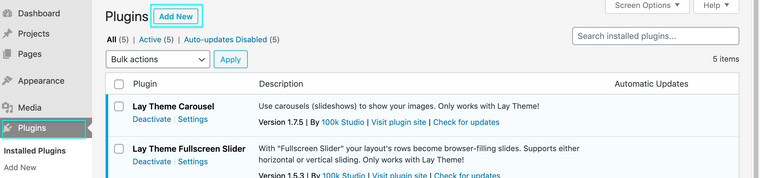
Then Clicking ' Add New' you can upload your Imagehover Zip file there
Am i understanding your problem correctly? :)
Best Wishes
Richard

Hello! It looks like you're interested in this conversation, but you don't have an account yet.
Getting fed up of having to scroll through the same posts each visit? When you register for an account, you'll always come back to exactly where you were before, and choose to be notified of new replies (either via email, or push notification). You'll also be able to save bookmarks and upvote posts to show your appreciation to other community members.
With your input, this post could be even better 💗
Register Login