How to set "font-stretch" percentage universally or for text formats?
-
How do I set a certain "font-stretch" percentage universally or for one of the text formats?
Hi
I want to use the command "font-stretch: 200%(for exmple)" and apply it for all non serif font happening on the website.Where in the css do i set this up? (I don't want to only set this rule for single containers. i also want it in the website title for example)
(In the text formats interface there are many options given already but not a font stretch)Many thanks in advance
-
Dear @palma
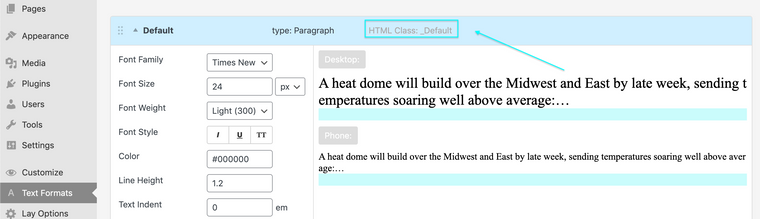
This is possible thanks to each 'Text Format' also coming with a Custom Class. For example the default text format can be targeted using its Class:
._default{
//insert desired CSS here -
}
Custom CSS can be applied to the Text Format of your choice via:
Lay Options > Custom CSS & HTML > Custom CSS >
Or
Customize > CSS
Say you have a Text Format Called Stretch with the Custom Class; 'font-stretch':
.font-stretch{ font-stretch: expanded; }Then all text across your site with this text format will also be given the desired CSS too.
Hope this helps @palma & have a lovely day, thank you for using Lay theme!
Sincerely
Richard -
Dear @palma
This is possible thanks to each 'Text Format' also coming with a Custom Class. For example the default text format can be targeted using its Class:
._default{
//insert desired CSS here -
}
Custom CSS can be applied to the Text Format of your choice via:
Lay Options > Custom CSS & HTML > Custom CSS >
Or
Customize > CSS
Say you have a Text Format Called Stretch with the Custom Class; 'font-stretch':
.font-stretch{ font-stretch: expanded; }Then all text across your site with this text format will also be given the desired CSS too.
Hope this helps @palma & have a lovely day, thank you for using Lay theme!
Sincerely
Richard@Richard
I have a similar question to this, I want to have a Text-Format with Outlined-Text.I added this to the Custom-CSS:
.Default{
-webkit-text-fill-color: #fd67eb;
-webkit-text-stroke-width: 1px;
-webkit-text-stroke-color: black;}but it does not work...
Can you help me with this? -
Dear @barbarama
"Can you help me with this?"
Sure! 🌝
If you are able to post a link to your website i can make sure.
Here is a test on my Lay Theme site with your code.The standard "default" format has a little " _ " underhyphen before it ( _Default ), I was wondering if this is the case with you as well?

When i set the correct format & changed the code to:
._Default{
-webkit-text-fill-color: #fd67eb;
-webkit-text-stroke-width: 1px;
-webkit-text-stroke-color: black;}
I got the intended result:

Hope this helps @barbarama & talk soon! best wishes 🌼
Sincerely
Richard

Hello! It looks like you're interested in this conversation, but you don't have an account yet.
Getting fed up of having to scroll through the same posts each visit? When you register for an account, you'll always come back to exactly where you were before, and choose to be notified of new replies (either via email, or push notification). You'll also be able to save bookmarks and upvote posts to show your appreciation to other community members.
With your input, this post could be even better 💗
Register Login