Skip to content
  • Recent
  • Tags
  • Popular
  • Users
  • Search
Skins
  • Light
  • Brite
  • Cerulean
  • Cosmo
  • Flatly
  • Journal
  • Litera
  • Lumen
  • Lux
  • Materia
  • Minty
  • Morph
  • Pulse
  • Sandstone
  • Simplex
  • Sketchy
  • Spacelab
  • United
  • Yeti
  • Zephyr
  • Dark
  • Cyborg
  • Darkly
  • Quartz
  • Slate
  • Solar
  • Superhero
  • Vapor

  • Default (No Skin)
  • No Skin
Collapse

Lay Theme Forum

  1. Home
  2. Bug Reports
  3. one-page menu

one-page menu

Scheduled Pinned Locked Moved Bug Reports
8 Posts 2 Posters 662 Views 1 Watching
  • Oldest to Newest
  • Newest to Oldest
  • Most Votes
Reply
  • Reply as topic
Log in to reply
This topic has been deleted. Only users with topic management privileges can see it.
  • D
    D
    danny
    wrote on last edited by
    #1

    Hi again,

    I'm working on a one-page website.

    I was able to set links on this one-page as anchor points.

    My question is: how do you set up a menu on a one-page website, that is sticky and works with the anchor points that I already have?

    http://testshila.de/onepage/

    Is the sticky Menu in Settings of any use?

    In your 2020 update it said:
    The code to make the browser scroll to an anchor on click of a hash link (<a href="#yourtarget">Scroll to target<a>) is now part of Lay Theme. No more need to insert the code by yourself! This works if you link to a different page also.

    Thanks a lot!

    Kind regards

    Daniel

    1 Reply Last reply
    0
    • RichardR
      RichardR
      Richard
      Global Moderator
      wrote on last edited by
      #2

      Dear Daniel

      Currently I noticed hard reloads when clicking your Anchor scroll links - You may well have the Ajax Options set:

      Screen Shot 2021-04-23 at 6.08.52 PM.png

      Secondly for the Anchor's to Work -e.g

      website/#work

      Above link Is asking for the ID 'work'. ( # = ID )
      An id can be set onto an Element: E.g a Row
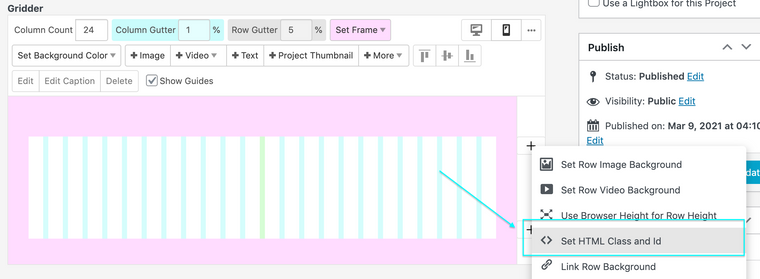
      Screen Shot 2021-04-23 at 6.11.36 PM.png


      If You need a Menu that also utlizes the Gridder Tools you could always make use of the 'Footer' as a page and change its Position into a 'Fake Header'


      Hope this Helps Daniel & have a wonderful day 🌞

      Richard

      1 Reply Last reply
      0
      • D
        D
        danny
        wrote on last edited by
        #3

        Dear @Richard,

        thanks so much for this. I'm still a bit lost ))

        So I copied the fake menu to a page: http://testshila.de/sample-page/

        And I copied the CSS Position into the CSS, but it doesn't seems to apply.

        Now - do I need to set the Anchor scroll links here on that page?

        And then delete them on the project page http://testshila.de/onepage/?

        Or would it be the best to move my one-page to the page http://testshila.de/sample-page/ ?

        I can as well send you the login, so you could have a look.

        Thanks again,

        Daniel

        1 Reply Last reply
        0
        • RichardR
          RichardR
          Richard
          Global Moderator
          wrote on last edited by Richard
          #4

          Dear Daniel

          @danny

          Setting up an Anchor Link to be sure:


          In the Gridder of a Project or Page we must set an ID for an element or row:
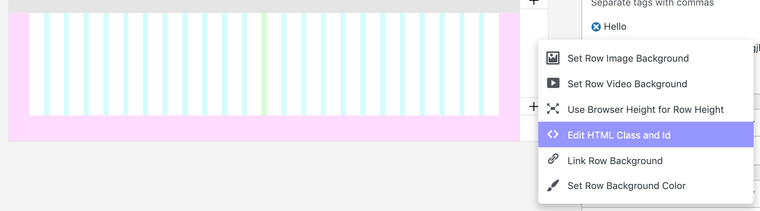
          Screen Shot 2021-04-26 at 12.00.28 PM.png

          Here in the "Edit HTML Class and Id" Options:
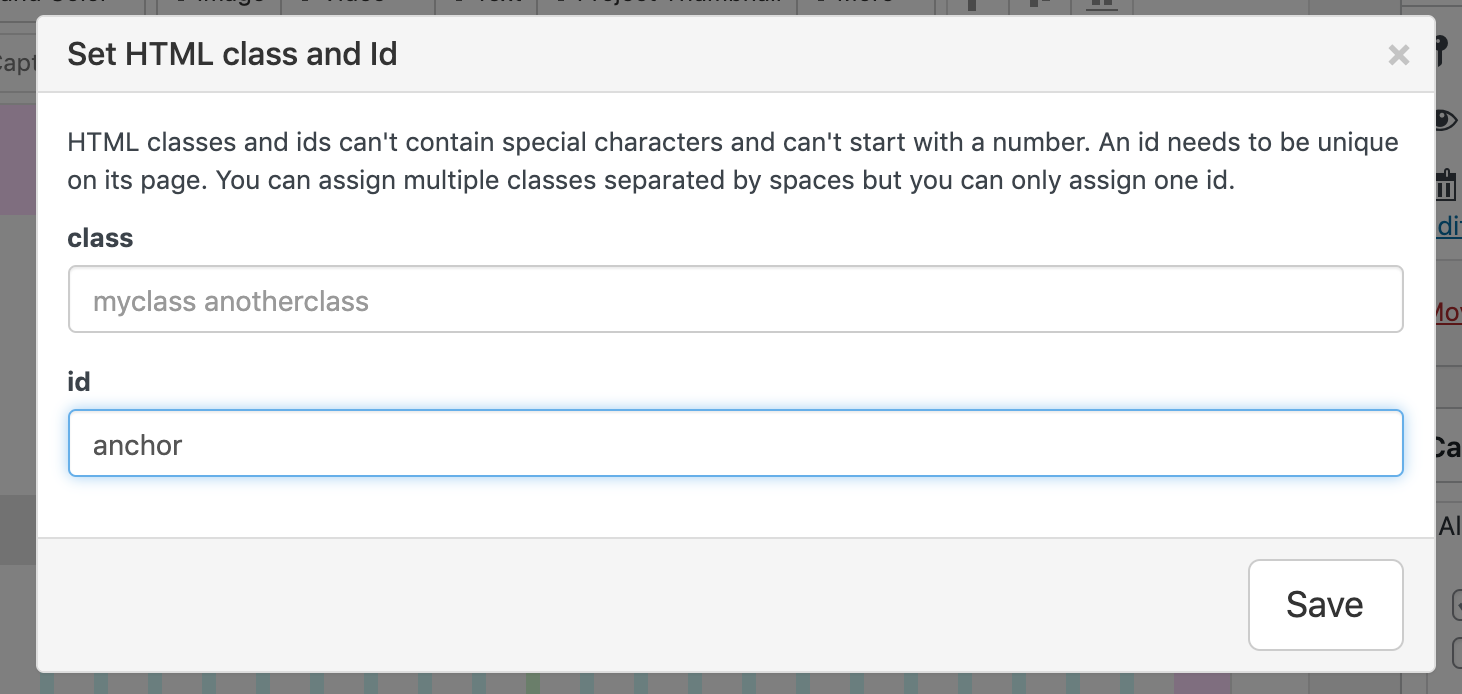
          Screen Shot 2021-04-26 at 11.48.29 AM.png
          I have set an ID called "anchor"


          Now when creating Text and setting a link:

          Screen Shot 2021-04-26 at 11.49.08 AM.png

          We need to reference the ID, (adding the # before ):
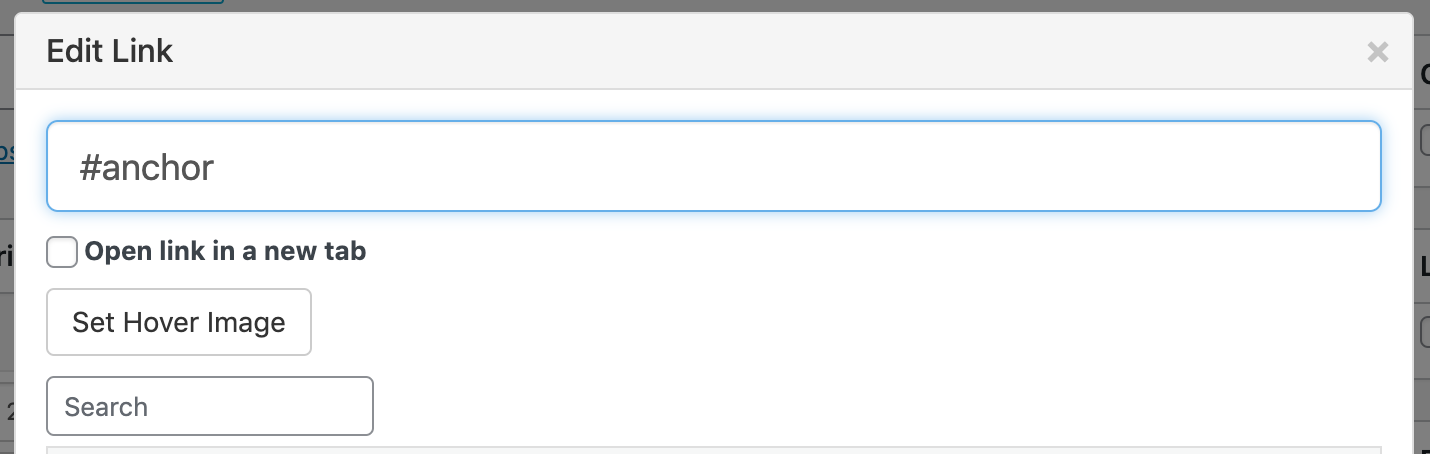
          Screen Shot 2021-04-26 at 11.49.50 AM.png


          Now when you click on this text you will be 'scrolled' to the row that has been given the id defined in the link.


          Hope this helps @danny & best wishes 🌞

          Richard

          1 Reply Last reply
          0
          • D
            D
            danny
            wrote on last edited by
            #5

            Dear @Richard,

            thanks so much!

            I managed to set the Anchor Links, see here http://testshila.de/onepage/

            Now how can enable a sticky Menu of the three Anchoir Links?
            So the Menu consists of "Works", "Biography" and "Press" and would always be visible?

            Not sure how I can use the Footer for this.

            Thanks @Richard and have a nice day.

            Daniel

            1 Reply Last reply
            0
            • RichardR
              RichardR
              Richard
              Global Moderator
              wrote on last edited by
              #6

              Dear Daniel

              @danny

              Depends on your design and what your needs are:

              Using the built in Menu options already present, you can customize a link to work as an anchor, i would say this is the easiest option:
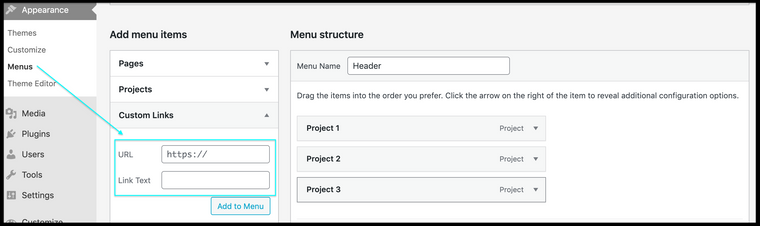
              Screen Shot 2021-04-27 at 11.10.10 AM.png

              The Footer option would be to apply the footer to all pages & projects and then use Custom CSS to bring it to the Top:

              #footer{
              position:fixed;
              top:0;
              left:0;
              }
              

              Custom CSS can be added via:

              Lay Options > Custom CSS & HTML > Custom CSS

              Or

              Customize > CSS


              Hope this helps Danny & best wishes 🌞

              Sincerely
              Richard
              1 Reply Last reply
              0
              • D
                D
                danny
                wrote on last edited by
                #7

                Nice, thanks @Richard. Have a nice day. Best, Daniel

                1 Reply Last reply
                0
                • RichardR
                  RichardR
                  Richard
                  Global Moderator
                  wrote on last edited by Richard
                  #8

                  You too Daniel, best wishes :)

                  @danny
                  1 Reply Last reply
                  0

                  Hello! It looks like you're interested in this conversation, but you don't have an account yet.

                  Getting fed up of having to scroll through the same posts each visit? When you register for an account, you'll always come back to exactly where you were before, and choose to be notified of new replies (either via email, or push notification). You'll also be able to save bookmarks and upvote posts to show your appreciation to other community members.

                  With your input, this post could be even better 💗

                  Register Login
                  Reply
                  • Reply as topic
                  Log in to reply
                  • Oldest to Newest
                  • Newest to Oldest
                  • Most Votes


                  Online Users
                  Forgot your key, lost your files, need a previous Lay Theme or Addon version? Go to www.laykeymanager.com
                  laytheme.com
                  • Login

                  • Don't have an account? Register

                  • Login or register to search.
                  • First post
                    Last post
                  0
                  • Recent
                  • Tags
                  • Popular
                  • Users
                  • Search