Letter Spacing?
-
Hello! Hello @Richard,
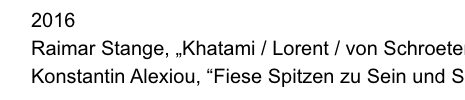
I noticed, that the letter spacing seems to be plus although the setting is 0em. As well the typeface (Arial) seems very light for regular, compared to other websites. Is there any pre-settings within Laytheme that affect that?
Thanks and best wishes
Daniel
http://testshila.de/onepage/#press
-
-
Dear Danny
@danny
" Is there any pre-settings within Laytheme that affect that? "
Laytheme has a number of variable Text options located in either Text Formats, Customizer or the Gridder.
These are some your text's CSS setting's when inspecting the page - specifically the '2016' screenshot in your example above:
@media (min-width: 601px)
._Arial20 {
    font-size: 20px;
    margin: 0px 0 20px 0;
}
._Arial20, ._Arial20_no_spaces {
    font-family: arial,helvetica,sans-serif;
    color: #000000;
    letter-spacing: 0em;
    line-height: 1.4;
    font-weight: 400;
    text-transform: none;
    font-style: normal;
    text-decoration: none;
    padding: 0;
    text-indent: 0em;
    border-bottom: none;
    text-align: left;
" the colour seems not 100% black as if there is a opacity general setting for the text? "
Colour is set to true black - Possibly this is a browser variation you are experiencing or your computer screen?
color: #000000;Attached to the <body> is 'antialiasing' if this is what you may be seeing?
    -webkit-font-smoothing: antialiased;
    text-rendering: optimizeLegibility;
Hope this helps & best wishes Daniel 🌞
Sincerely
Richard
-
-
Dear Daniel
@danny
"Is there a way to get rid of it?"
You could add the following code into:
Lay Options > Custom CSS & HTML > Custom CSS
body{
   -webkit-font-smoothing: none || antialiased || subpixel-antialiased
   -moz-osx-font-smoothing: auto || inherit || unset || grayscale
   font-smoothing: auto || inherit || unset || grayscale
}
Best wishes
Richard

Hello! It looks like you're interested in this conversation, but you don't have an account yet.
Getting fed up of having to scroll through the same posts each visit? When you register for an account, you'll always come back to exactly where you were before, and choose to be notified of new replies (either via email, or push notification). You'll also be able to save bookmarks and upvote posts to show your appreciation to other community members.
With your input, this post could be even better 💗
Register Login