Skip to content
  • Recent
  • Tags
  • Popular
  • Users
  • Search
Skins
  • Light
  • Brite
  • Cerulean
  • Cosmo
  • Flatly
  • Journal
  • Litera
  • Lumen
  • Lux
  • Materia
  • Minty
  • Morph
  • Pulse
  • Sandstone
  • Simplex
  • Sketchy
  • Spacelab
  • United
  • Yeti
  • Zephyr
  • Dark
  • Cyborg
  • Darkly
  • Quartz
  • Slate
  • Solar
  • Superhero
  • Vapor

  • Default (No Skin)
  • No Skin
Collapse

Lay Theme Forum

  1. Home
  2. General Discussion
  3. insert link not working

insert link not working

Scheduled Pinned Locked Moved General Discussion
10 Posts 2 Posters 1.7k Views
  • Oldest to Newest
  • Newest to Oldest
  • Most Votes
Reply
  • Reply as topic
Log in to reply
This topic has been deleted. Only users with topic management privileges can see it.
  • T
    T
    Toby
    wrote on last edited by
    #1

    Hi

    The insert link stops working when I've added a class / ID to same text box.

    In my case 'Close'

    www.tobyneilan.com/lockdown-2

    toby

    1 Reply Last reply
    0
    • RichardR
      RichardR
      Richard
      Global Moderator
      wrote on last edited by
      #2

      Dear Toby

      @Toby

      Beautiful website and Artworks ✨
      Have sent you a message via 'Chats' ➡️


      Best wishes
      Richard
      1 Reply Last reply
      0
      • T
        T
        Toby
        wrote on last edited by
        #3

        Thanks Richard - I've sent you a response.

        1 Reply Last reply
        0
        • RichardR
          RichardR
          Richard
          Global Moderator
          wrote on last edited by Richard
          #4

          Dear @Toby

          Thank you 🌝 I understand now:

          " The insert link stops working when I've added a class / ID to same text box. " "In my case 'Close'"

          When testing I had no issue creating links, but then see the problem on the front-end.

          Giving an element the class or ID 'close' assigns something native/default in either Lay Theme or WooCommerce to the element.

          I would suggest choosing a different Class or ID name that doesn't cause this interference. When testing different names, your element worked as it should.

          Thank you for posting this Toby as i learnt something, also have a wonderful day, let me know if you run into further issue 🌼

          Best wishes
          Richard
          1 Reply Last reply
          0
          • T
            T
            Toby
            wrote on last edited by Toby
            #5

            Hi Richard
            Thanks for the response. - I changed the class/ID to 'back' and tried a number of other names too but the link still won't respond!?

            Cheers
            Toby

            1 Reply Last reply
            0
            • RichardR
              RichardR
              Richard
              Global Moderator
              wrote on last edited by
              #6

              Dear Toby

              @Toby

              I have created a test page called "Link Test By Richard"

              Here i have given the text element a class: special.
              The link works as it should.

              Talk soon & best wishes
              Richard

              T 1 Reply Last reply
              0
              • RichardR Richard

                Dear Toby

                @Toby

                I have created a test page called "Link Test By Richard"

                Here i have given the text element a class: special.
                The link works as it should.

                Talk soon & best wishes
                Richard

                T
                T
                Toby
                wrote on last edited by
                #7

                @Richard said in insert link not working:

                Link Test By Richard

                Hi Richard

                I've narrowed it down - all links work until you add the 'fixed' element and then the class / id stops working - any suggestions??

                Thanks
                Toby

                1 Reply Last reply
                0
                • RichardR
                  RichardR
                  Richard
                  Global Moderator
                  wrote on last edited by Richard
                  #8

                  Dear @Toby

                  This is is a z-indexing problem related to the navbar.

                  https://www.w3schools.com/cssref/pr_pos_z-index.asp


                  I set up a test page as you needed:

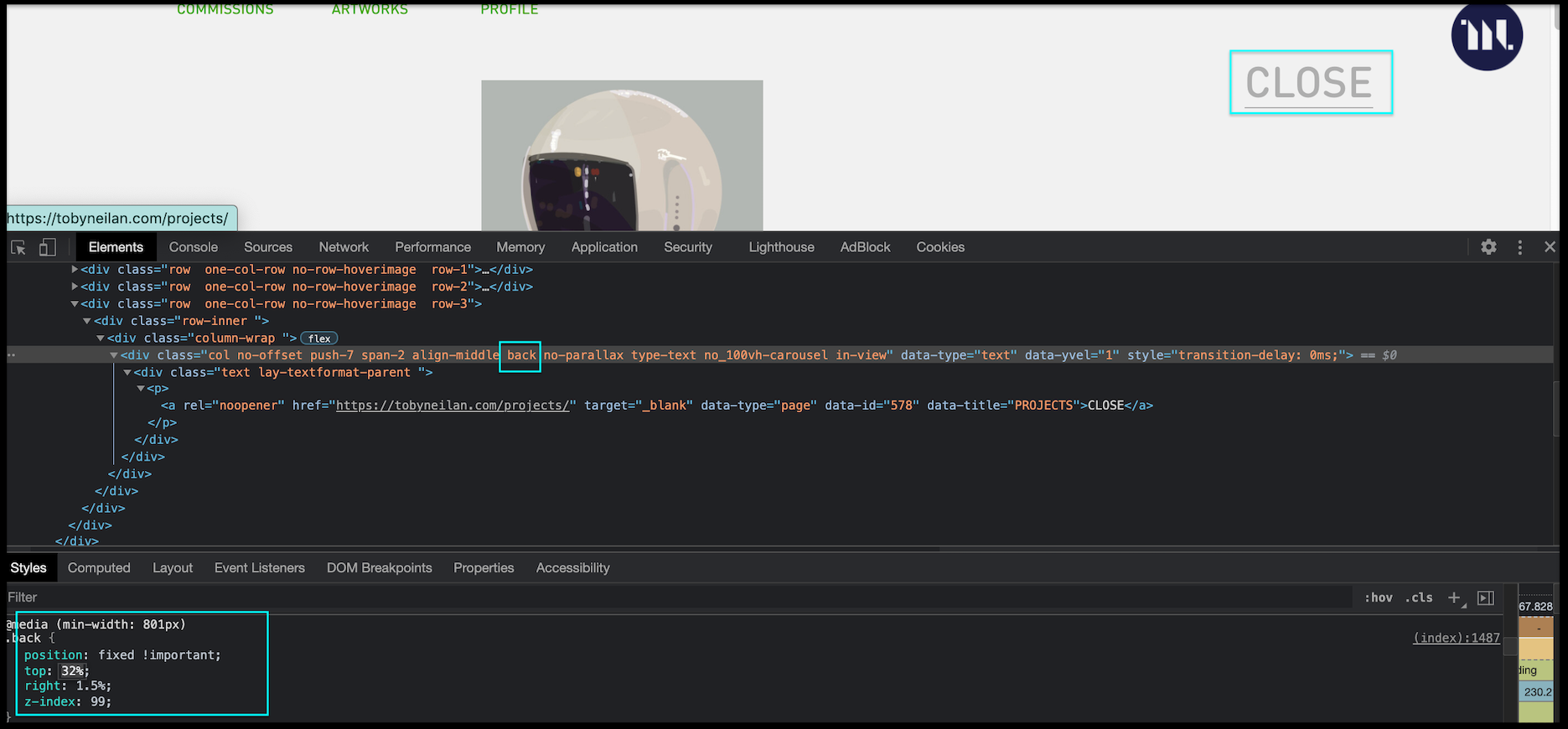
                  • text element with 'close'
                  • Linked back to 'projects' page
                  • custom class 'back' applied

                  Screen Shot 2021-05-21 at 10.57.18 AM.png


                  If the Link falls under the navbar's area it becomes unclickable because it is hidden behind ( even though the navbar is transparent it still applies ) :
                  Screen Shot 2021-05-21 at 11.01.27 AM.png

                  For testing purposes i set the text elements 'z-index' to 99 & the navbar's 'z-index' to 0. This was issue as now the 'close' text element / link is clickable:

                  Screen Shot 2021-05-21 at 11.02.32 AM.png

                  The Link was functioning as it should all along but this was why you couldn't activate it.


                  Best wishes Toby & thank you for supporting Lay Theme 🌝
                  Sincerely
                  Richard
                  1 Reply Last reply
                  0
                  • T
                    T
                    Toby
                    wrote on last edited by
                    #9

                    Ah! the dreaded z- index
                    Thanks Richard

                    Toby

                    1 Reply Last reply
                    1
                    • RichardR
                      RichardR
                      Richard
                      Global Moderator
                      wrote on last edited by
                      #10

                      Yes the z-index a common enemy indeed! 🙈

                      1 Reply Last reply
                      0

                      Hello! It looks like you're interested in this conversation, but you don't have an account yet.

                      Getting fed up of having to scroll through the same posts each visit? When you register for an account, you'll always come back to exactly where you were before, and choose to be notified of new replies (either via email, or push notification). You'll also be able to save bookmarks and upvote posts to show your appreciation to other community members.

                      With your input, this post could be even better 💗

                      Register Login
                      Reply
                      • Reply as topic
                      Log in to reply
                      • Oldest to Newest
                      • Newest to Oldest
                      • Most Votes


                      Online Users
                      L
                      lstark
                      Forgot your key, lost your files, need a previous Lay Theme or Addon version? Go to www.laykeymanager.com
                      laytheme.com
                      • Login

                      • Don't have an account? Register

                      • Login or register to search.
                      • First post
                        Last post
                      0
                      • Recent
                      • Tags
                      • Popular
                      • Users
                      • Search