Buttonstyle Question
-
I created this ,kind of, Linktree copy:
I was wondering if I can arrange the buttons next to each other, with equal spacing, instead of on top of each other.
So far I am using individual textboxes with the assigned buttonstyle-class.
Thanks for any help!
-
Dear @Hayo-Gebauer
If you wish to use the Stack element to achieve this.
Apply a custom ID to the Stack element:
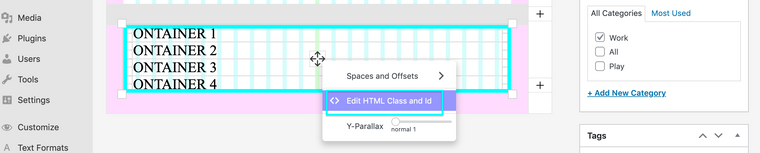

With this you can apply
display:flex;making the child elements behave a number of possible ways:
This code
#stack-parent-container{display:flex;}gave me the following result: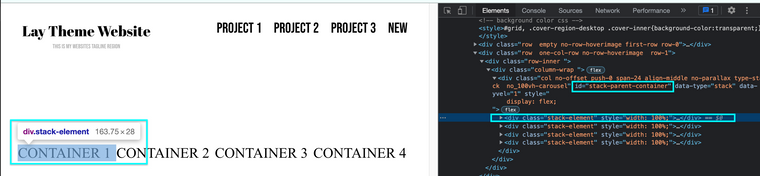
Paddings and Margins can then be applied to the child stack elements, spacing them as you wish.
Best wishes 🏖
Richard
-
Dear @Hayo-Gebauer
If you wish to use the Stack element to achieve this.
Apply a custom ID to the Stack element:
With this you can apply
display:flex;making the child elements behave a number of possible ways:
This code
#stack-parent-container{display:flex;}gave me the following result:Paddings and Margins can then be applied to the child stack elements, spacing them as you wish.
Best wishes 🏖
Richard
@Richard this is great, thank you! I'll look into it
-
@Hayo-Gebauer No worries Good Luck! 💥
-
Dear @Hayo-Gebauer
If you wish to use the Stack element to achieve this.
Apply a custom ID to the Stack element:
With this you can apply
display:flex;making the child elements behave a number of possible ways:
This code
#stack-parent-container{display:flex;}gave me the following result:Paddings and Margins can then be applied to the child stack elements, spacing them as you wish.
Best wishes 🏖
Richard
hey, I've tried to recreate your example step by step, but it doesn't have any different result for some reason.
-
Dear @Hayo-Gebauer
Do you have a link to the page you are trying to achieve this on? I could take a closer look.
Also your CSS code & any other relevant screenshots. I could be you need to add
!importantto override Lay Theme's CSS but this should only be used if truly necessary, e.g#stack-parent-container{ display: flex !important ; }
Talk soon Hayo & best wishes 🌻
Richard
@Richard Hey Richard,
sure:
What I have in Custom CSS:
#stack-parent-container{
display: flex !important ;}Testpage:
https://hayogebauer.com/test/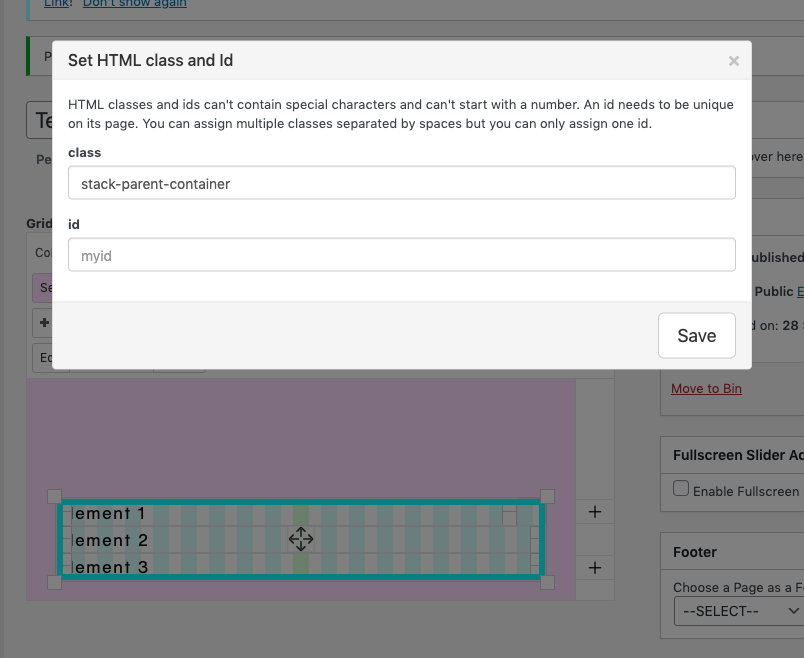
-
Dear @Hayo-Gebauer
The
#is the CSS selector for an ID, you must set the id to stack-parent-container. Or if you wish to select a class then using the.selector:.stack-parent-container{ display: flex ; }(remove !important)
Best wishes Hayo 🌝
Richard

Hello! It looks like you're interested in this conversation, but you don't have an account yet.
Getting fed up of having to scroll through the same posts each visit? When you register for an account, you'll always come back to exactly where you were before, and choose to be notified of new replies (either via email, or push notification). You'll also be able to save bookmarks and upvote posts to show your appreciation to other community members.
With your input, this post could be even better 💗
Register Login