Skip to content
  • Recent
  • Tags
  • Popular
  • Users
  • Search
Skins
  • Light
  • Brite
  • Cerulean
  • Cosmo
  • Flatly
  • Journal
  • Litera
  • Lumen
  • Lux
  • Materia
  • Minty
  • Morph
  • Pulse
  • Sandstone
  • Simplex
  • Sketchy
  • Spacelab
  • United
  • Yeti
  • Zephyr
  • Dark
  • Cyborg
  • Darkly
  • Quartz
  • Slate
  • Solar
  • Superhero
  • Vapor

  • Default (No Skin)
  • No Skin
Collapse

Lay Theme Forum

  1. Home
  2. General Discussion
  3. Mobile menus customization

Mobile menus customization

Scheduled Pinned Locked Moved General Discussion
7 Posts 2 Posters 901 Views
  • Oldest to Newest
  • Newest to Oldest
  • Most Votes
Reply
  • Reply as topic
Log in to reply
This topic has been deleted. Only users with topic management privileges can see it.
  • W
    W
    Warul Kawa
    wrote on last edited by
    #1

    Hi!
    I need to make it so the primary and the secondary menus are displayed in two different fonts.

    I tried to target one in the Mobile CSS customization with both

    nav.primary
    

    and

    nav.primary li a
    

    but it keeps showing the same font on both menus.

    What's the best way to get around this / successfully target one out of multiple menus?
    Thank you!

    1 Reply Last reply
    0
    • RichardR
      RichardR
      Richard
      Global Moderator
      wrote on last edited by
      #2

      Dear @Warul-Kawa

      Could you please post a link to your website with the menu in question πŸ”


      Best wishes 🌝
      Richard
      W 2 Replies Last reply
      0
      • RichardR Richard

        Dear @Warul-Kawa

        Could you please post a link to your website with the menu in question πŸ”


        Best wishes 🌝
        Richard
        W
        W
        Warul Kawa
        wrote on last edited by
        #3

        @Richard Hi Richard,
        here's the draft :) https://vivaiocosmico.it/shelf/

        1 Reply Last reply
        0
        • RichardR Richard

          Dear @Warul-Kawa

          Could you please post a link to your website with the menu in question πŸ”


          Best wishes 🌝
          Richard
          W
          W
          Warul Kawa
          wrote on last edited by
          #4

          @Richard
          Also, I'm trying to change the color of each item of the primary menu, but I'm not able to make it work neither using

          .menu-item-696 {
          	color: blue;
          }
          

          nor through assigned class.

          Any tips? Thank you :)

          1 Reply Last reply
          0
          • RichardR
            RichardR
            Richard
            Global Moderator
            wrote on last edited by Richard
            #5

            Dear @Warul-Kawa

            Cool Website! πŸ’₯

            You were really close 🌝its a bit of an interesting one, because it's also a Link <a> .
            When including the a within your css works (links are a bit funny sometimes)

            Screen Shot 2021-09-21 at 4.59.38 PM.png

            .menu-item-602 a {
                color:blue;
                font-family: "Lucida Console", "Courier New", monospace;
            }
            

            Let me know how you go! and best wishes πŸ–
            Richard
            W 1 Reply Last reply
            0
            • RichardR Richard

              Dear @Warul-Kawa

              Cool Website! πŸ’₯

              You were really close 🌝its a bit of an interesting one, because it's also a Link <a> .
              When including the a within your css works (links are a bit funny sometimes)

              Screen Shot 2021-09-21 at 4.59.38 PM.png

              .menu-item-602 a {
                  color:blue;
                  font-family: "Lucida Console", "Courier New", monospace;
              }
              

              Let me know how you go! and best wishes πŸ–
              Richard
              W
              W
              Warul Kawa
              wrote on last edited by Warul Kawa
              #6

              hi @Richard
              thank you for your reply,
              unfortunately it still isn't working :/

              Actually, it seems to be working with the second menu, but there's no way for me to target the primary

              1 Reply Last reply
              0
              • RichardR
                RichardR
                Richard
                Global Moderator
                wrote on last edited by
                #7

                Dear @Warul-Kawa

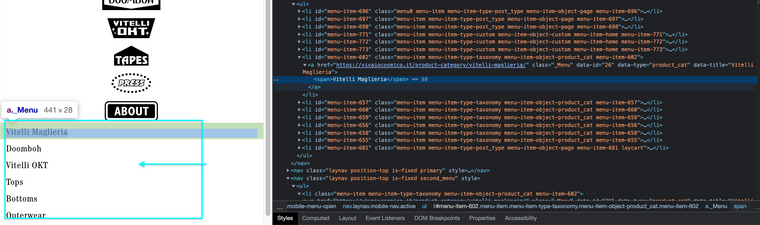
                Sorry that its not working, happy to help you further - To clarify here on the mobile menu we have two different styles - Which is the primary you wish to target? ( i assume the lower portion ). The Top menu items are graphically styled you do not wish to change the font of these right?
                Screen Shot 2021-10-04 at 10.37.09 AM.png


                Talk soon & best wishes
                Richard
                1 Reply Last reply
                0

                Hello! It looks like you're interested in this conversation, but you don't have an account yet.

                Getting fed up of having to scroll through the same posts each visit? When you register for an account, you'll always come back to exactly where you were before, and choose to be notified of new replies (either via email, or push notification). You'll also be able to save bookmarks and upvote posts to show your appreciation to other community members.

                With your input, this post could be even better πŸ’—

                Register Login
                Reply
                • Reply as topic
                Log in to reply
                • Oldest to Newest
                • Newest to Oldest
                • Most Votes


                Online Users
                Y
                yaninaisla
                OLVVDBO
                OLVVDB
                Forgot your key, lost your files, need a previous Lay Theme or Addon version? Go to www.laykeymanager.com
                laytheme.com
                • Login

                • Don't have an account? Register

                • Login or register to search.
                • First post
                  Last post
                0
                • Recent
                • Tags
                • Popular
                • Users
                • Search