Lightbox: Cannot click with mouse in the zoomed-mode to navigate through images.
-
-
Dear @luluhu
Could you please post a link to your website with the problem Lightbox 🔍
Also please make sure of the following:
Wordpress, Lay Theme & Laytheme's Addons are all up to date ?
Any custom CSS or JS that may interfere is temporarily removed.
Any third-party plugins are de-activated to see if this resolves the issue.
Talk soon @luluhu & best wishes ✨
Richard
-
Hi Richard, thanks so much for the quick answer, I've checked that everything is up to date und deleted CSS / JS and deactivated third party plugins (expect for ninja). Unfortunately I can't send you the link to the website, as I'm working locally (localhost) on my computer. Is there another way to solve the problem? Many thanks, Laura
-
Dear Laura
@luluhu
To be sure, have you checked the correct settings within > Lay Options > Lightbox Addon > 'only zoom'
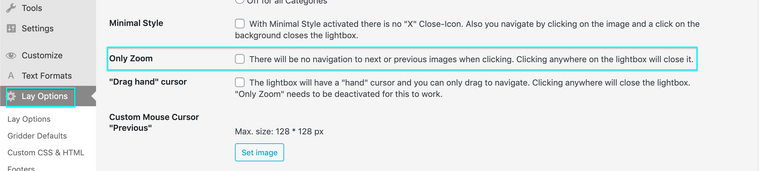
I understand you are on localhost, Screenshots always help or videos. Temporarily de-activating Ninja forms to make sure this isn't the cause
Talk soon Laura & have a wonderful day 🌻
Richard
-
-
Dear Laura
@luluhu
If you wish to send any files to me, no worries, please do so via:
That way i will receive them with other Lay Theme content. If you could add the link of your Thread this will also help!
Also to be sure within Lay Options > Lightbox Addon > The correct settings are checked:

Best wishes 🌼
Richard

Hello! It looks like you're interested in this conversation, but you don't have an account yet.
Getting fed up of having to scroll through the same posts each visit? When you register for an account, you'll always come back to exactly where you were before, and choose to be notified of new replies (either via email, or push notification). You'll also be able to save bookmarks and upvote posts to show your appreciation to other community members.
With your input, this post could be even better 💗
Register Login