size images beyond the frame?
-
-
Dear @pk
Just to Clarify 🌝
"Outside of the Frame" - Do you wish to make images larger than the browser width?This is possible with Custom CSS but unlikely with standard options, however you could select " never show resized versions " for your Images and upload really big ones? (this would be very slow for your website though)

Another option may be to play with "Max width of Content" and set a very large width:

Talk soon & best wishes 🏖
Richard
-
-
Dear David
@pk
If you wish to apply a 'Bleed' to certain images, i would suggest giving them all the same Custom Class E.g
bleed:(right-click on element)
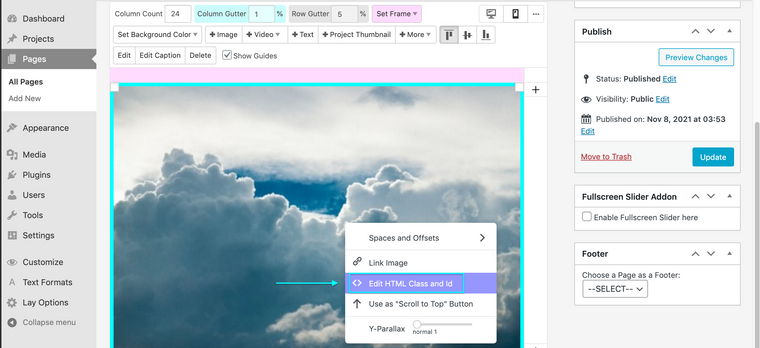
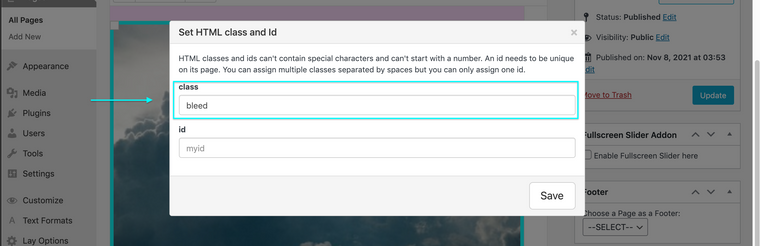
Then for a fullscreen bleed you can target these images and define some CSS for them, pushing them outside the frame E.g:
.bleed img{
    width: 105vw;
}
( 105 viewport width, slightly wider than 100% browser width )
Or for a bleed effect on Hover:
.bleed img:hover{
    width: 150vw;
    transition: 0.9s ease;
}
The Custom CSS will be up to you, but i hope this sets you in the right direction. Custom CSS can be added via Lay Options > Custom CSS & HTML or through > Customize > CSS
Talk soon @pk & have a wonderful day 🌻
Richard

Hello! It looks like you're interested in this conversation, but you don't have an account yet.
Getting fed up of having to scroll through the same posts each visit? When you register for an account, you'll always come back to exactly where you were before, and choose to be notified of new replies (either via email, or push notification). You'll also be able to save bookmarks and upvote posts to show your appreciation to other community members.
With your input, this post could be even better 💗
Register Login