Skip to content
  • Recent
  • Tags
  • Popular
  • Users
  • Search
Skins
  • Light
  • Brite
  • Cerulean
  • Cosmo
  • Flatly
  • Journal
  • Litera
  • Lumen
  • Lux
  • Materia
  • Minty
  • Morph
  • Pulse
  • Sandstone
  • Simplex
  • Sketchy
  • Spacelab
  • United
  • Yeti
  • Zephyr
  • Dark
  • Cyborg
  • Darkly
  • Quartz
  • Slate
  • Solar
  • Superhero
  • Vapor

  • Default (No Skin)
  • No Skin
Collapse

Lay Theme Forum

  1. Home
  2. General Discussion
  3. 2 different mobile menus on 2 different sites

2 different mobile menus on 2 different sites

Scheduled Pinned Locked Moved General Discussion
14 Posts 2 Posters 1.4k Views 1 Watching
  • Oldest to Newest
  • Newest to Oldest
  • Most Votes
Reply
  • Reply as topic
Log in to reply
This topic has been deleted. Only users with topic management privileges can see it.
  • RichardR
    RichardR
    Richard
    Global Moderator
    wrote on last edited by
    #4

    Dear @vernandel

    online_april-21 has the main menu for desktop & mobile but no secondary menu:

    .slug-online_april-21 .navbar .second_menu {
    display:none;
    }
    

    Presentation has the second menu for desktop & mobile but no main menu:

    .slug-presentation .laynav.primary {
    display:none;
    }
    

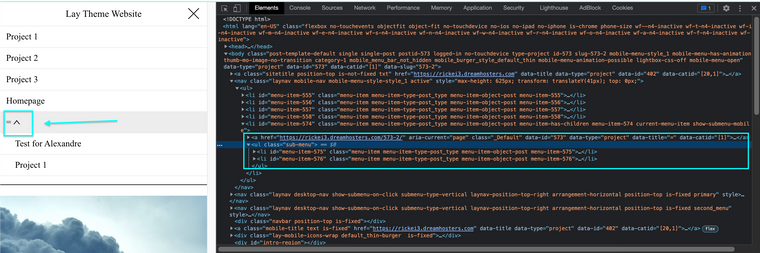
    I am unable to find your Second Menu on Mobile on the page presentation. It should normally be added to the other menu points. For example here i have a "second menu" set:
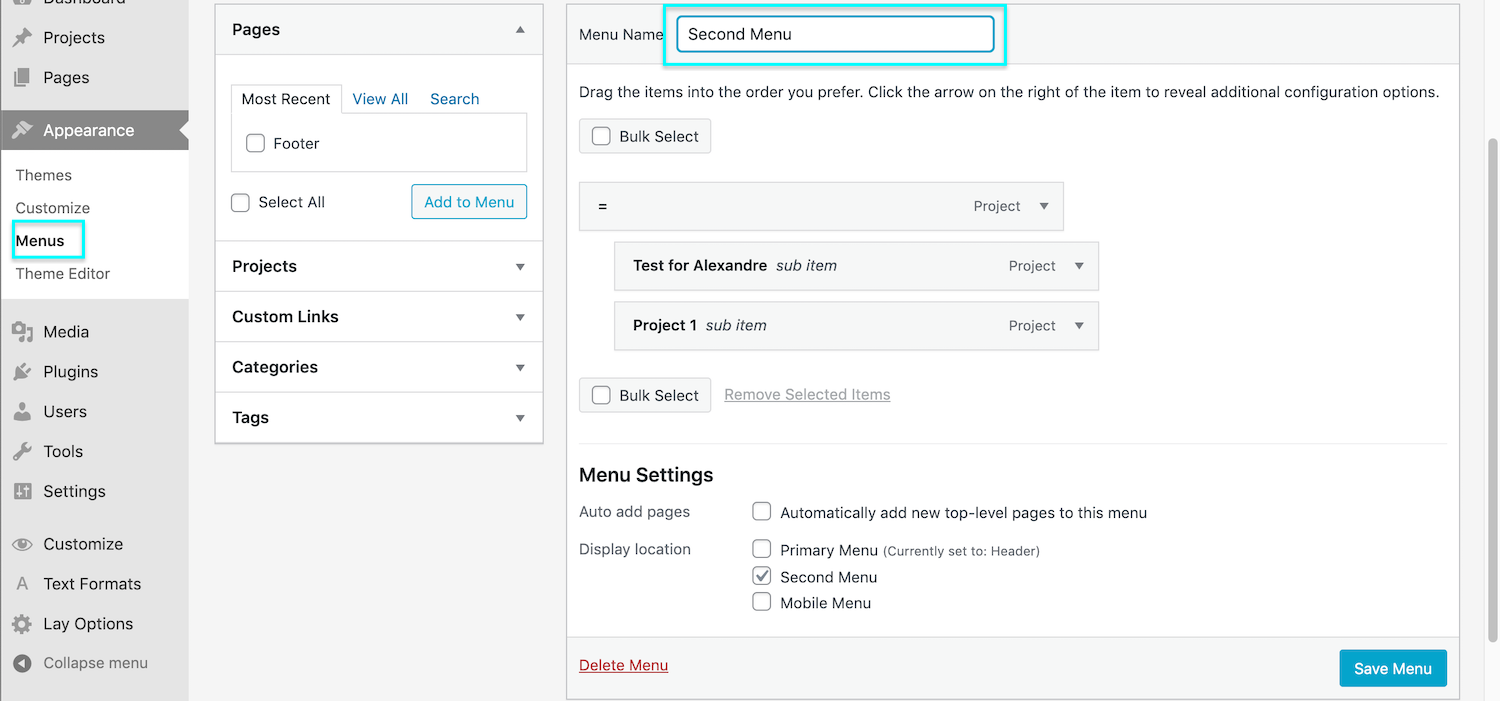
    Screen Shot 2021-11-08 at 4.37.31 PM.png

    & The result:
    Screen Shot 2021-11-08 at 4.37.38 PM.png

    however with your Secondary Menu we have it present:
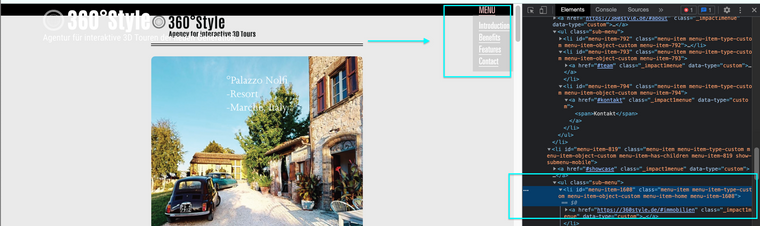
    Screen Shot 2021-11-08 at 4.37.48 PM.png

    But it's not present in the HTML (with your css removed - to make it display):
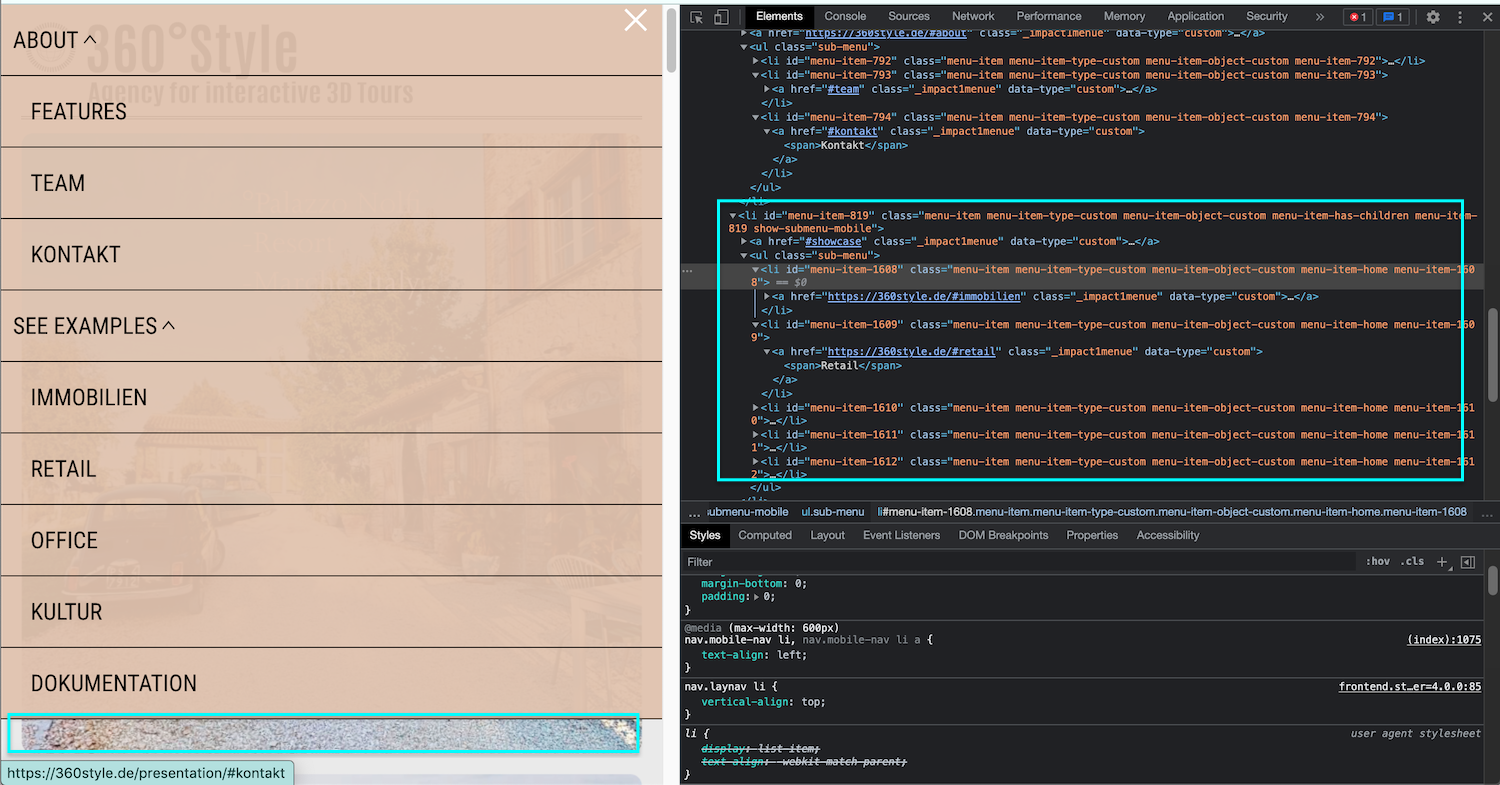
    Screen Shot 2021-11-08 at 4.37.57 PM.png


    Do you know why this may be? 🤔


    Talk soon @vernandel & have a great day 🏖
    Richard
    V 1 Reply Last reply
    0
    • RichardR Richard

      Dear @vernandel

      online_april-21 has the main menu for desktop & mobile but no secondary menu:

      .slug-online_april-21 .navbar .second_menu {
      display:none;
      }
      

      Presentation has the second menu for desktop & mobile but no main menu:

      .slug-presentation .laynav.primary {
      display:none;
      }
      

      I am unable to find your Second Menu on Mobile on the page presentation. It should normally be added to the other menu points. For example here i have a "second menu" set:
      Screen Shot 2021-11-08 at 4.37.31 PM.png

      & The result:
      Screen Shot 2021-11-08 at 4.37.38 PM.png

      however with your Secondary Menu we have it present:
      Screen Shot 2021-11-08 at 4.37.48 PM.png

      But it's not present in the HTML (with your css removed - to make it display):
      Screen Shot 2021-11-08 at 4.37.57 PM.png


      Do you know why this may be? 🤔


      Talk soon @vernandel & have a great day 🏖
      Richard
      V
      V
      vernandel
      wrote on last edited by
      #5

      @Richard
      dear richard,
      to answer your question: i really don't know.

      is it generally possible to have main menu displayed as mobil menu at site online_april-21 (YES)
      and in the sam time have a second menu displayed as a mobil menu at presentation? or is it something that just don't work?

      thank YOU
      g.

      1 Reply Last reply
      0
      • RichardR
        RichardR
        Richard
        Global Moderator
        wrote on last edited by
        #6

        Dear @vernandel

        It is very possible for both ✅
        However you second menu is not appearing on the presentation page in Mobile view, you will need to look into that.

        • Create a test a page and setup a secondary menu.

        • Does the second menu appear on Mobile as well as desktop?

        • If it appears on Mobile good, we can then work from there

        • If not then further debugging is needed


        Talk soon & best wishes 🌞
        Richard
        1 Reply Last reply
        0
        • V
          V
          vernandel
          wrote on last edited by
          #7

          hey hey,

          test page: https://360style.de/test/

          the second menu appears as desktop but not on mobile

          CSS:

          .slug-test .laynav.primary {
          display:none;
          }

          .slug-test .laynav.mobile-nav {
          display:none;
          }

          any idea what to do next?

          thank you
          g.

          V 1 Reply Last reply
          0
          • V vernandel

            hey hey,

            test page: https://360style.de/test/

            the second menu appears as desktop but not on mobile

            CSS:

            .slug-test .laynav.primary {
            display:none;
            }

            .slug-test .laynav.mobile-nav {
            display:none;
            }

            any idea what to do next?

            thank you
            g.

            V
            V
            vernandel
            wrote on last edited by
            #8

            @Richard
            edit
            when i delete
            .slug-test .laynav.mobile-nav {
            display:none;
            }

            the primary menu will show up on mobile

            1 Reply Last reply
            0
            • RichardR
              RichardR
              Richard
              Global Moderator
              wrote on last edited by
              #9

              Dear @vernandel

              This is turning into quite the problem isnt it!? 🌝🤔
              If you feel comfortable doing so, please send me your login details via 'Chats' and i will look further into why this secondary menu is not displaying as it should.

              ( Note: Please do not disclose your private info on the thread itself )


              Best wishes & have a wonderful day ✨
              Richard
              V 2 Replies Last reply
              0
              • RichardR Richard

                Dear @vernandel

                This is turning into quite the problem isnt it!? 🌝🤔
                If you feel comfortable doing so, please send me your login details via 'Chats' and i will look further into why this secondary menu is not displaying as it should.

                ( Note: Please do not disclose your private info on the thread itself )


                Best wishes & have a wonderful day ✨
                Richard
                V
                V
                vernandel
                wrote on last edited by
                #10

                @Richard done ;-)

                1 Reply Last reply
                0
                • RichardR Richard

                  Dear @vernandel

                  This is turning into quite the problem isnt it!? 🌝🤔
                  If you feel comfortable doing so, please send me your login details via 'Chats' and i will look further into why this secondary menu is not displaying as it should.

                  ( Note: Please do not disclose your private info on the thread itself )


                  Best wishes & have a wonderful day ✨
                  Richard
                  V
                  V
                  vernandel
                  wrote on last edited by
                  #11

                  @Richard
                  dear richard. did you get my message via chat?

                  1 Reply Last reply
                  0
                  • RichardR
                    RichardR
                    Richard
                    Global Moderator
                    wrote on last edited by Richard
                    #12

                    Dear @vernandel

                    Great thank you for the Login details, also thank you for having such a clean setup 🌝

                    Please check out https://360style.de/presentation/ as now i believe it's the setup you wanted.

                    The Sub-menu was not showing up because the Mobile Menu in > Appearance > Menu's was set to only display the primary menu, I set it back to default so that your Sub-menu would appear.
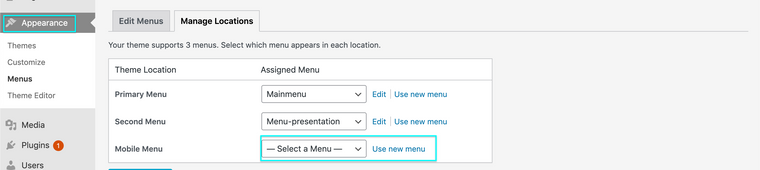
                    Screen Shot 2021-11-16 at 8.52.38 AM.png

                    The following CSS was removed:

                    .slug-presentation .laynav.mobile-nav {
                        display:none;
                     }
                    

                    & Replaced by:

                    .slug-presentation .laynav.mobile-nav .menu-item-1244 {
                       display:none;
                    }
                    
                    .slug-presentation .laynav.mobile-nav .menu-item-819 {
                       display:none;
                    }
                    

                    Glad we finally got there @vernandel
                    Because I needed to change the Mobile-menu setup you may need to see if this has effected anything, but Im happy that Lay Theme functions are working as they should and not at fault 🐛


                    Best wishes ✨
                    Richard
                    V 1 Reply Last reply
                    0
                    • RichardR Richard

                      Dear @vernandel

                      Great thank you for the Login details, also thank you for having such a clean setup 🌝

                      Please check out https://360style.de/presentation/ as now i believe it's the setup you wanted.

                      The Sub-menu was not showing up because the Mobile Menu in > Appearance > Menu's was set to only display the primary menu, I set it back to default so that your Sub-menu would appear.
                      Screen Shot 2021-11-16 at 8.52.38 AM.png

                      The following CSS was removed:

                      .slug-presentation .laynav.mobile-nav {
                          display:none;
                       }
                      

                      & Replaced by:

                      .slug-presentation .laynav.mobile-nav .menu-item-1244 {
                         display:none;
                      }
                      
                      .slug-presentation .laynav.mobile-nav .menu-item-819 {
                         display:none;
                      }
                      

                      Glad we finally got there @vernandel
                      Because I needed to change the Mobile-menu setup you may need to see if this has effected anything, but Im happy that Lay Theme functions are working as they should and not at fault 🐛


                      Best wishes ✨
                      Richard
                      V
                      V
                      vernandel
                      wrote on last edited by
                      #13

                      @Richard GREAT!
                      thank you 1000 and 1 times!

                      all ist working now
                      best
                      g.

                      1 Reply Last reply
                      0
                      • RichardR
                        RichardR
                        Richard
                        Global Moderator
                        wrote on last edited by
                        #14

                        Dear @vernandel

                        Very welcome, it took a while but we got there! ⭐️


                        Best wishes
                        Richard
                        1 Reply Last reply
                        0

                        Hello! It looks like you're interested in this conversation, but you don't have an account yet.

                        Getting fed up of having to scroll through the same posts each visit? When you register for an account, you'll always come back to exactly where you were before, and choose to be notified of new replies (either via email, or push notification). You'll also be able to save bookmarks and upvote posts to show your appreciation to other community members.

                        With your input, this post could be even better 💗

                        Register Login
                        Reply
                        • Reply as topic
                        Log in to reply
                        • Oldest to Newest
                        • Newest to Oldest
                        • Most Votes


                        Online Users
                        Forgot your key, lost your files, need a previous Lay Theme or Addon version? Go to www.laykeymanager.com
                        laytheme.com
                        • Login

                        • Don't have an account? Register

                        • Login or register to search.
                        • First post
                          Last post
                        0
                        • Recent
                        • Tags
                        • Popular
                        • Users
                        • Search