Show only tags of category in use, not all
-
Okay, say I have two different categories, Category A and Category B and either of those categories uses tags, but never cross-over. So Category A uses Tag A1, A2 and A3 and Category B uses Tags B1, B2 and B3.
I display an element grid for Category A on one page and an element grid for Category B on another page. Both element grids use tag filters to display their tags.
Right now – at least for me – both element grids now display ALL tags. So both show tags A1, A2, A3, B1, B2, B3. Even though on both occasions three tags are "empty".
Can I (or can you) connect the category filter with the tag filter in a way that only the tags are displays that are used by this category.
Or do you have a different suggestion how to solve this?
-
Dear Thomas
@thomasmaier
"Can I (or can you) connect the category filter with the tag filter in a way that only the tags are displays that are used by this category."
Could you please update to the newest version (4.0.7). There are new options for Tag Filtering:
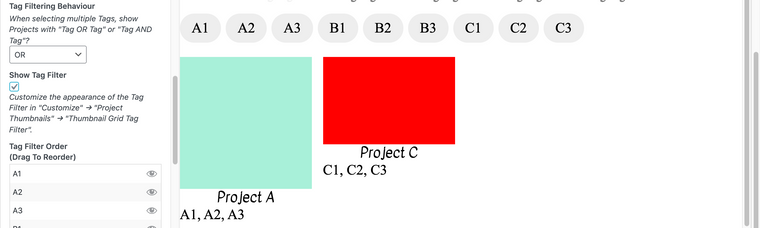
You can hide tags too!

Best wishes Thomas 🌝
Richard

Hello! It looks like you're interested in this conversation, but you don't have an account yet.
Getting fed up of having to scroll through the same posts each visit? When you register for an account, you'll always come back to exactly where you were before, and choose to be notified of new replies (either via email, or push notification). You'll also be able to save bookmarks and upvote posts to show your appreciation to other community members.
With your input, this post could be even better 💗
Register Login