Dropshadow for menu bar
-
Hey there!
Is it possible to put a dropshadow under a blurry/transparent menu bar?
Similar to this page: https://benelliot.io/
Thanks!
Nico -
Dear Nico
@Nico-Schröder
I'm sure its possible 🌝The CSS applied to the the header (navigation) on your example website has some
blurandbox-shadow.
The different versions of box-shadow you see are just support for different browsers.
header {

    -webkit-backdrop-filter: blur(.3rem);
    backdrop-filter: blur(0.3rem);

    -webkit-box-shadow: 0 1px 5px rgb(0 0 0 / 10%);
    -moz-box-shadow: 0 1px 5px rgba(0,0,0,.1);
    -ms-box-shadow: 0 1px 5px rgba(0,0,0,.1);
    -o-box-shadow: 0 1px 5px rgba(0,0,0,.1);
    box-shadow: 0 1px 5px rgb(0 0 0 / 10%);
}
Best wishes Nico & have a great day ⭐️
Richard
-
Dear Richard,
thanks alot! I copied the CSS from the browser but it only shows a white shadow right on the top of the site for me. How can I make it dark like on the example website?
Many thanks and best regards,
Nico -
Dear Nico
@Nico-Schröder
unsure, when i apply the CSS to your navbar i get the following result (http://nico-schroeder.com/):

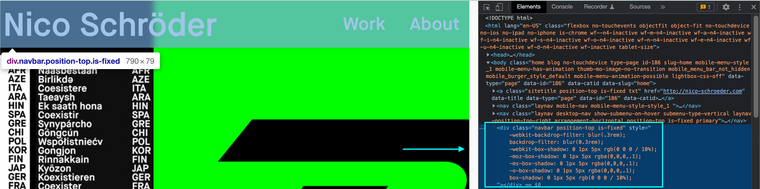
I do not see this white shadow sorry. Just to be sure the above code should added to your
navbarand not the<header>. The CSS was applied to the header in your example website but Lay Theme uses a different setup.
Best wishes 🏖
Richard
-
Dear Richard,
that looks fine! I copied the CSS but I cant seem to save the changes to the website. How can i save the process after I alter the CSS? The way you put it in the screenshot looks perfect.
Many thanks!
Nico -
Dear Nico
@Nico-Schröder
Are you adding the code into your Website via:
Lay options > Custom CSS & HTML > Custom CSS >
https://laytheme.com/documentation/custom-css-styling.html
Best wishes
Richard
-
I tried adding the code into the section, but I get a lot of "unexpected token" notifications though. I copied it the way you showed on the top.
-
Dear Nico
@Nico-Schröder
The following code:
.navbar {

    -webkit-backdrop-filter: blur(.3rem);
    backdrop-filter: blur(0.3rem);

    -webkit-box-shadow: 0 1px 5px rgb(0 0 0 / 10%);
    -moz-box-shadow: 0 1px 5px rgba(0,0,0,.1);
    -ms-box-shadow: 0 1px 5px rgba(0,0,0,.1);
    -o-box-shadow: 0 1px 5px rgba(0,0,0,.1);
    box-shadow: 0 25px 5px rgb(0 0 0 / 10%);
}
Produces the following result:

This is not the same for you?
The unexpected Token shouldn't be a problem: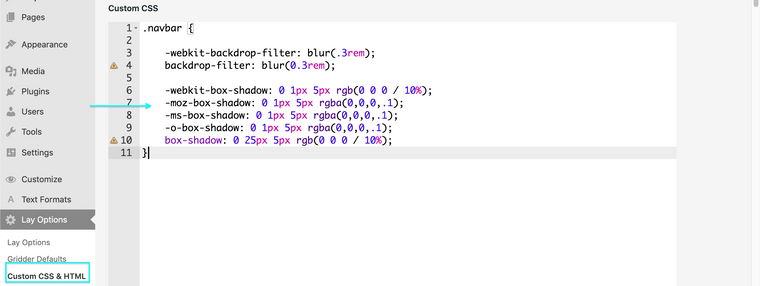
Result:

Best wishes
Richard

Hello! It looks like you're interested in this conversation, but you don't have an account yet.
Getting fed up of having to scroll through the same posts each visit? When you register for an account, you'll always come back to exactly where you were before, and choose to be notified of new replies (either via email, or push notification). You'll also be able to save bookmarks and upvote posts to show your appreciation to other community members.
With your input, this post could be even better 💗
Register Login