Replace the previous and next slider buttons with text
-
Hello,
Is it possible to replace the previous and next buttons of the slider with text? (write with the typography of the site "previous" on the left, "next" on the right.)
Thank you very much!
-
Dear @Antoine-dvc
Not with standard options and will need to be custom coded by you - but I can set you in the right direction 🌝
https://stackoverflow.com/questions/1309452/how-to-replace-innerhtml-of-a-div-using-jquery
The following jQuery will target the classes
next&previousrelating to the Carousel ( you probably should specify which next and previous if there are multiple on your website) And change the inner HTML ( an image ) to some Text.jQuery('.next').html('next'); jQuery('.previous').html('Previous');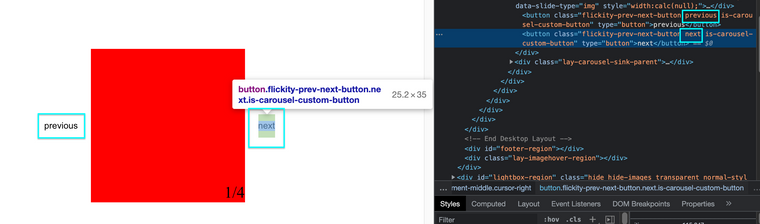
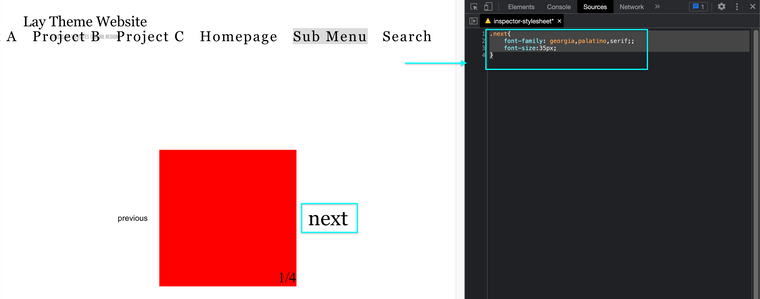
You will also need to define some CSS for your text to match the design of your website:
.next{
    font-family: georgia,palatino,serif;;
    font-size:35px;
}
Hope this helps & best wishes
Richard
-
@Richard said in Replace the previous and next slider buttons with text:
And change the inner HTML ( an image ) to some Text.
Hi Richard, Thanks for your feedback.
I understand pretty much, however how can I change the inner HTML ( an image ) to some Text ? I managed in the google chrome console to make "previous" appear by including this line "<button class="flickity-prev-next-button previous" type="button">previous</button>" however I can't seem to do it in the laytheme.
Here'is a screenshot
Thanks a lot,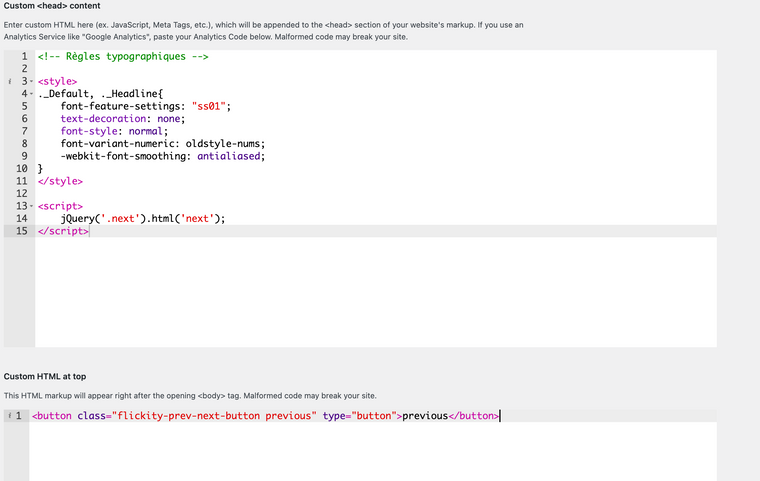
-
Dear @Antoine-dvc
As a first test wrap the code into a 'newpage event" within your Custom <head> Content:
https://laytheme.com/documentation/custom-javascript.html
<script>
window.laytheme.on("newpageshown", function(){

// insert your desired code here

});
</script>
Best
Richard
-
I just wanted to suggest this feature when I found this post… would be cool to have an option in the Carousel and Fullscreen Slider to show simple text like “next” or “previous” next to the cursor instead of needing custom cursor images.
-
sure i wrote it down


Hello! It looks like you're interested in this conversation, but you don't have an account yet.
Getting fed up of having to scroll through the same posts each visit? When you register for an account, you'll always come back to exactly where you were before, and choose to be notified of new replies (either via email, or push notification). You'll also be able to save bookmarks and upvote posts to show your appreciation to other community members.
With your input, this post could be even better 💗
Register Login