Responsive Alignment Issues
-
Hello,
We have build a customer of ours some functionality in his website:
1- Vertical Navigation
2- Social Media Button
3- Endless Scroll Function.However, we have massive problems aligning elements to certain places and making them responsive in a way it scales propotionally.
For instance we can't align the menu in the same hight as the image and logo:
https://i.imgur.com/AAo8ATY.png
For instance we had to special code the intro area in order to align the logo in the upper area and move the text around. However we can't get the text here to scale responsive in a way that it is propotional
https://i.imgur.com/PvKxoOy.jpg
We had to completeley override the navigation section because we couldn't do it otherwise.
Other things as well:
1- We can't implement a breadcrumb feature (tried many things like YoastSeo and such)
2- We can't add a space in de desktop view between image tiles. Currently it looks like this:
https://i.imgur.com/OkEXirv.png
I mean the visitor doesn't know which text belong to which image.
3- When using table in content the space between the coloumns disappear.
https://i.imgur.com/el6OCri.png
This had to be modified manually: https://i.imgur.com/2mbE0fS.png
Can anyone point us in the right direction on how to effectiveley use LayThemes and make the best of responsive usage?
-
Dear @yavuzyayla
"For instance we can't align the menu in the same hight as the image and logo:"
The Margin above the menu may be set to
pxinstead of the responsive%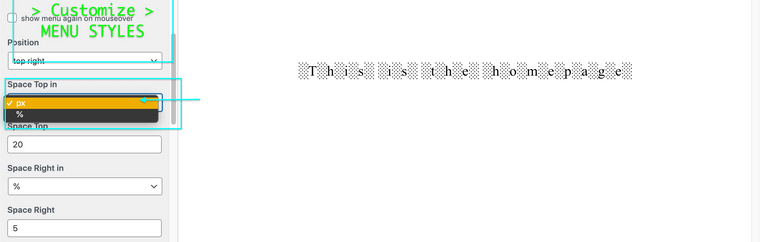
Or your Gridder Frame may be set to
pxor%
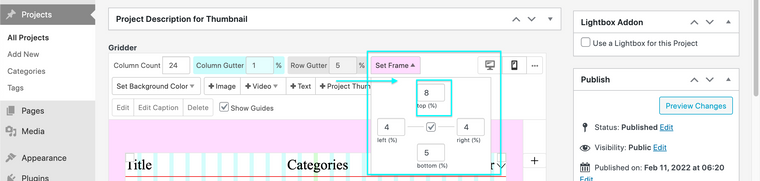
This can be changed in Gridder Defaults:
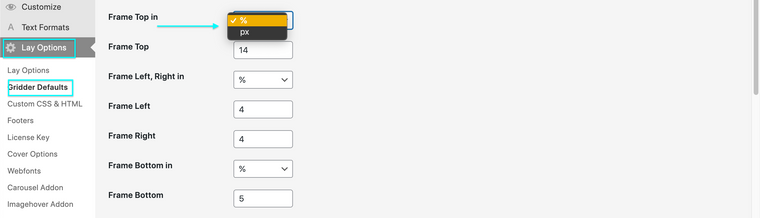
I feel a combination of two seperate measurements could be the issue.
"We can't add a space in de desktop view between image tiles."
Are these spaces the Titles of Project's in a Thumbnail Grid?
If so they can be set within Customizing ▸ Project Thumbnails
Project Title:
Best wishes ✨
Richard

Hello! It looks like you're interested in this conversation, but you don't have an account yet.
Getting fed up of having to scroll through the same posts each visit? When you register for an account, you'll always come back to exactly where you were before, and choose to be notified of new replies (either via email, or push notification). You'll also be able to save bookmarks and upvote posts to show your appreciation to other community members.
With your input, this post could be even better 💗
Register Login