Skip to content
  • Recent
  • Tags
  • Popular
  • Users
  • Search
Skins
  • Light
  • Brite
  • Cerulean
  • Cosmo
  • Flatly
  • Journal
  • Litera
  • Lumen
  • Lux
  • Materia
  • Minty
  • Morph
  • Pulse
  • Sandstone
  • Simplex
  • Sketchy
  • Spacelab
  • United
  • Yeti
  • Zephyr
  • Dark
  • Cyborg
  • Darkly
  • Quartz
  • Slate
  • Solar
  • Superhero
  • Vapor

  • Default (No Skin)
  • No Skin
Collapse

Lay Theme Forum

  1. Home
  2. General Discussion
  3. fullscreen slider problem with widht

fullscreen slider problem with widht

Scheduled Pinned Locked Moved General Discussion
16 Posts 2 Posters 1.5k Views 1 Watching
  • Oldest to Newest
  • Newest to Oldest
  • Most Votes
Reply
  • Reply as topic
Log in to reply
This topic has been deleted. Only users with topic management privileges can see it.
  • N
    N
    nataliastatement
    wrote on last edited by
    #1

    Hello ,
    I have problem with fullscreen slider on frontpage and other. I need full widht without scrollbar area (there is no scrollbar just the area) How to get rid off it ? Please find attached screens for better understanding. Screenshot 2022-06-27 at 18.31.00.png Screenshot 2022-06-27 at 18.06.12.png


    1 Reply Last reply
    0
    • arminunruhA
      arminunruhA
      arminunruh
      Global Moderator
      wrote on last edited by
      #2

      link to ur site?

      N 1 Reply Last reply
      0
      • arminunruhA arminunruh

        link to ur site?

        N
        N
        nataliastatement
        wrote on last edited by
        #3

        @arminunruh www.statement-studio.com

        1 Reply Last reply
        0
        • arminunruhA
          arminunruhA
          arminunruh
          Global Moderator
          wrote on last edited by
          #4

          check this
          Screenshot 2022-07-04 at 14.48.19.png

          ure not using a fullscreen slider, ure using a carousel

          N 1 Reply Last reply
          0
          • arminunruhA arminunruh

            check this
            Screenshot 2022-07-04 at 14.48.19.png

            ure not using a fullscreen slider, ure using a carousel

            N
            N
            nataliastatement
            wrote on last edited by
            #5

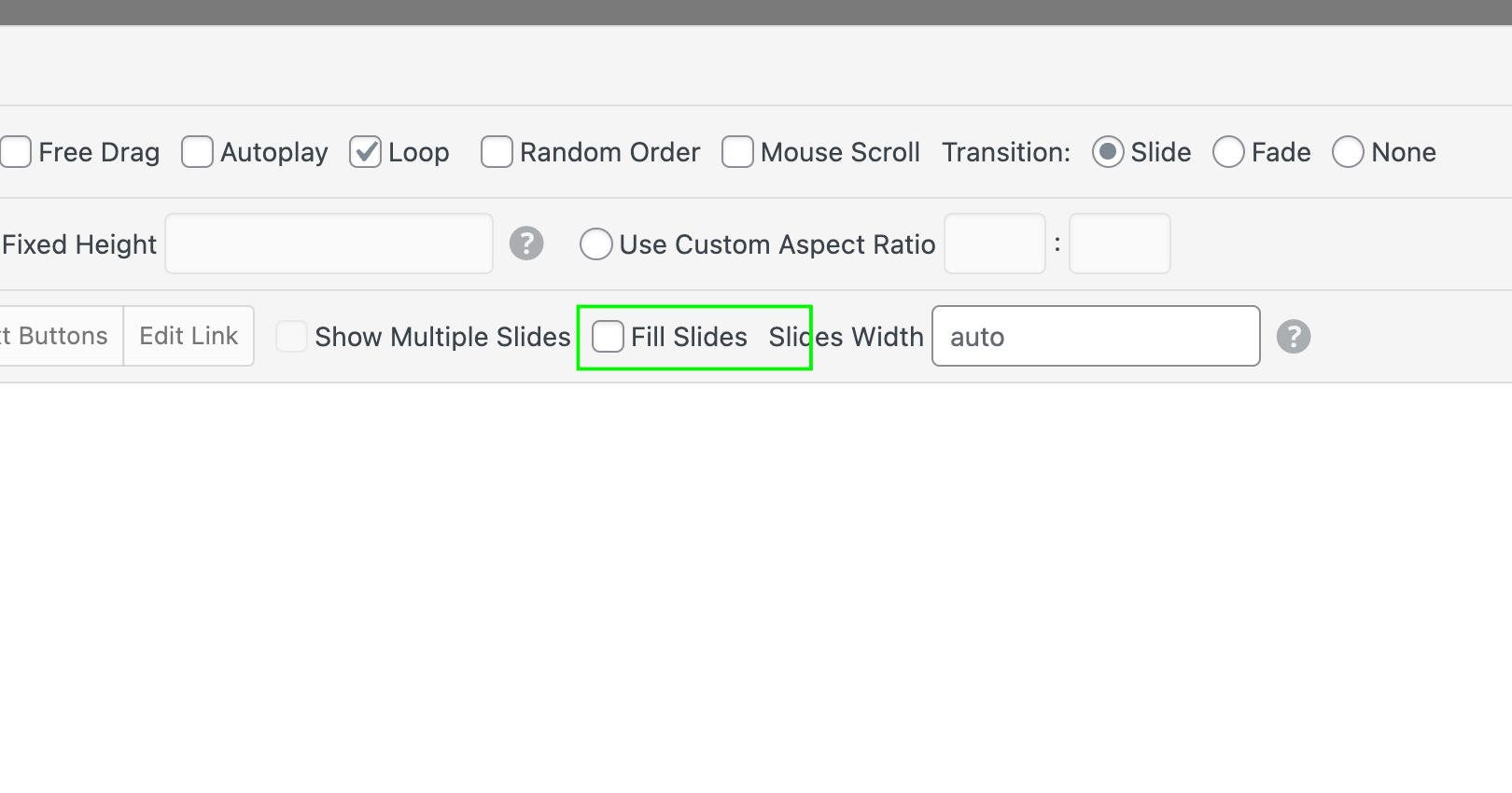
            @arminunruh thank u for replay , I changed this settings for fill slides , but there is still black bar on the right side like i marked upper , and is it possible to put text on image or no ? i know i can add caption under , but i need add text on center , thank you.

            1 Reply Last reply
            0
            • N
              N
              nataliastatement
              wrote on last edited by
              #6

              and another question , why there is some blackground block on carousel image when they change on front page? how to turn it off ?

              1 Reply Last reply
              0
              • arminunruhA
                arminunruhA
                arminunruh
                Global Moderator
                wrote on last edited by
                #7

                @nataliastatement said in fullscreen slider problem with widht:

                thank u for replay , I changed this settings for fill slides , but there is still black bar on the right side like i marked upper

                no there is no black bar anymore

                i know i can add caption under , but i need add text on center , thank you.

                oh yea thats a good idea, i didnt think of this yet.

                do you have the fullscreen slider addon?
                you could use it instead. for each row, create a browser filling row then use a background image for each row and write text on the middle of the row.

                N 1 Reply Last reply
                0
                • arminunruhA arminunruh

                  @nataliastatement said in fullscreen slider problem with widht:

                  thank u for replay , I changed this settings for fill slides , but there is still black bar on the right side like i marked upper

                  no there is no black bar anymore

                  i know i can add caption under , but i need add text on center , thank you.

                  oh yea thats a good idea, i didnt think of this yet.

                  do you have the fullscreen slider addon?
                  you could use it instead. for each row, create a browser filling row then use a background image for each row and write text on the middle of the row.

                  N
                  N
                  nataliastatement
                  wrote on last edited by
                  #8

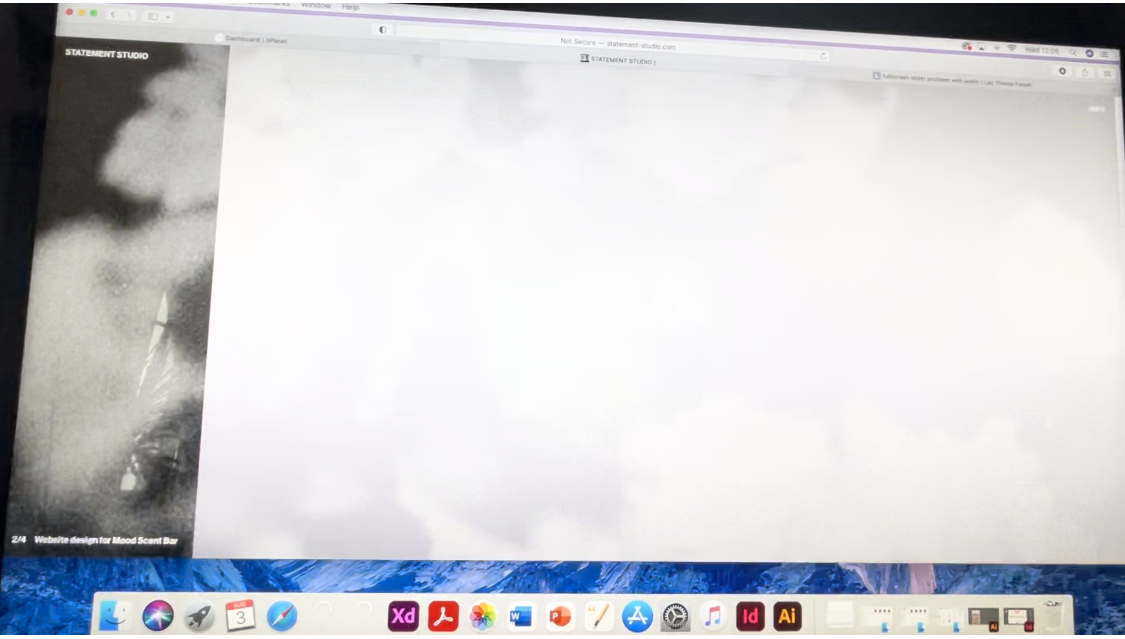
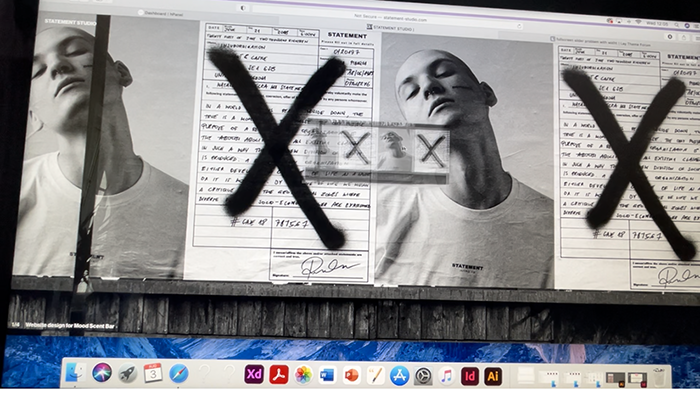
                  @arminunruh Hello , i need your advice because i cant resolve the problem, i made screenshots to show you what the problem is .

                  1. When image change on carousel appears the background colour , now there are white flashes between the photos (why? how can i remove it?)
                    IMG_0267 2.PNG
                  2. i dont want this small image when i grab the photo with a mouse
                    IMG_0265 3.PNG
                  3. i would like to make a 'X' (or close) button when i am on the info page (after clicking X or Close it should take me back to home page)
                    www.statement-studio.com
                  1 Reply Last reply
                  0
                  • arminunruhA
                    arminunruhA
                    arminunruh
                    Global Moderator
                    wrote on last edited by
                    #9

                    hey there, the flashes i cant do anything about,
                    i think that only happens in safari

                    you can disable the loop option for your carousel and then the flash shouldn't appear

                    to prevent the ghost image / draggable image try this css in lay options -> css:

                    .lay-carousel-wrap img {
                      -webkit-user-drag: none;
                      -khtml-user-drag: none;
                      -moz-user-drag: none;
                      -o-user-drag: none;
                      user-drag: none;
                    }
                    

                    or

                    .lay-carousel-wrap img {
                      pointer-events: none;
                    }
                    
                    N 1 Reply Last reply
                    0
                    • arminunruhA arminunruh

                      hey there, the flashes i cant do anything about,
                      i think that only happens in safari

                      you can disable the loop option for your carousel and then the flash shouldn't appear

                      to prevent the ghost image / draggable image try this css in lay options -> css:

                      .lay-carousel-wrap img {
                        -webkit-user-drag: none;
                        -khtml-user-drag: none;
                        -moz-user-drag: none;
                        -o-user-drag: none;
                        user-drag: none;
                      }
                      

                      or

                      .lay-carousel-wrap img {
                        pointer-events: none;
                      }
                      
                      N
                      N
                      nataliastatement
                      wrote on last edited by
                      #10

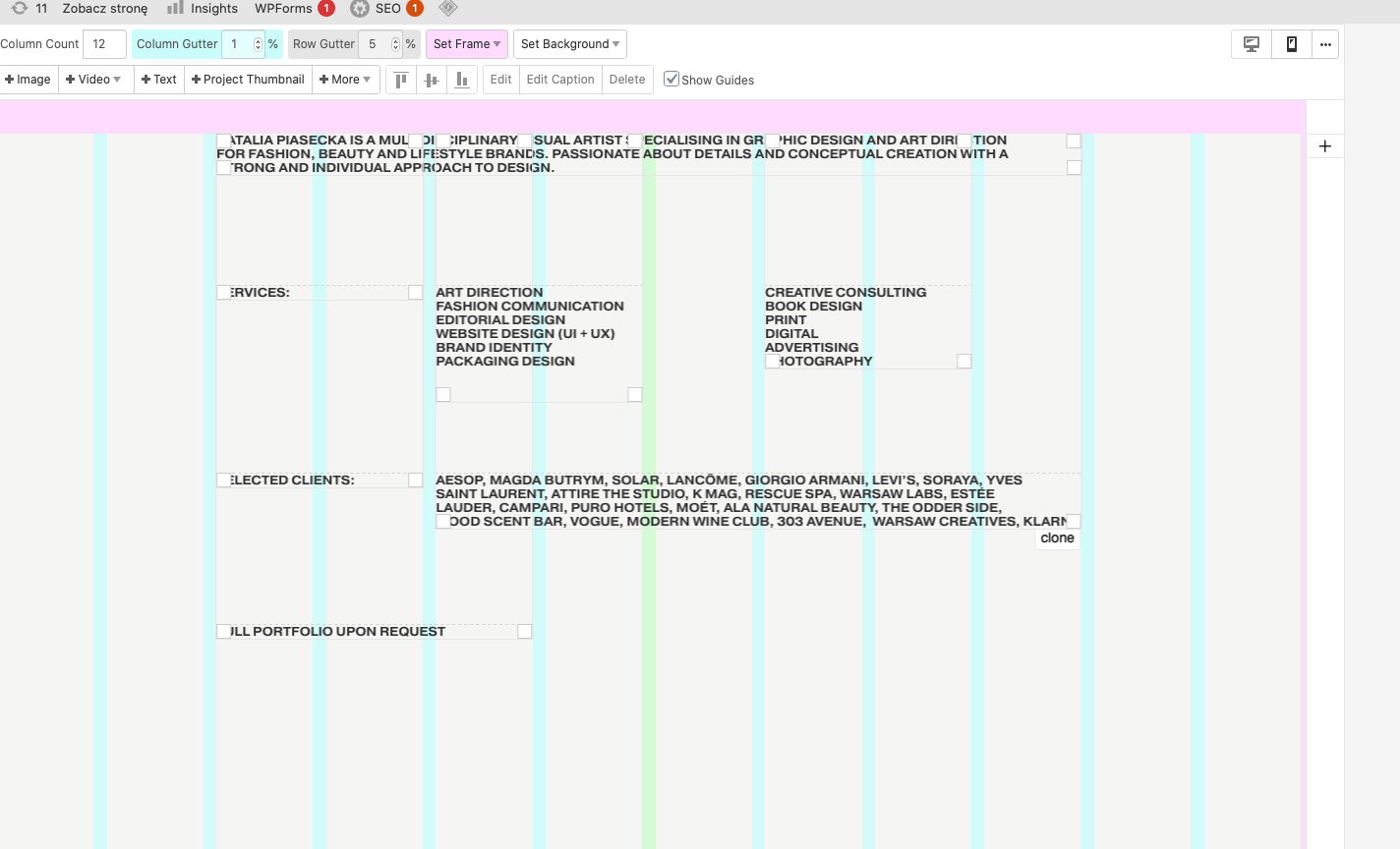
                      @arminunruh okay ghost image gone - thank you, and how can i use a browser height for row height(maybe add some css code which work , bc a tried some and nothing happen , page 'info' still expanding down ? Is it better way to add text on page like i do ?
                      Screenshot 2022-08-17 at 15.03.30.png

                      N 1 Reply Last reply
                      0
                      • N nataliastatement

                        @arminunruh okay ghost image gone - thank you, and how can i use a browser height for row height(maybe add some css code which work , bc a tried some and nothing happen , page 'info' still expanding down ? Is it better way to add text on page like i do ?
                        Screenshot 2022-08-17 at 15.03.30.png

                        N
                        N
                        nataliastatement
                        wrote on last edited by
                        #11

                        @nataliastatement
                        the website www.nataliapiasecka.com

                        1 Reply Last reply
                        0
                        • arminunruhA
                          arminunruhA
                          arminunruh
                          Global Moderator
                          wrote on last edited by
                          #12

                          @nataliastatement said in fullscreen slider problem with widht:

                          and how can i use a browser height for row height(maybe add some css code which work , bc a tried some and nothing happen , page 'info' still expanding down ? Is it better way to add text on page like i do ?

                          hey you did great

                          just remove frame top and frame bottom for that page and then the page is exactly the height of the browser

                          1 Reply Last reply
                          0
                          • N
                            N
                            nataliastatement
                            wrote on last edited by
                            #13

                            Hello Armin,
                            I'm just looking for how to make more responsive website, cause the front page look different on some mobile , before update my phone the front page was on fullscreen without any gap and now there is a gap and on the other phone is full, how to fix it (it is about breakpoint? because i want same on every mobile. IMG_1318.jpg IMG_2347.PNG


                            1 Reply Last reply
                            0
                            • arminunruhA
                              arminunruhA
                              arminunruh
                              Global Moderator
                              wrote on last edited by
                              #14

                              so i have the latest ios installed on my iphone and i dont see a gap

                              which phone model are u using and which ios version? for when you see the gap

                              N 1 Reply Last reply
                              0
                              • arminunruhA arminunruh

                                so i have the latest ios installed on my iphone and i dont see a gap

                                which phone model are u using and which ios version? for when you see the gap

                                N
                                N
                                nataliastatement
                                wrote on last edited by
                                #15

                                @arminunruh iphone 12 and X as well, software 15.6.1

                                1 Reply Last reply
                                0
                                • arminunruhA
                                  arminunruhA
                                  arminunruh
                                  Global Moderator
                                  wrote on last edited by
                                  #16

                                  hey still need to look at this…

                                  1 Reply Last reply
                                  0

                                  Hello! It looks like you're interested in this conversation, but you don't have an account yet.

                                  Getting fed up of having to scroll through the same posts each visit? When you register for an account, you'll always come back to exactly where you were before, and choose to be notified of new replies (either via email, or push notification). You'll also be able to save bookmarks and upvote posts to show your appreciation to other community members.

                                  With your input, this post could be even better đź’—

                                  Register Login
                                  Reply
                                  • Reply as topic
                                  Log in to reply
                                  • Oldest to Newest
                                  • Newest to Oldest
                                  • Most Votes


                                  Online Users
                                  Forgot your key, lost your files, need a previous Lay Theme or Addon version? Go to www.laykeymanager.com
                                  laytheme.com
                                  • Login

                                  • Don't have an account? Register

                                  • Login or register to search.
                                  • First post
                                    Last post
                                  0
                                  • Recent
                                  • Tags
                                  • Popular
                                  • Users
                                  • Search