responsive issue carousel desktop / mobile
-
Hi,
I created a simple carousel for a project which shows on my home page:
hugochevallier.comI wanted the mobile to be a simple stack version to avoid scroll and crops so I activated "custom phone layouts" and created a different simple layout following the instructions from lay documentations:
https://laytheme.com/documentation/custom-phone-layouts.htmlBut unfortunately the mobile version wont show on mobile devices. (I have an iPhone 13 Pro)
But it shows when reducing a desktop window ....I've double check everything and I'm kinda stuck here.
I'm sure there is something to enable somewhere.Thank you in advance for your help
-
Hi,
I created a simple carousel for a project which shows on my home page:
hugochevallier.comI wanted the mobile to be a simple stack version to avoid scroll and crops so I activated "custom phone layouts" and created a different simple layout following the instructions from lay documentations:
https://laytheme.com/documentation/custom-phone-layouts.htmlBut unfortunately the mobile version wont show on mobile devices. (I have an iPhone 13 Pro)
But it shows when reducing a desktop window ....I've double check everything and I'm kinda stuck here.
I'm sure there is something to enable somewhere.Thank you in advance for your help
@hugochevallier hey, your website loads on my mobile albeit slowly and loads in a carousel but it takes up the majority of the screen. I think you might need to readjust the carousel settings, try turning off the 'fill slides' on the mobile carousel. Also try clearing your cache to load in the newest version, your phone might be showing an old version perhaps.
-
@hugochevallier hey, your website loads on my mobile albeit slowly and loads in a carousel but it takes up the majority of the screen. I think you might need to readjust the carousel settings, try turning off the 'fill slides' on the mobile carousel. Also try clearing your cache to load in the newest version, your phone might be showing an old version perhaps.
@alasdair17 yes it loads on my side too but it should not be a carousel on mobile but a custom simple stack scroll images (you can see it when reducing your desktop window)
-
@alasdair17 yes it loads on my side too but it should not be a carousel on mobile but a custom simple stack scroll images (you can see it when reducing your desktop window)
@hugochevallier ah okay, and in your gridder on the phone layout it is showing the stacked images? sounds like it could be a cache thing where it is displaying the old version of the site before you had a custom layout. Try installing WP Fastest Cache and clearing the cache, that might work.
-
hey hugo nice website! congratulations!
so on my phone, the phone version shows up correctly.
look: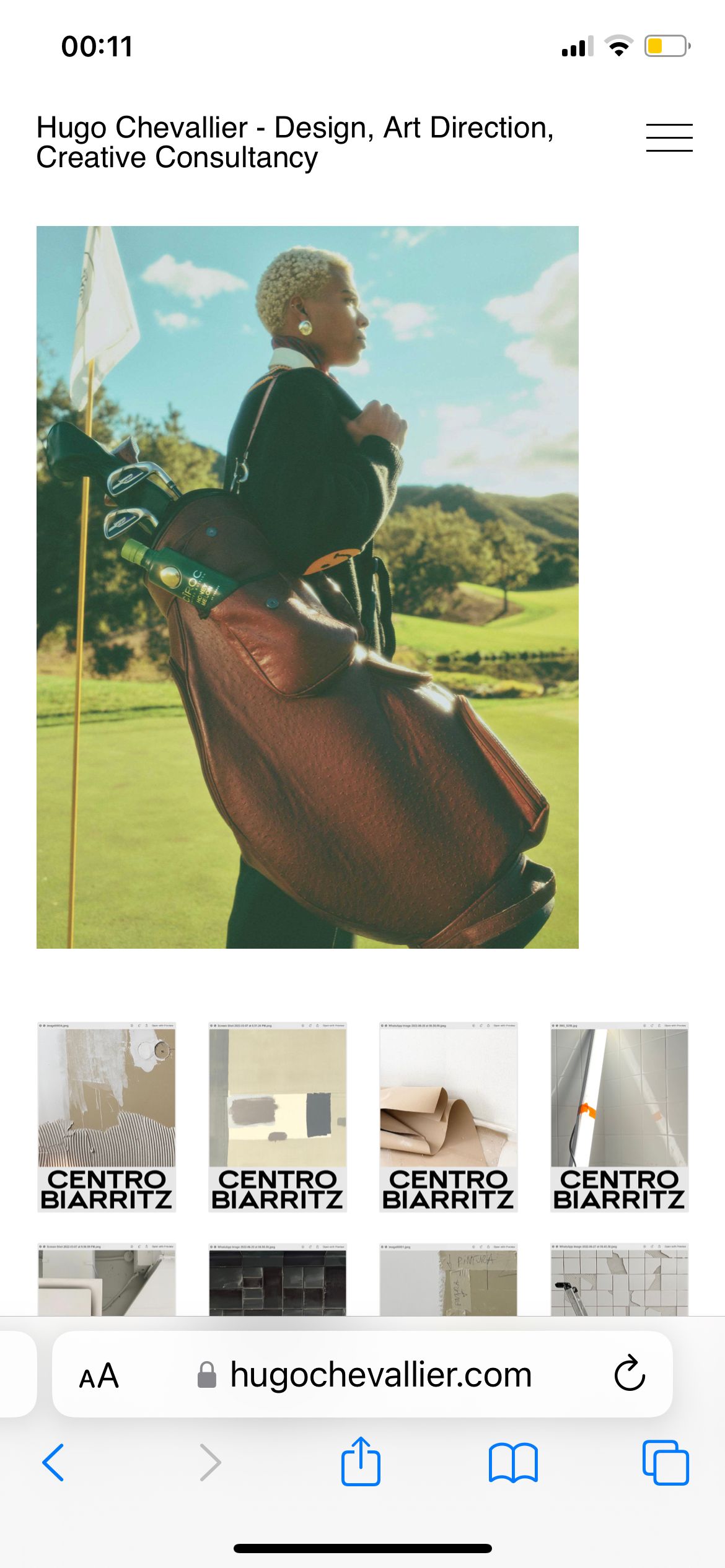
does it work for you too now?

Hello! It looks like you're interested in this conversation, but you don't have an account yet.
Getting fed up of having to scroll through the same posts each visit? When you register for an account, you'll always come back to exactly where you were before, and choose to be notified of new replies (either via email, or push notification). You'll also be able to save bookmarks and upvote posts to show your appreciation to other community members.
With your input, this post could be even better 💗
Register Login