Skip to content
  • Recent
  • Tags
  • Popular
  • Users
  • Search
Skins
  • Light
  • Brite
  • Cerulean
  • Cosmo
  • Flatly
  • Journal
  • Litera
  • Lumen
  • Lux
  • Materia
  • Minty
  • Morph
  • Pulse
  • Sandstone
  • Simplex
  • Sketchy
  • Spacelab
  • United
  • Yeti
  • Zephyr
  • Dark
  • Cyborg
  • Darkly
  • Quartz
  • Slate
  • Solar
  • Superhero
  • Vapor

  • Default (No Skin)
  • No Skin
Collapse

Lay Theme Forum

D

DET

@DET
Unfollow Follow
About
Posts
4
Topics
2
Shares
0
Groups
0
Followers
0
Following
0

Posts

Recent Best Controversial

  • Custom <head> content only for Desktop - jquery
    D DET
    General Discussion

    Hey guys,

    thanks to that script i found in that forum, it's now possible to change the color of the navbar from transparent to any color by scrolling.

    <script>
        jQuery(document).ready(function(){
          jQuery(window).scroll(function() { // check if scroll event happened
            if (jQuery(document).scrollTop() > 25) { // check if user scrolled more than 50 from top of the browser window
              jQuery(".navbar").css({"background-color": "rgba(66,70,80,1.0)", "backdrop-filter": "saturate(180%) blur(20px)"}); // if yes, then change the color of class "navbar" to white (#ffffff)
            } else {
              jQuery(".navbar").css({"background-color": "transparent", "backdrop-filter": "none"}); // if not, change it back to transparent
            }
          });
        });
    </script>
    

    I'm not really into coding, so can anyone of you tell me what i have to add to this script that the jquery only executes for desktop view? atm it also effects the mobile version, resulting into display errors.

    Thanks for your help!

  • Anchor Scroll Dekstop/Mobile
    D DET
    General Discussion

    @saschatoussaine Thanks for your hint. I tried every possible variation with the header/navigation, but nothing helped. As i mentioned, this website is a commissioned work, wherefore i'm not yet allowed to post the link in public :/

    i send the url + login for the wp-admin to info@laytheme.com, but didn't get any answer.
    can someone of the admins please have a look on this topic.


  • Anchor Scroll Dekstop/Mobile
    D DET
    General Discussion

    Can anyone please help? It's urgent!


  • Anchor Scroll Dekstop/Mobile
    D DET
    General Discussion

    Hey guys,

    — FYI
    I updated Lay Theme to the latest version 3.4.2, but it's not solving my problem.
    Anchor scrolling on mobile devices worked fine with version 3.3.9

    — ISSUE
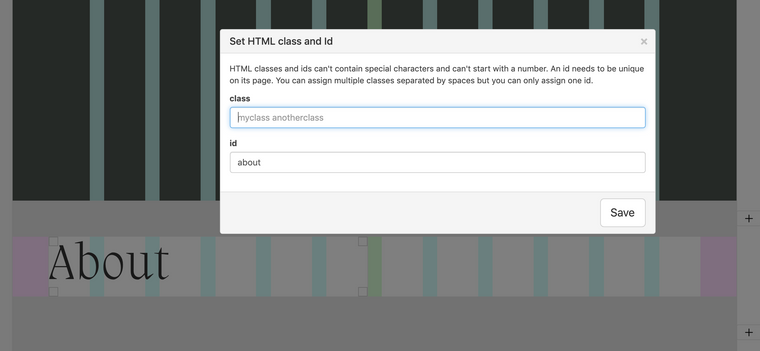
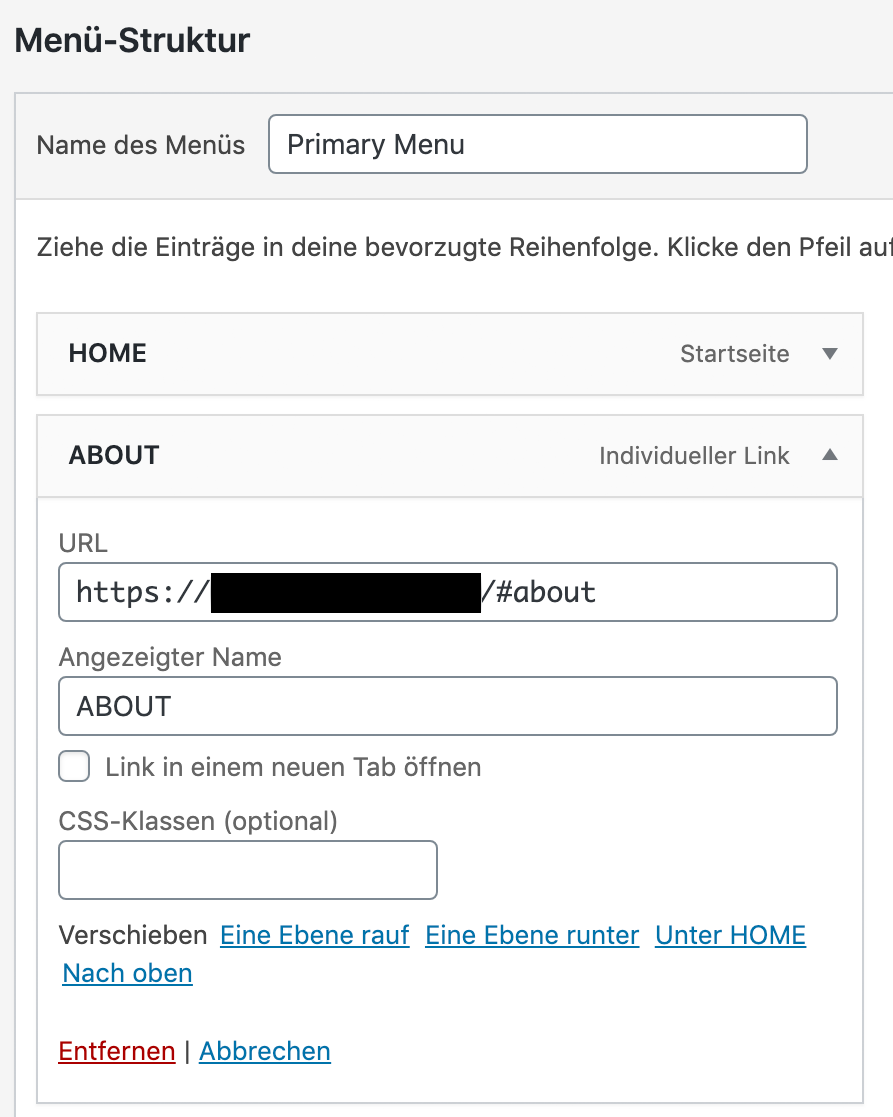
    The home page is built like a onepager with different sections (about - services - work - contact) and has also some links to other pages. In the menu i have set 4 individual links with the complete URL of the start page + the Row ID (e.g. https://mydomain.com/#about). The ID for the anchor is set on the equivalent row.

    Bildschirmfoto 2020-08-27 um 01.30.40 1.png

    Bildschirmfoto 2020-08-27 um 01.05.51.png

    — Desktop:

    • In Google Chrome everything works almost fine, besides that smooth scrolling is only working when i add following custom css:
    html {
      scroll-behavior: smooth;
    }
    
    • In Safari the smooth scroll for anchors doesn't work for the home page – it simply jumps to the section. But it works for anchors on different pages for which i set following custom <head> i found in the forum:
    <script>
        window.laytheme.on('newpageshown', function(){
           if(window.location.hash.length > 0){
               var id = window.location.hash;
               if(jQuery(id).length > 0){
                    jQuery('html, body').animate(
                    { scrollTop: jQuery(id).offset().top },
                    { duration: 1200 });
               }
           } 
        });
    </script>
    

    — Mobile:

    • I use the same menu for mobile as well as the desktop version, but nothing works
    • If I tap on 'About' on the home page nothing happens - the menu stays open and I'm not navigated to the section
    • On other pages if I open the menu and tap 'About' it just takes me back to the home page but not the relevant section

    I am truly desperate, because i searched the whole forum for answers and saw that many others have same issues but i didn't find any solution that worked for me, instead of the codes above.

    Since the website is a commissioned work, i'm not allowed to post the link in public but i'll send you all relevant information to info@laytheme.com, hoping you guys can help me.

    Cheers
    Daniel

  • Login

  • Don't have an account? Register

  • Login or register to search.
  • First post
    Last post
0
  • Recent
  • Tags
  • Popular
  • Users
  • Search