Skip to content
  • Recent
  • Tags
  • Popular
  • Users
  • Search
Skins
  • Light
  • Brite
  • Cerulean
  • Cosmo
  • Flatly
  • Journal
  • Litera
  • Lumen
  • Lux
  • Materia
  • Minty
  • Morph
  • Pulse
  • Sandstone
  • Simplex
  • Sketchy
  • Spacelab
  • United
  • Yeti
  • Zephyr
  • Dark
  • Cyborg
  • Darkly
  • Quartz
  • Slate
  • Solar
  • Superhero
  • Vapor

  • Default (No Skin)
  • No Skin
Collapse

Lay Theme Forum

E

EN

@EN
Unfollow Follow
About
Posts
6
Topics
2
Shares
0
Groups
0
Followers
0
Following
0

Posts

Recent Best Controversial

  • px instead of %
    E EN
    Feedback

    Second this.

    To be able to adjust x and y offset in px would be awesome.

    For example, I'm currently using x offset with a minus value to finely left-align a headline to the left margin. This works perfectly on desktop, but on mobile, the position shifts undesirably between portrait and landscape due to the percentage, meaning that it's never quite aligned. Some more control here would be great.


  • 1px black 'fringe' at bottom of some images
    E EN
    Bug Reports

    Thanks Marius, works like a charm. Much appreciated.


  • 1px black 'fringe' at bottom of some images
    E EN
    Bug Reports

    Hi Marius,

    Thanks! I really appreciate you taking a look. I made a test page for you here:

    http://endlessnameless.studio/test


  • 1px black 'fringe' at bottom of some images
    E EN
    Bug Reports

    I'm getting a 1px black horizontal line appearing at the bottom of some of my images in Safari 11.0.3. It's not happening in Chrome. Any ideas on how to fix it?

    Image sizes of 1920 x 1357 px and 1920 x 1358 px both produce the same issue. Theme and plugins are all up to date.

    Thanks.


  • Web fonts only displaying correctly on pages with fullscreen slider activated
    E EN
    Bug Reports

    Thank you so much, Marius! Worked like a charm. Now I can get back to being wowed by this awesome theme.

    Best,

    N


  • Web fonts only displaying correctly on pages with fullscreen slider activated
    E EN
    Bug Reports

    Hello everyone.

    I'm having problems getting web fonts to display correctly in my browser and have spent a few hours banging my head to narrow it down.

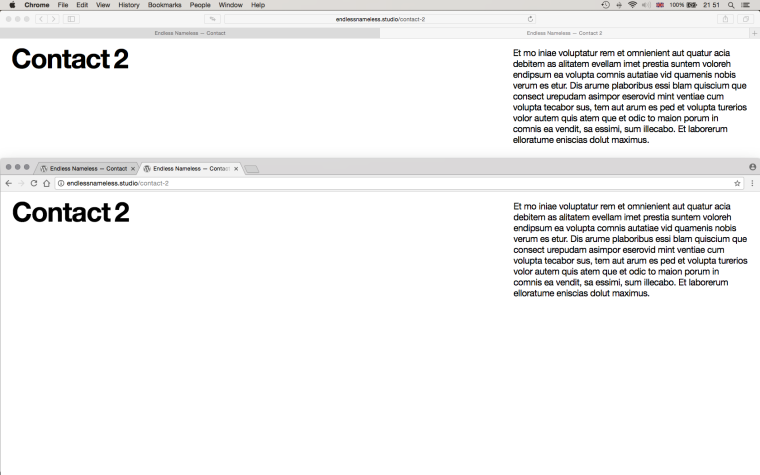
    Basically, I have two web fonts installed: Helvetica Neue Regular and Helvetica Neue Bold, and I have noticed that they only display correctly, i.e. crisp and sharp, in Safari, but only on pages that have the fullscreen slideshow activated. On pages in Safari without the slideshow activated, they look swollen and, well, pretty terrible. In Chrome, I can't get them to display correctly regardless of whether or not the slideshow is activated—they're constantly swollen; Regular looks more like Medium.

    I've made two screenshots that, hopefully, will illustrate the issue. They consist of two pages: one named 'Contact', which has the slideshow activated and one named 'Contact 2' which has no slideshow activated. I've split the screen to show Safari at the top and Chrome at the bottom.

    I've tested these same web fonts with other themes on my current OS/browser setup with no issues. Hopefully we can get to the bottom of this one. Links to the pages in question here:

    http://endlessnameless.studio/contact
    http://endlessnameless.studio/contact-2

    Best,

    N
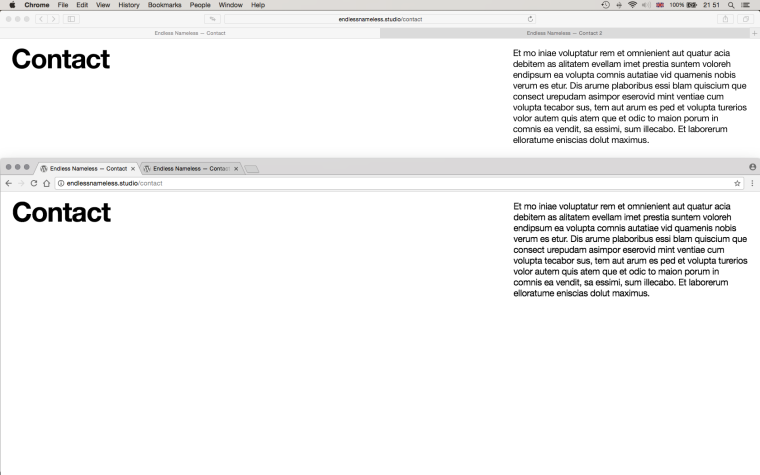
    0_1513076610959_Screen Shot 2017-12-12 at 21.51.28.png

    0_1513076632597_Screen Shot 2017-12-12 at 21.51.42.png

    OS X 10.10.5
    Safari 10.1.2
    Chrome 62.0.3202.94

  • Login

  • Don't have an account? Register

  • Login or register to search.
  • First post
    Last post
0
  • Recent
  • Tags
  • Popular
  • Users
  • Search