Skip to content
  • Recent
  • Tags
  • Popular
  • Users
  • Search
Skins
  • Light
  • Brite
  • Cerulean
  • Cosmo
  • Flatly
  • Journal
  • Litera
  • Lumen
  • Lux
  • Materia
  • Minty
  • Morph
  • Pulse
  • Sandstone
  • Simplex
  • Sketchy
  • Spacelab
  • United
  • Yeti
  • Zephyr
  • Dark
  • Cyborg
  • Darkly
  • Quartz
  • Slate
  • Solar
  • Superhero
  • Vapor

  • Default (No Skin)
  • No Skin
Collapse

Lay Theme Forum

L

lstark

@lstark
About
Posts
9
Topics
4
Shares
0
Groups
0
Followers
0
Following
0

Posts

Recent Best Controversial

  • Columns inside a text frame
    L lstark

    https://sebastianwinkler.net/text/
    Columns inside a text frame

    In the desktop layout I have two separate text frames. When I stack the elements on top for the mobile layout I want one textbox. If I do so and select only apply to current layout, the desktop layout changes as well.

    Main question:
    Is it possible to have two columns inside one text frame? It would fix the problem, that I don't need two separate text frames at all.

    Best,
    Leon
    General Discussion

  • Menu border disappears
    L lstark

    @arminunruh
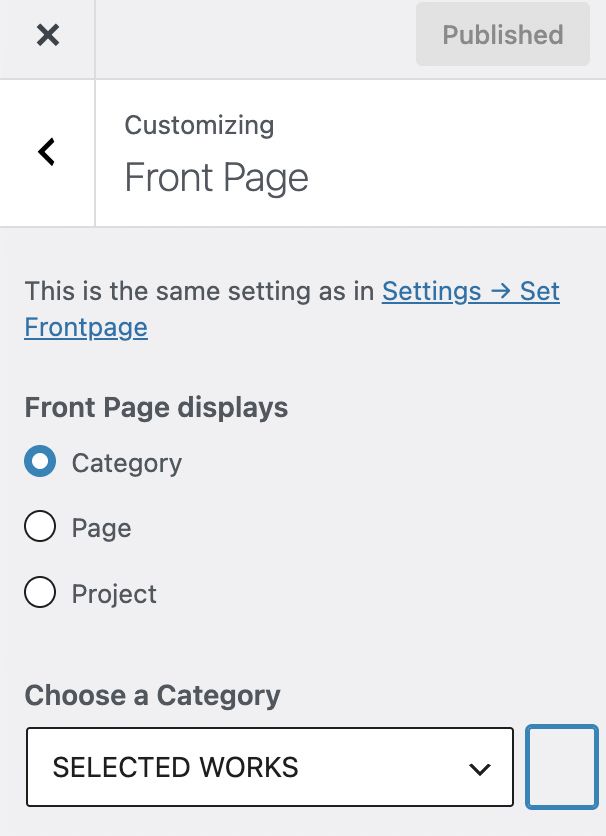
    Where exactly do I find it?
    My Front Page displays a category.
    Bildschirmfoto 2026-08-18 um 13.02.27.jpg

    Best,
    Leon

    General Discussion

  • Menu border disappears
    L lstark

    @arminunruh Thanks a lot!

    General Discussion

  • Menu border disappears
    L lstark

    https://sebastianwinkler.net/
    Chrome / Desktop

    For the Menu Bar I have selected "show border".
    It works on all pages in the primary menu: Selected Works, Selected Poetry, About, Text, Publications, Contact.
    But once you enter a project/thumbnail on Selected Works or Selected Poetry and a subpage opens, the border of the menu disappears. For example: https://sebastianwinkler.net/ > https://sebastianwinkler.net/o-t-scholle-2025/
    Also, when you enter a project/thumbnail the Type in the menu jumps from thick to normal again.
    Is the a way to fix it?

    Best,
    Leon

    General Discussion

  • hide second menu
    L lstark

    @arminunruh https://sebastianwinkler.net/
    If you click on the main menu points (Selected Poetry, About, Text, Publications, Contact), the second menu (Installations, Sculptures and Objects, Paperworks) should disappear on these pages.
    But it only disappears once I reload the pages.

    General Discussion

  • hide second menu
    L lstark

    @arminunruh

    Thanks for the quick update! But somehow it doesn't work seamlessly.
    When I load the page the first time the second menu still appears. Only after reloading that same page it disappears.
    Thanks in advance!

    General Discussion

  • hide second menu
    L lstark

    Perfect, thanks!

    General Discussion

  • hide second menu
    L lstark

    Hey everybody,

    I want my second menu only to appear on the front page and on the project pages you can access from there.
    I want it to be hidden in the other categorie pages you can access via the main menu.
    Does anybody know how it works or has done it before?

    Thanks in advance!

    General Discussion
  • Login

  • Don't have an account? Register

  • Login or register to search.
  • First post
    Last post
0
  • Recent
  • Tags
  • Popular
  • Users
  • Search