Skip to content
  • Recent
  • Tags
  • Popular
  • Users
  • Search
Skins
  • Light
  • Brite
  • Cerulean
  • Cosmo
  • Flatly
  • Journal
  • Litera
  • Lumen
  • Lux
  • Materia
  • Minty
  • Morph
  • Pulse
  • Sandstone
  • Simplex
  • Sketchy
  • Spacelab
  • United
  • Yeti
  • Zephyr
  • Dark
  • Cyborg
  • Darkly
  • Quartz
  • Slate
  • Solar
  • Superhero
  • Vapor

  • Default (No Skin)
  • No Skin
Collapse

Lay Theme Forum

M

matejmoravec

@matejmoravec
About
Posts
9
Topics
5
Shares
0
Groups
0
Followers
0
Following
0

Posts

Recent Best Controversial

  • lINKABLE STACK
    M matejmoravec

    Hi, I am just adding to this – that I would use this feature too.

    I have example: a landing page menu where are three cards as links to three sub pages. The cards are currently made as stacks because there is a photo of the product and its logo, then on this is a class that makes the bg color.

    however, clickable are currently just the photo and the logo, the whole stack is not.
    Having an easy right click button on stack to make the each group/stack as button would be great.

    Screenshot 2025-11-12 at 11.38.41.png

    Feedback

  • sections of stacked content saved as modules?
    M matejmoravec

    thanks Armin, I use the copy for now and have a hidden page with the sections.

    General Discussion

  • sections of stacked content saved as modules?
    M matejmoravec

    Hi, I am going to build three different landing pages for a software product that share visual language, but text and images will change. Is there a way, when I create the first one, to save sections of it somewhere so I can recall them later?

    Some other themes have this functionality and I wonder if Lay has it somehwere hidden or maybe some plugin exist that would allow it?


    basically similar to how the Footer in Lay works

    General Discussion

  • My site broke and I dont know what to do
    M matejmoravec

    oh thank you! and sorry I did not look for this link.. i honestly thought that I did something wrong not that it is a system problem

    General Discussion

  • My site broke and I dont know what to do
    M matejmoravec

    Please help, I dont know what I broke and how to fix it.. backup from my host did not help. It could be related to Gelato shop? Otherwise I have no idea whats wrong.

    https://matejmoravec.com/

    ———————————————————

    Warning: require(/www/matejmoravec.com/matejmoravec.com/wp-content/themes/lay/utility.php): failed to open stream: No such file or directory in /www/matejmoravec.com/matejmoravec.com/wp-content/themes/lay/functions.php on line 7

    Fatal error: require(): Failed opening required '/www/matejmoravec.com/matejmoravec.com/wp-content/themes/lay/utility.php' (include_path='/www/matejmoravec.com/matejmoravec.com/wp-content/plugins/backwpup/vendor/pear/archive_tar:/www/matejmoravec.com/matejmoravec.com/wp-content/plugins/backwpup/vendor/pear/console_getopt:/www/matejmoravec.com/matejmoravec.com/wp-content/plugins/backwpup/vendor/pear/pear-core-minimal/src:/www/matejmoravec.com/matejmoravec.com/wp-content/plugins/backwpup/vendor/pear/pear_exception:.:/usr/share/pear:/usr/share/php:/www/matejmoravec.com:/www/matejmoravec.com-tmpdir') in /www/matejmoravec.com/matejmoravec.com/wp-content/themes/lay/functions.php on line 7
    There has been a critical error on this website.

    Learn more about troubleshooting WordPress.

    General Discussion

  • Suggestion / placeholder image for placeholder color
    M matejmoravec

    Hi,
    I have a suggestion.

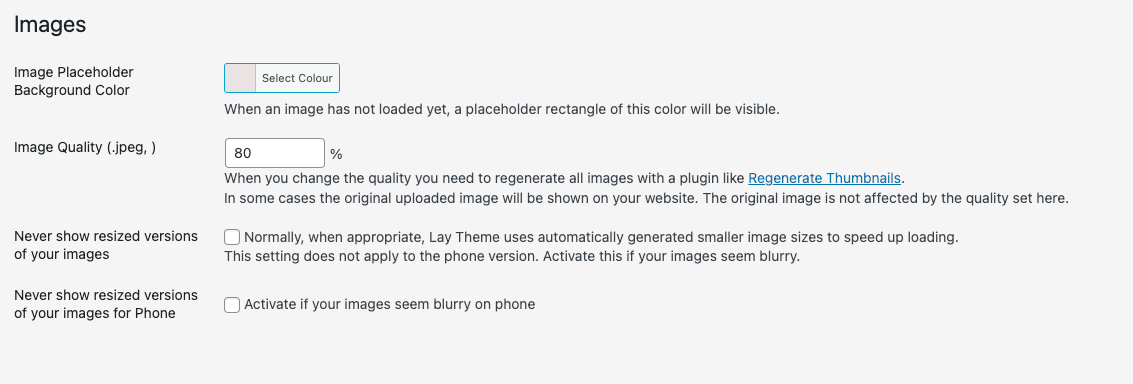
    Would it be possible to add an option to Image Placeholder Background Color section also a image?

    I would like to have there instead just a color box, a small gif (5kb) that has written Loading... in it.

    Otherwise, is it possible to add a text box in this area where users could write loading or some other message? I know I can add placeholder images to single files, but this solution would help me to setup all globally.

    I believe I am not alone who would appreciate it 🙂

    Screenshot 2025-02-15 at 00.05.27.png

    Screenshot 2025-02-15 at 00.12.34.png

    General Discussion

  • WOO / GElato items - size options missing
    M matejmoravec

    SOLVED: By creating new items in Gelato and publish those to the shop.

    not by using templates
    not by creating copies

    clean new project items only

    Shop / WooCommerce

  • WOO / GElato items - size options missing
    M matejmoravec

    https://matejmoravec.com/shop/

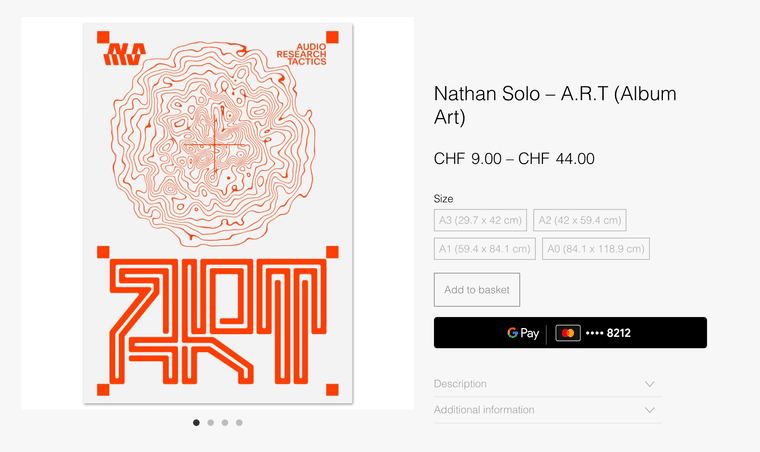
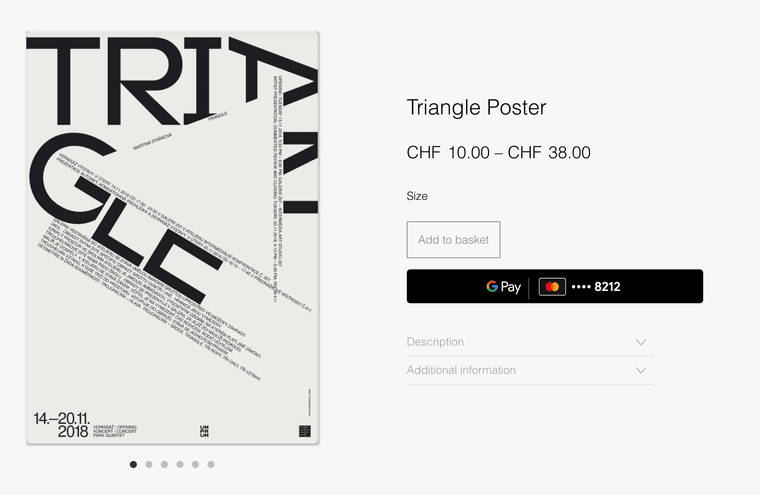
    Hey, I am having issues with WOO / Gelato Shop items size selector.

    I did copies in Gelato from the one poster that is working, but the others have some bug that is not showing sizes.

    this one works:
    Screenshot 2024-11-01 at 17.33.00.png

    this one not:
    Screenshot 2024-11-01 at 17.32.50.png

    Shop / WooCommerce
  • Login

  • Don't have an account? Register

  • Login or register to search.
  • First post
    Last post
0
  • Recent
  • Tags
  • Popular
  • Users
  • Search