@teemuhoo well i just avoided the text animations now for texts with links and such
Y
YungKafta
@YungKafta
Posts
-
Text Animation does not behave consistent -
pill menu with submenusthanks for the quick answer!
yes, the shortcode was the reason for the hard reload - i switched off ajax now and it's working pretty well now for me. also the submenus dont have any backgrounds anymore which is good! so for now i can live without the sliding effect :)thanks again armin!
-
pill menu with submenushttp://haustechnik-breitbarth.de/kermi-nica/
this is the website
-
pill menu with submenushey hey!
i tried out the new pill menu style which i think is really gorgeous, but i find that it does not work really well with submenus yet - i was just wondering :)
on my site it behaves like this: whenever i switch to a site from one of the submenus there still appears a menu point background for the submenu title although the submenu itself closes after entering the new site. would be super nice if the main menu point would keep the pill background e.g.
also i am using a plugin for calculating a quotation for different services. this plugin loads a calculator script from a shortcode which stops the pill menu on this site from moving to the menu point and instead it just fades in. might be happening because of the hard load of that site?
maybe this is just a cause of the early stage of the pill menu.thanks in advance!
peace!
-
Text Animation does not behave consistenthey hey!
i recently tried out the text animations, but noticed a few things. whenever the text changes from regular to bold within a textbox, it does not aply to the website but the spaces disappear before and after the words in bold. also the underline in textlinks disappears partly when the text animations are turned on. on phone layout i turned it off completely, since the animation did often not completely load and the text only rendered as half lines. also the line height seems to change with different text formats in combination.
i dont know if this is only the case for my website and i have to change some settings? i deactivated all plugins and all custom code already, but that had no effect.here is a link to a test site: https://pntl.finnvormann.de/links-copy/
thanks for your help as always!
-
Element grid is glitching in the gridder when trying to editworking like a charm, thanks a lot!
-
Element grid is glitching in the gridder when trying to editi was hoping that haha - sweet, thank you so much!
-
Element grid is glitching in the gridder when trying to editHey there!
I have set up a few pages with simple element grids and pictures and some texts in the past, nothing special really. Now I tried to change the content of the element grid but I can't get into it with a double click. Instead it only glitches around a little.
I've tried the usual: deactivating all plugins and custom code updated Laytheme and all plugins, tried different browsers (Chrome, Brave, Firefox) and deletet my cache. No change so far..
The page is pntl.finnvormann.de (I can provide login data, if that might help)I am happy for some quick help since it's urgent for my client.
Thanks in advance <3 -
Variable product selection does not show variationsyeah i was hoping to find the solution in the developer mode as well but its kind of illogical there, or rather i cant find anything that would disable the text in any kind of way.. even with custom code disabled theres no difference with the bug.
also i cant get a developer mode on a my samsung tablet where the bug is still there. and on other devices i cant reproduce the bug as well. i will try another browser on the tablet with a developer mode later, maybe i find something there -
Variable product selection does not show variationsAnyone any other ideas on this?
-
Variable product selection does not show variationsThanks for the idea, i've tried that already and it still displays empty buttons..
-
Variable product selection does not show variationsHi Armin,
thanks for looking into this so fast. i disabled the autoptimize plugin now, there should be no error anymore. and yes, the gift card just shows the prices, thats how it should look like.i was expecting that this bug is not easy to reproduce - if you have a samsung/android smartphone or tablet at hand, maybe on these devices it can be reproduced. i feel like multiple reloads might not produce this error since my own windows pc has never shown these white backgrounds for example. not even with "mobile emulators" etc.
@arminunruh said in Variable product selection does not show variations:
ur website looks really good!
and thank you :)
-
Variable product selection does not show variationshey hey!
I am currently working on a woocommerce shop and have a problem with product variations. the bug is not easily reproduced, thats why i am clueless right now.
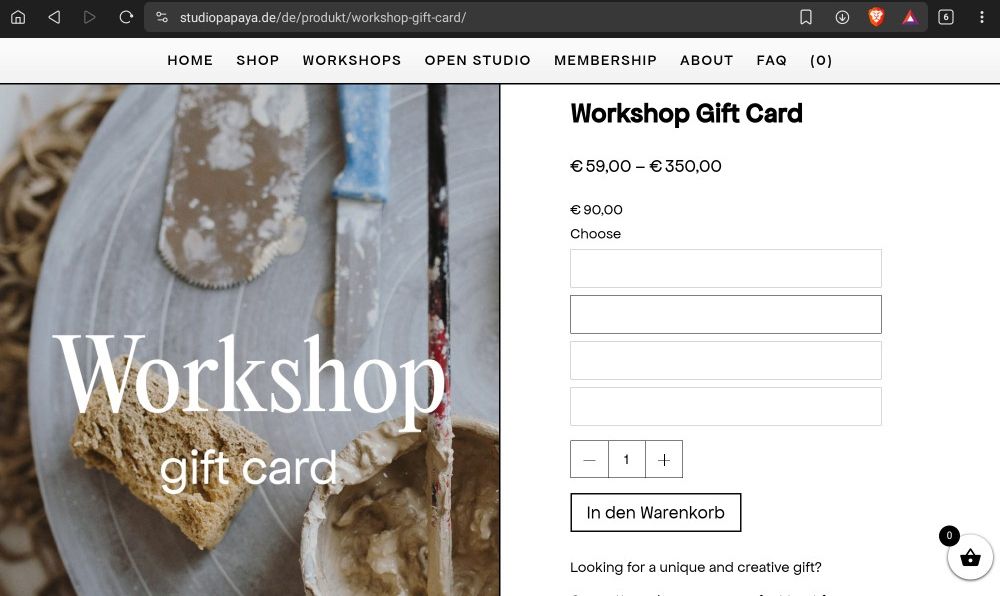
in the shop there are multiple products (e.g. studiopapaya.de/produkt/workshop-gift-card) that have selectable variations (e.g. gift card prices) on one product. on some rare cases the dropdown opens up but just shows the white background like this:
the options are still selectable and you can add them to the cart and proceed to the checkout - its just the dropdown that is not showing the options. what confuses me is that there is one product (studiopapaya.de/produkt/gift-card) that is working on all the devices that otherwise show the bug.
i tried a lot of scenarios for bugfixing:- on windows/macOS/samsung phones and tablets/iOS (samsung devices seem to have this problem most)
- on different browsers like chrome, safari, edge and firefox
- deactivating all plugins
- wordpress, laytheme, the woocommerce database and all plugins are updated
- disable all custom code
- deleted the cache in wordpress and in the browsers everytime
to make this even more illogical i tried the following:
- create a new product with variations
- check on device that did not show the variations for now - it's still not working
- disable all plugins
- check on the same device - its working now
- activate all plugins
- check on the same device - its still working
- check on another device that had the bug - its still not working
when i repeat this on the next device that was not working before, its working in the end. but all other devices are still not working. this might sound super confusing, but i hope i described it as precise as possible.
any help figuring out this problem would be appreciated!Thanks a lot!