Dear @phyllmag
Cool Website :)
You need to look into the :hover css function
:hover
http://laytheme.com/documentation.html#custom-css-styling
https://www.w3schools.com/cssref/sel_hover.asp
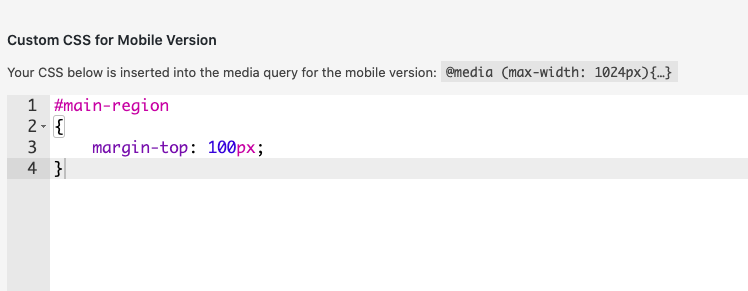
Right now we have the NAV contents set to
display:none
When we hover we want to set the contents to i believe
display: block
[image: 1597249387027-screen-shot-2020-08-12-at-6.21.12-pm.png]
A quick example would be:
.second_menu:hover{
display: block;
}
is this what you are looking for?
let me know :)
Best
Richard
Dear @sebht
Cool Website! :)
The Click function doesn't work for me.
[image: 1597247173910-screen-shot-2020-08-12-at-5.44.59-pm-resized.png]
But i see your <Script> did you take the class away from the PNG X?
[image: 1597247287163-screen-shot-2020-08-12-at-5.47.02-pm-resized.png]
Best
Richard
Dear @maharzan
Im sorry that we don't provide support for wider customisation beyond our Custom CSS,HTML & JS options.
However many people do customize the design and there have been some wonderful outputs.
We do provide options that we implement over time based on feedback from Lay Theme users with the intention of making it a better product for all.
If you feel that this Theme is not usable or somehow has caused you problems, we are happy to Refund you.
We wish to help
Sincerely
Richard
Dear @Sophie
If you haven't already you need to look into adding Custom Javascript to Lay Theme
http://laytheme.com/documentation.html#custom-javascript
Your Code Must first go within the surrounding code.
window.laytheme.on("newpageshown", function(layoutObj, type, obj){
});
Hope this helps
Sincerely
Richard
Dear @aueaeao
Its difficult for us to recommend any code when dealing with Third-party plugins and and the plugin and Lay Theme get updated on their seperate paths this can lead to ongoing problems.
However i don't wish to discourage you :)
I can only lead you hopefully in a good direction
Searching through what other people on the forum have tried may give you so new options
http://laythemeforum.com/search?term=member&in=titlesposts
Apologies that i am unable to help further and Thank you for using Lay Theme
Best wishes and good luck! :)
Sincerely
Richard
Dear @gerardbosch
Wish to update!
So Marius a long running helper/developer here at Lay Theme is sadly not working on the Forum Support anymore.
But of course we still wish to help :)
I noticed this was a week ago so apologies for the delay,
Does your problem still persist or was a solution found
Thank you for using Lay Theme & Best wishes
Sincerely
Richard
@edgrbnz thank you! Didn't realize it replaced the slash. However........the link still isn't working. On mobile or desktop....it just doesn't take me anywhere. I can't figure this one out!
Dear @mesomaxl
Yes interesting problem
Thank you for understanding how we have difficulty figuring out certain problems with Third-party plugins :)
I still wish that you find some help though, But am unable to hunt for a solution at this time.
I apologise for this but will keep thinking!
Thank you for your patience and for using Lay Theme.
Sincerely
Richard
Dear @marcelgross
Nice :) Thank you
Dear @rubensousaborges Apologies that i didn't understand the question properly.
Hope all is well now
Sincerely
Richard
Dear @ksmarsh
Yes Password protection plugins can be difficult sometimes, however because it is a hot topic and lots of people have had varying degrees of success in the past have you looked into older Forum threads to see if anything suits you needs?
http://laythemeforum.com/search?term=password&in=titlesposts&matchWords=all&sortBy=relevance&sortDirection=desc&showAs=posts
Also:
http://laythemeforum.com/topic/3711/password-protection
Unless it is a specific bug that needs fixing with Laytheme at this point i apologise that this is all i can offer as a solution
Thank you for your patience and for using Lay Theme and sincerely
Best of luck
Richard