Skip to content

General Discussion

5.0k Topics 21.7k Posts

A place to talk about anything Lay Theme related

  • Dropdown menu / submenu hover problem

    1
    0 Votes
    1 Posts
    181 Views
    No one has replied
  • Images in same row one under the other

    6
    1
    0 Votes
    6 Posts
    595 Views
    RichardR
    Thanks for the confirmation @NDT ⭐️
  • Text placement over background image gets lost on mobile

    4
    0 Votes
    4 Posts
    266 Views
    RichardR
    Dear @alucidwake Happy to hear all is working now for you, thank you for coming back and providing a conclusion to the thread 🌝 Best of luck Richard
  • 0 Votes
    13 Posts
    2k Views
    RichardR
    Thank you for supporting Lay Theme @FesT Best wishes ✨
  • Use mobile menu as desktop menu

    8
    0 Votes
    8 Posts
    1k Views
    RichardR
    Dear @j36g2 A user on this Forum has been great in suggesting this simple Plugin for a responsive desktop menu 👍 https://wordpress.org/support/plugin/dc-full-screen-responsive-menu/ Best Richard
  • Simple CSS Button Style not working

    2
    1
    0 Votes
    2 Posts
    314 Views
    RichardR
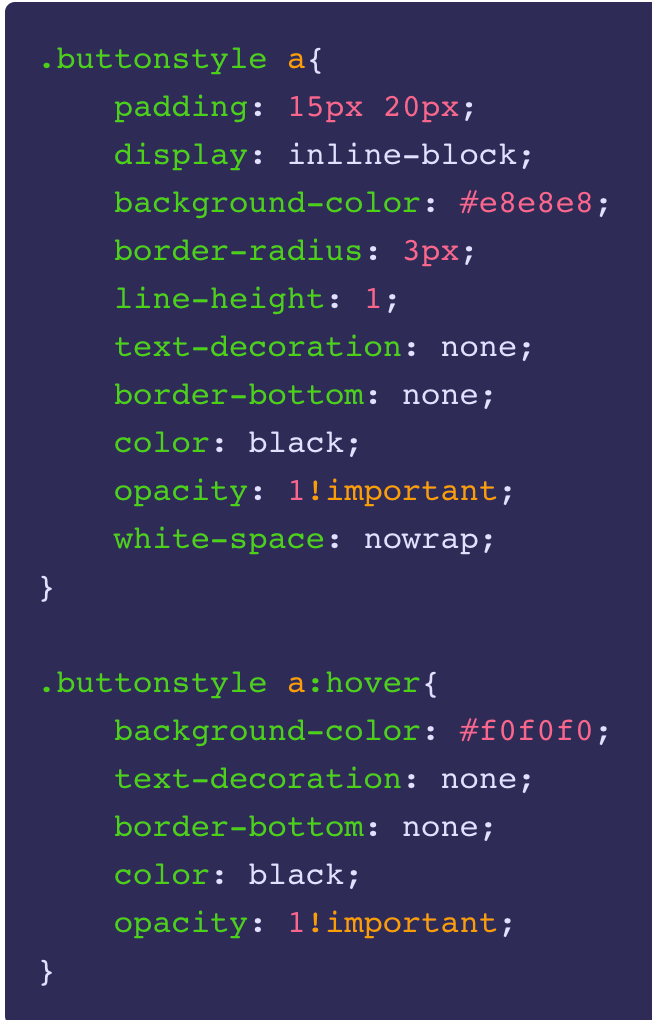
    Dear @matcampostrini I have reviewed the Buttonstyle tutorial to make sure and i can confirm it works: [image: Screen Shot 2022-02-17 at 4.48.01 PM.png] [image: Screen Shot 2022-02-17 at 4.49.47 PM.png] [image: Screen Shot 2022-02-17 at 4.49.57 PM.png] I am happy to help & find out why this isn't the case for you. The link provided takes me here: [image: Screen Shot 2022-02-17 at 4.51.50 PM.png] is there any way i can view this Button of yours? 🌝 ( also just to be sure; when giving the text element the class of buttonstyle you also need to update the page as well ) Talk soon Richard
  • Fixed text, scrollin images in the background

    8
    0 Votes
    8 Posts
    846 Views
    RichardR
    Great @stefanstraeter , thank you for supporting Lay Theme! 👍
  • Password protected projects in index

    3
    0 Votes
    3 Posts
    242 Views
    arminunruhA
    mmh this was fixed a long time ago
  • Caption

    5
    0 Votes
    5 Posts
    735 Views
    arminunruhA
    okay elementgrids will be able to have a caption with the next update
  • Fullscreen slider with Cover option

    4
    0 Votes
    4 Posts
    370 Views
    RichardR
    Dear @doorofperception Possibly though i haven't tested this myself and would need to be custom coded by you 🌝 Richard
  • This topic is deleted!

    1
    0 Votes
    1 Posts
    9 Views
    No one has replied
  • Update – Column gutters in pixels with the project thumbnail grid

    2
    0 Votes
    2 Posts
    241 Views
    RichardR
    Dear @Antoine-dvc Yes its currently not possible with the way the Grid is generated but will add to the development notes! ✅ Thanks you so much for supporting Lay Theme too! ⭐️ Sincerely Richard
  • Project Thumbnail Grid: Show "ALL" projects

    8
    0 Votes
    8 Posts
    976 Views
    RichardR
    Thanks for understanding @bbbfg have an amazing day & thank you for supporting Lay Theme! ⭐️
  • Client Website Project

    4
    0 Votes
    4 Posts
    700 Views
    RichardR
    Thanks @5a5uke have a wonderful day & thank you for supporting Lay Theme and thinking of using in for future projects 🌝 sincerely Richard
  • Reduce logo size on scroll

    4
    0 Votes
    4 Posts
    693 Views
    RichardR
    Dear @KingJut There would be a difference based on what is needed. Do you scroll and then i get's smaller once, E,g Top of page > Logo=100px 25% down page > Logo=50px Or does it shrink gradually in relation the the specific scroll E.g Top of page > Logo=100px 1% further down > Logo=99px 1% further down > Logo =98px etc This would need to be custom coded by you, adding the code within > Lay options > Custom CSS & HTML > https://laytheme.com/documentation/custom-css-styling.html https://www.w3schools.com/howto/howto_js_shrink_header_scroll.asp https://stackoverflow.com/questions/28676253/changing-div-height-on-scroll https://developer.mozilla.org/en-US/docs/Web/CSS/transform-function/scale() For targeting the site title has a class called sitetitle E.g .sitetitle{ // insert CSS here } Best Richard 🌝
  • Typeform Integration

    4
    0 Votes
    4 Posts
    801 Views
    RichardR
    Dear @KingJut I am unsure sorry, The Phone layout uses a different HTML structure, has the code been applied to this as well? Either via the Gridder (phone layout) or within the Custom CSS & HTML? I am unsure what the setup is so don't know how the code is applied. Best wishes Richard
  • This topic is deleted!

    4
    0 Votes
    4 Posts
    8 Views
  • reposition mobile menu icon

    4
    0 Votes
    4 Posts
    367 Views
    RichardR
    Great to hear @Hadewych have a wonderful day! 🌻
  • Deactivate Fullscreen Slider on mobile ONLY

    3
    0 Votes
    3 Posts
    162 Views
    RichardR
    @alasdair17 Thanks Alasdair 👍
  • Captions of HTML5 videos disappear on horizontal scroll carousel

    2
    0 Votes
    2 Posts
    280 Views
    RichardR
    Dear Johannes @jwk Cool Website ⚡️ I think it might be related to your Custom CSS, when removed i don't see any flicker or issue with the Captions (particularly "Kalymos") - When your CSS is activated the captions is not appearing on "Kalymos" etc". Best Richard
Online Users
Forgot your key, lost your files, need a previous Lay Theme or Addon version? Go to www.laykeymanager.com