Skip to content
  • Recent
  • Tags
  • Popular
  • Users
  • Search
Skins
  • Light
  • Brite
  • Cerulean
  • Cosmo
  • Flatly
  • Journal
  • Litera
  • Lumen
  • Lux
  • Materia
  • Minty
  • Morph
  • Pulse
  • Sandstone
  • Simplex
  • Sketchy
  • Spacelab
  • United
  • Yeti
  • Zephyr
  • Dark
  • Cyborg
  • Darkly
  • Quartz
  • Slate
  • Solar
  • Superhero
  • Vapor

  • Default (No Skin)
  • No Skin
Collapse

Lay Theme Forum

  1. Home
  2. General Discussion
  3. Use different menu position for "Datenschutzerklärung"?

Use different menu position for "Datenschutzerklärung"?

Scheduled Pinned Locked Moved General Discussion
23 Posts 3 Posters 1.6k Views
  • Oldest to Newest
  • Newest to Oldest
  • Most Votes
Reply
  • Reply as topic
Log in to reply
This topic has been deleted. Only users with topic management privileges can see it.
  • edgrbnzE Offline
    edgrbnzE Offline
    edgrbnz
    wrote on last edited by
    #11

    As far as I understand something along these lines inside Custom CSS for Mobile Version should do the trick:

    #menu-item-1504,
    #menu-item-1531 {
       font-size: 10px;
    }
    

    It targets the desired menu elements of News and Datenschutzerklärung and sets the font size to 10px.

    ✦ ✦ ✦

    1 Reply Last reply
    0
    • D Offline
      D Offline
      danny
      wrote on last edited by
      #12

      thanks!

      doesn't work though ((

      but thats probably because of that?

      body.use-desktop-menu-as-mobile-menu nav.mobile-nav ul {
      display: flex;
      flex-direction: column;
      height: calc(90vh - 24px);
      justify-content: space-between;
      }
      #menu-item-1531 {
      font-size: 10px;
      }

      1 Reply Last reply
      0
      • D Offline
        D Offline
        danny
        wrote on last edited by
        #13

        Dear @mariusjopen,

        did you changed the mobile menu? Because suddenly the menu is all small?? Please put it back.

        Thanks!

        Best wishes
        Daniel

        1 Reply Last reply
        0
        • edgrbnzE Offline
          edgrbnzE Offline
          edgrbnz
          wrote on last edited by
          #14

          I’m unable to change anything on your site. I just tryed the CSS mentioned above inside the dev-console of my browser which just has a temporary local effect on my machine.

          You probably added the CSS mentioned above and it has some effect 😊
          Either play around with the settings for font-size and the menu-items and see if you could make it work as desired or just remove

          #menu-item-1531 {
             font-size: 10px;
          }
          

          and it should all be back to normal.

          ✦ ✦ ✦

          1 Reply Last reply
          0
          • D Offline
            D Offline
            danny
            wrote on last edited by
            #15

            thanks! it's back ))

            now we still searching for how can we have MOBIL "Datenschutzerklärung" small in the left corner as in the DESKTOP version.

            I tried your CSS Code in the Custom CSS for Mobile Version but unfortunately it didn't work.

            thanks again,

            Daniel

            1 Reply Last reply
            0
            • D Offline
              D Offline
              danny
              wrote on last edited by
              #16

              Hi @edgrbnz,
              Hi @mariusjopen

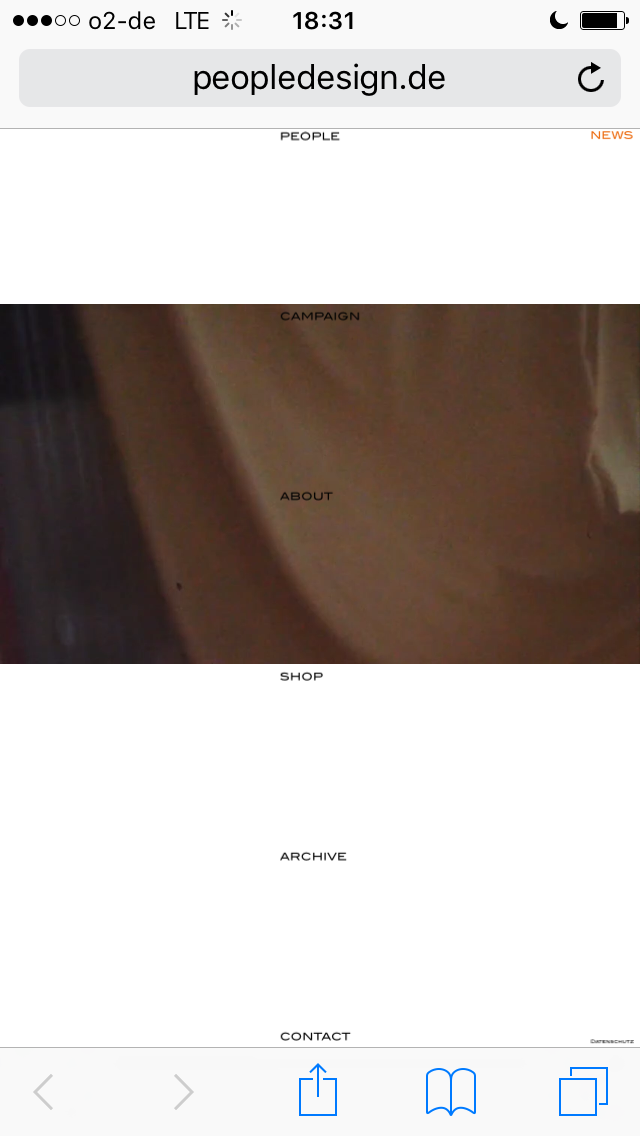
              we just noticed, that the "frame forwarding" domain peopledesign.de still features the to small menu. As the original people-berlin.karuna-ev.de works just right.

              Do you have any idea how this comes?

              Thanks a lot.

              All best wishes

              Daniel

              1_1558024518071_IMG_8996.PNG 0_1558024518071_IMG_8995.PNG

              1 Reply Last reply
              0
              • edgrbnzE Offline
                edgrbnzE Offline
                edgrbnz
                wrote on last edited by edgrbnz
                #17

                Hmmm… I don’t know much about frame forwarding.
                I’d move the site to the URL where you want it to live. Any weird forwarding can do all sorts of unpredictable things.

                The undesired behaviours could be caused by a cache issue, it could also be a database issue (wordpress addressing something that’s somewhere else), etc. In addition, if you want your page to rank somewhat normal in search results frame forwarding or forwarding in general isn’t really recommended.

                I’d suggest to keep your website setup as straight forward as possible.

                This is waaay beyond my ken → Perhaps @mariusjopen or @arminunruh can help with this?

                ✦ ✦ ✦

                1 Reply Last reply
                0
                • mariusjopenM Offline
                  mariusjopenM Offline
                  mariusjopen
                  Global Moderator
                  wrote on last edited by
                  #18

                  Dear @danny
                  yes. I agree with @edgrbnz. I would not recommend to use this forwarding method.
                  Responsive might cause problems.

                  Best is to move the page either manually or with a migration tool like Updraft Plus.

                  Best!

                  Marius

                  www.mariusjopen.world

                  1 Reply Last reply
                  1
                  • D Offline
                    D Offline
                    danny
                    wrote on last edited by
                    #19

                    Dear @edgrbnz and @mariusjopen

                    that's very good to know, thanks for that!

                    Would you have another suggestion to have the menu point DATENSCHUTZ http://people-berlin.karuna-ev.de/datenschutz/ as well in smaller size and outside of the main menu as in the desktop version? Because it is not as important as the rest of the main menu.

                    Thanks again.

                    All best

                    Daniel

                    1 Reply Last reply
                    0
                    • edgrbnzE Offline
                      edgrbnzE Offline
                      edgrbnz
                      wrote on last edited by
                      #20

                      How about putting it inside a footer?

                      ✦ ✦ ✦

                      1 Reply Last reply
                      0
                      • mariusjopenM Offline
                        mariusjopenM Offline
                        mariusjopen
                        Global Moderator
                        wrote on last edited by
                        #21

                        Dear @danny
                        or put it into the HTML section and hide it on desktop with CSS.

                        Best!

                        MArius

                        www.mariusjopen.world

                        1 Reply Last reply
                        0
                        • D Offline
                          D Offline
                          danny
                          wrote on last edited by
                          #22

                          Dear @edgrbnz @mariusjopen

                          thanks, Footer sounds good - I just tried it. How do you edit and design the footer? Couldn't find any options for that.

                          Thanks. Best wishes

                          Daniel

                          1 Reply Last reply
                          0
                          • mariusjopenM Offline
                            mariusjopenM Offline
                            mariusjopen
                            Global Moderator
                            wrote on last edited by
                            #23

                            Dear @danny
                            the footer is an own page. You can access it with CUSTOM CSS.
                            Have a look with the Inspector Tool.

                            Best!

                            Marius

                            www.mariusjopen.world

                            1 Reply Last reply
                            1
                            Reply
                            • Reply as topic
                            Log in to reply
                            • Oldest to Newest
                            • Newest to Oldest
                            • Most Votes


                            I also code custom websites or custom Lay features.
                            💿 Email me here: 💿
                            info@laytheme.com

                            Our Web Development company: 100k.studio

                            Want to tip me? https://www.paypal.com/paypalme/arminunruh

                            Before you post:
                            1. When using a WordPress Cache plugin, disable it or clear your cache.
                            2. Update Lay Theme and all Lay Theme Addons
                            3. Disable all Plugins
                            4. Go to Lay Options → Custom CSS & HTML, click "Turn Off All Custom Code", click "Save Changes"

                            This often solves issues you might run into

                            When you post:
                            1. Post a link to where the problem is
                            2. Does the problem happen on Chrome, Firefox, Safari or iPhone or Android?
                            3. If the problem is difficult to explain, post screenshots / link to a video to explain it
                            Online Users
                            dmncnD
                            dmncn
                            Forgot your key, lost your files, need a previous Lay Theme or Addon version? Go to www.laykeymanager.com
                            laytheme.com
                            • Login

                            • Don't have an account? Register

                            • Login or register to search.
                            • First post
                              Last post
                            0
                            • Recent
                            • Tags
                            • Popular
                            • Users
                            • Search