Hover on text with image showing
-
hi,
this can be done with css or js, but the main issue is with positioning since LAY grid is flex based. also pre-loading the images has to be done manually, unless you include them in the grid, but hide them.
see an example here (hover over instrumentatirum texts).http://duoxamp.com/instrumentarium/
d
-
Thanks a lot dani :)
Actually I managed to do it, I used this tutorial and installed this jQuery UI Widgets plugging following these steps:
https://harleyshelphut.com/how-to-make-images-appear-when-you-hover-over-text-in-wordpress/I'm not so familiar with developing and coding and for some reason I can't get rid of a white box around the image with a line, that's my problem right now. Any ideas on how to solve it? Thank you!
-
-
-
the css style is built into the widget (js) so it's not easily editable. (disadvantage of using plugins).
try to find something here that does the same thing: https://codepen.io/
i can help you implement it when you find something.
dani
-
Dear @lauramas
if the images would always show up at the same spot I would recommend to build it yourself with jQuery and CSS. But the images need to be relative to the word which is hovered – that makes it more complex.What I saw is that you are actually very close with your solution.
You could use CUSTOM CSS with !important to get it to look like how you want.
Best!
Marius
-
Can you post a link to this plugin you use?
-
-
try this... only css
-
-
Dear @dani
can you not overwrite those CSS things or isolate them from the code in the plugin?Best!
Marius
-
-
-
hey guys, thanks for this, just saw it now. @mariusjopen I used already the jQuery plugin and CSS (at least I think it is, I copy+pasted a code that I found online and changed the image name on it) but my current problem is that I can't get rid of the white box on the back of the images :( any ideas on how to do that in a simple way? my page is laura-mas.com/about
This was the code I used on the source code inside the "add text" function:
<span style="background-color: #ffffff;" data-tooltip="http://s1.postimg.org/kpmbwqe73/Spices.jpg"><strong>
And this was the code that I added to the J Query plugin after I installed it:
jQuery(document).ready(function($) {
$( document ).tooltip({
items: "[data-tooltip]",
content: function() {
var element = $( this );
var text = element.text();
var url = element.attr('data-tooltip');
return "<img class='map' alt='" + text +
"' src='" + url + "'>";
}
});
});thank you so much!
-
-
Dear @lauramas
it is difficult because you cannot inspect the image. Everytime I move my cursor on the new image, it disappears. Is there a way to make it stay and then edit the CSS?Best!
Marius
www.mariusjopen.world
-
Dear @lauramas
it is difficult because you cannot inspect the image. Everytime I move my cursor on the new image, it disappears. Is there a way to make it stay and then edit the CSS?Best!
Marius
@mariusjopen you can hover the image, and in the hover state (in chrome) select 'inspect'. that will show you the css for the hover state.
-
Dear @dani
exactly that does not work. I assume because it is a jQuery function which gets called on hover.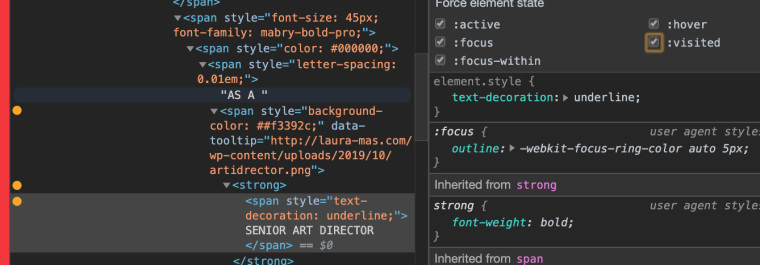
If you find a way to edit the CSS it should all be fine.
Best!
Marius


Hello! It looks like you're interested in this conversation, but you don't have an account yet.
Getting fed up of having to scroll through the same posts each visit? When you register for an account, you'll always come back to exactly where you were before, and choose to be notified of new replies (either via email, or push notification). You'll also be able to save bookmarks and upvote posts to show your appreciation to other community members.
With your input, this post could be even better 💗
Register Login