Skip to content
  • Recent
  • Tags
  • Popular
  • Users
  • Search
Skins
  • Light
  • Brite
  • Cerulean
  • Cosmo
  • Flatly
  • Journal
  • Litera
  • Lumen
  • Lux
  • Materia
  • Minty
  • Morph
  • Pulse
  • Sandstone
  • Simplex
  • Sketchy
  • Spacelab
  • United
  • Yeti
  • Zephyr
  • Dark
  • Cyborg
  • Darkly
  • Quartz
  • Slate
  • Solar
  • Superhero
  • Vapor

  • Default (No Skin)
  • No Skin
Collapse

Lay Theme Forum

  1. Home
  2. General Discussion
  3. Hover on text with image showing

Hover on text with image showing

Scheduled Pinned Locked Moved General Discussion
21 Posts 4 Posters 4.6k Views 2 Watching
  • Oldest to Newest
  • Newest to Oldest
  • Most Votes
Reply
  • Reply as topic
Log in to reply
This topic has been deleted. Only users with topic management privileges can see it.
  • daniD
    daniD
    dani
    wrote on last edited by
    #8

    the css style is built into the widget (js) so it's not easily editable. (disadvantage of using plugins).

    try to find something here that does the same thing: https://codepen.io/

    i can help you implement it when you find something.

    dani

    1 Reply Last reply
    0
    • mariusjopenM
      mariusjopenM
      mariusjopen
      Global Moderator
      wrote on last edited by
      #9

      Dear @lauramas
      if the images would always show up at the same spot I would recommend to build it yourself with jQuery and CSS. But the images need to be relative to the word which is hovered – that makes it more complex.

      What I saw is that you are actually very close with your solution.

      You could use CUSTOM CSS with !important to get it to look like how you want.

      Best!

      Marius

      www.mariusjopen.world

      1 Reply Last reply
      0
      • mariusjopenM
        mariusjopenM
        mariusjopen
        Global Moderator
        wrote on last edited by
        #10

        Can you post a link to this plugin you use?

        www.mariusjopen.world

        1 Reply Last reply
        0
        • daniD
          daniD
          dani
          wrote on last edited by
          #11

          i looked at the plugin and the complicated part is that the styling is built into the plugin. there is no separate css code.

          1 Reply Last reply
          0
          • daniD
            daniD
            dani
            wrote on last edited by dani
            #12

            try this... only css

            https://codepen.io/cestdani/pen/vYYxvwV

            1 Reply Last reply
            0
            • daniD
              daniD
              dani
              wrote on last edited by
              #13
              This post is deleted!
              1 Reply Last reply
              0
              • mariusjopenM
                mariusjopenM
                mariusjopen
                Global Moderator
                wrote on last edited by
                #14

                Dear @dani
                can you not overwrite those CSS things or isolate them from the code in the plugin?

                Best!

                Marius

                www.mariusjopen.world

                1 Reply Last reply
                0
                • daniD
                  daniD
                  dani
                  wrote on last edited by
                  #15

                  it's too much work!
                  it could be useful to add some kind of hover function in laytheme, since many people ask for it.

                  1 Reply Last reply
                  1
                  • mariusjopenM
                    mariusjopenM
                    mariusjopen
                    Global Moderator
                    wrote on last edited by
                    #16

                    Dear @dani
                    good input. We will write it down.

                    Best!

                    Marius

                    www.mariusjopen.world

                    1 Reply Last reply
                    0
                    • L
                      L
                      lauramas
                      wrote on last edited by
                      #17

                      hey guys, thanks for this, just saw it now. @mariusjopen I used already the jQuery plugin and CSS (at least I think it is, I copy+pasted a code that I found online and changed the image name on it) but my current problem is that I can't get rid of the white box on the back of the images :( any ideas on how to do that in a simple way? my page is laura-mas.com/about

                      This was the code I used on the source code inside the "add text" function:

                      <span style="background-color: #ffffff;" data-tooltip="http://s1.postimg.org/kpmbwqe73/Spices.jpg"><strong>

                      And this was the code that I added to the J Query plugin after I installed it:

                      jQuery(document).ready(function($) {
                      $( document ).tooltip({
                      items: "[data-tooltip]",
                      content: function() {
                      var element = $( this );
                      var text = element.text();
                      var url = element.attr('data-tooltip');
                      return "<img class='map' alt='" + text +
                      "' src='" + url + "'>";
                      }
                      });
                      });

                      thank you so much!

                      1 Reply Last reply
                      0
                      • daniD
                        daniD
                        dani
                        wrote on last edited by
                        #18

                        @lauramas said in [Hover on text with image showing]

                        try adding a class called clean

                        return "<img class='map clean' alt='" + text +
                        "' src='" + url + "'>";

                        and in your css, add this

                        .clean {
                        background-color: none !important;
                        border: none !important;
                        }

                        1 Reply Last reply
                        0
                        • mariusjopenM
                          mariusjopenM
                          mariusjopen
                          Global Moderator
                          wrote on last edited by
                          #19

                          Dear @lauramas
                          it is difficult because you cannot inspect the image. Everytime I move my cursor on the new image, it disappears. Is there a way to make it stay and then edit the CSS?

                          Best!

                          Marius

                          www.mariusjopen.world

                          daniD 1 Reply Last reply
                          0
                          • mariusjopenM mariusjopen

                            Dear @lauramas
                            it is difficult because you cannot inspect the image. Everytime I move my cursor on the new image, it disappears. Is there a way to make it stay and then edit the CSS?

                            Best!

                            Marius

                            daniD
                            daniD
                            dani
                            wrote on last edited by
                            #20

                            @mariusjopen you can hover the image, and in the hover state (in chrome) select 'inspect'. that will show you the css for the hover state.

                            1 Reply Last reply
                            0
                            • mariusjopenM
                              mariusjopenM
                              mariusjopen
                              Global Moderator
                              wrote on last edited by
                              #21

                              Dear @dani
                              exactly that does not work. I assume because it is a jQuery function which gets called on hover.
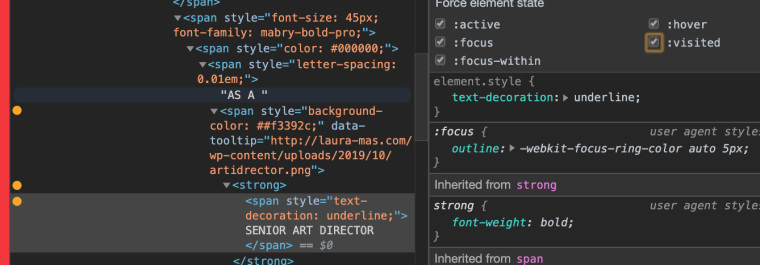
                              0_1572857644013_Bildschirmfoto 2019-11-04 um 09.53.35.png

                              If you find a way to edit the CSS it should all be fine.

                              Best!

                              Marius

                              www.mariusjopen.world

                              1 Reply Last reply
                              0

                              Hello! It looks like you're interested in this conversation, but you don't have an account yet.

                              Getting fed up of having to scroll through the same posts each visit? When you register for an account, you'll always come back to exactly where you were before, and choose to be notified of new replies (either via email, or push notification). You'll also be able to save bookmarks and upvote posts to show your appreciation to other community members.

                              With your input, this post could be even better 💗

                              Register Login
                              Reply
                              • Reply as topic
                              Log in to reply
                              • Oldest to Newest
                              • Newest to Oldest
                              • Most Votes


                              Online Users
                              Forgot your key, lost your files, need a previous Lay Theme or Addon version? Go to www.laykeymanager.com
                              laytheme.com
                              • Login

                              • Don't have an account? Register

                              • Login or register to search.
                              • First post
                                Last post
                              0
                              • Recent
                              • Tags
                              • Popular
                              • Users
                              • Search
