Different font for each menu point?
-
-
Dear Daniel
@danny
Sure this is very possible 🌼
When right-clicking on a menu-item in your browser and choosing "inspect" the webpages HTML structure will appear:
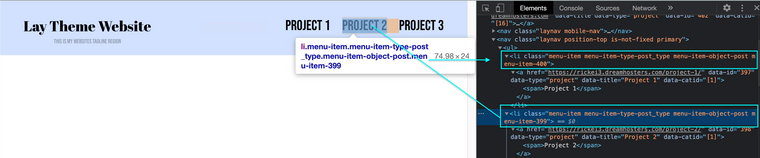
Here we can see the each menu-item also has its own unique Class with number E.g:
.menu-item-400or.menu-item-399With this knowledge we can change the font-family easily.
In either:Lay Options > Custom CSS & HTML > Custom CSS
Or:
Customize > CSS
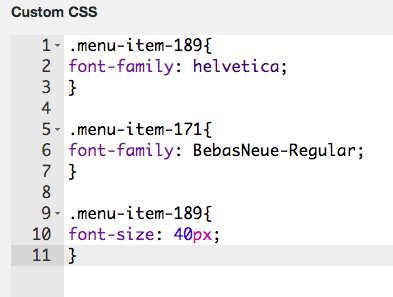
Custom CSS would look similar to this depending on your needs ( class name > then css rule nested within ):
.menu-item-400{
font-family: helvetica;
}

.menu-item-399{
font-family: BebasNeue-Regular;
}
Here are some links that will help you with what is referenced:
Best wishes Daniel and good luck - Google is your friend! 💥🌝
Sincerely
Richard
-
-
-
-
-
-
Dear Daniel
@danny
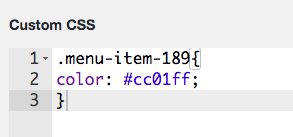
In this case you are targeting a link <a>. Also the color has been defined somewhere else so you must override with
!important.menu-item-240 a { color:red !important; font-size:40px; }Please note, respectfully Daniel that if you wish to go deeper into customising Laytheme it is up to you to research how Basic CSS and HTML function, i am unfortunately unable to maintain a tutorial like this even though i wish to help.
Have a wonderful day Daniel and thank you for supporting Laytheme.
Best
Richard
-
-

Hello! It looks like you're interested in this conversation, but you don't have an account yet.
Getting fed up of having to scroll through the same posts each visit? When you register for an account, you'll always come back to exactly where you were before, and choose to be notified of new replies (either via email, or push notification). You'll also be able to save bookmarks and upvote posts to show your appreciation to other community members.
With your input, this post could be even better 💗
Register Login