Skip to content
  • Recent
  • Tags
  • Popular
  • Users
  • Search
Skins
  • Light
  • Brite
  • Cerulean
  • Cosmo
  • Flatly
  • Journal
  • Litera
  • Lumen
  • Lux
  • Materia
  • Minty
  • Morph
  • Pulse
  • Sandstone
  • Simplex
  • Sketchy
  • Spacelab
  • United
  • Yeti
  • Zephyr
  • Dark
  • Cyborg
  • Darkly
  • Quartz
  • Slate
  • Solar
  • Superhero
  • Vapor

  • Default (No Skin)
  • No Skin
Collapse

Lay Theme Forum

  1. Home
  2. General Discussion
  3. Different font for each menu point?

Different font for each menu point?

Scheduled Pinned Locked Moved General Discussion
10 Posts 2 Posters 1.0k Views 1 Watching
  • Oldest to Newest
  • Newest to Oldest
  • Most Votes
Reply
  • Reply as topic
Log in to reply
This topic has been deleted. Only users with topic management privileges can see it.
  • D
    D
    danny
    wrote on last edited by
    #1

    Dear @Richard,

    is it possible to have a different font for each menu point?

    So News = Helvetica, Works = Times, Biography = Comic Sans etc.?

    http://testshila.de/onepage/

    Thanks and best wishes,

    Daniel

    1 Reply Last reply
    0
    • RichardR
      RichardR
      Richard
      Global Moderator
      wrote on last edited by Richard
      #2

      Dear Daniel

      @danny

      Sure this is very possible 🌼

      When right-clicking on a menu-item in your browser and choosing "inspect" the webpages HTML structure will appear:
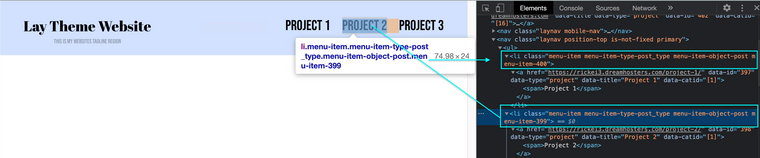
      Screen Shot 2021-05-18 at 8.59.02 AM.png


      Here we can see the each menu-item also has its own unique Class with number E.g:
      .menu-item-400 or .menu-item-399

      With this knowledge we can change the font-family easily.
      In either:

      Lay Options > Custom CSS & HTML > Custom CSS

      Or:

      Customize > CSS

      Custom CSS would look similar to this depending on your needs ( class name > then css rule nested within ):

      .menu-item-400{
      font-family: helvetica;
      }
      
      .menu-item-399{
      font-family: BebasNeue-Regular;
      }
      

      Here are some links that will help you with what is referenced:

      https://laytheme.com/documentation.html#custom-css-styling

      https://www.w3schools.com/cssref/pr_font_font-family.asp


      Best wishes Daniel and good luck - Google is your friend! 💥🌝
      Sincerely
      Richard
      1 Reply Last reply
      0
      • D
        D
        danny
        wrote on last edited by
        #3

        thanks @Richard ! I managed, can I change the font size for each menu item as well?

        thanks a lot and best wishes

        Daniel

        1 Reply Last reply
        0
        • D
          D
          danny
          wrote on last edited by
          #4

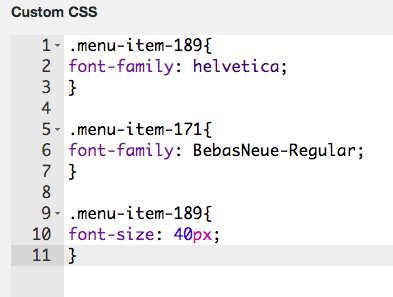
          I actually tried:

          Bildschirmfoto 2021-05-20 um 20.19.00.png

          1 Reply Last reply
          0
          • D
            D
            danny
            wrote on last edited by
            #5

            Dear @Richard,

            it shouldn't be to hard to change the color of each menu item?

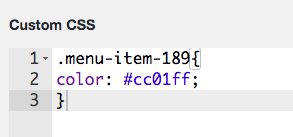
            I tried as well:

            Bildschirmfoto 2021-05-20 um 21.01.12.png

            Thanks so much. Really appreciate your help.

            best wishes

            Daniel

            1 Reply Last reply
            0
            • RichardR
              RichardR
              Richard
              Global Moderator
              wrote on last edited by
              #6

              Dear Daniel

              @danny

              Awesome! happy to help ✨


              Sincerely
              Richard
              1 Reply Last reply
              0
              • D
                D
                danny
                wrote on last edited by danny
                #7

                Dear @Richard,

                oh, but the Custom CSS didn't work.

                How can I change to color of each menu item?
                And how can I change the size of each menu item?

                Thanks a lot.

                Best wishes

                Daniel

                1 Reply Last reply
                0
                • RichardR
                  RichardR
                  Richard
                  Global Moderator
                  wrote on last edited by Richard
                  #8

                  Dear Daniel

                  @danny

                  In this case you are targeting a link <a>. Also the color has been defined somewhere else so you must override with !important

                  .menu-item-240 a {
                      color:red !important;
                      font-size:40px;
                  }
                  

                  Please note, respectfully Daniel that if you wish to go deeper into customising Laytheme it is up to you to research how Basic CSS and HTML function, i am unfortunately unable to maintain a tutorial like this even though i wish to help.

                  Have a wonderful day Daniel and thank you for supporting Laytheme.


                  Best
                  Richard
                  1 Reply Last reply
                  0
                  • D
                    D
                    danny
                    wrote on last edited by
                    #9

                    Dear @Richard,

                    thanks a lot! Works great!

                    Now for the Lightbox Captions, this seems to be a bug. Could you have a look? http://laythemeforum.com/topic/6897/lightbox-caption-alignment

                    Have a nice day!

                    Best

                    Daniel

                    1 Reply Last reply
                    0
                    • RichardR
                      RichardR
                      Richard
                      Global Moderator
                      wrote on last edited by
                      #10

                      Dear Daniel

                      @danny

                      Will take a look, thanks! 🌝


                      Best wishes
                      Richard
                      1 Reply Last reply
                      0

                      Hello! It looks like you're interested in this conversation, but you don't have an account yet.

                      Getting fed up of having to scroll through the same posts each visit? When you register for an account, you'll always come back to exactly where you were before, and choose to be notified of new replies (either via email, or push notification). You'll also be able to save bookmarks and upvote posts to show your appreciation to other community members.

                      With your input, this post could be even better 💗

                      Register Login
                      Reply
                      • Reply as topic
                      Log in to reply
                      • Oldest to Newest
                      • Newest to Oldest
                      • Most Votes


                      Online Users
                      L
                      lukas123
                      Forgot your key, lost your files, need a previous Lay Theme or Addon version? Go to www.laykeymanager.com
                      laytheme.com
                      • Login

                      • Don't have an account? Register

                      • Login or register to search.
                      • First post
                        Last post
                      0
                      • Recent
                      • Tags
                      • Popular
                      • Users
                      • Search