Skip to content
  • Recent
  • Tags
  • Popular
  • Users
  • Search
Skins
  • Light
  • Brite
  • Cerulean
  • Cosmo
  • Flatly
  • Journal
  • Litera
  • Lumen
  • Lux
  • Materia
  • Minty
  • Morph
  • Pulse
  • Sandstone
  • Simplex
  • Sketchy
  • Spacelab
  • United
  • Yeti
  • Zephyr
  • Dark
  • Cyborg
  • Darkly
  • Quartz
  • Slate
  • Solar
  • Superhero
  • Vapor

  • Default (No Skin)
  • No Skin
Collapse

Lay Theme Forum

  1. Home
  2. Addons
  3. Scroll slider - functions/features

Scroll slider - functions/features

Scheduled Pinned Locked Moved Addons
10 Posts 3 Posters 1.5k Views 2 Watching
  • Oldest to Newest
  • Newest to Oldest
  • Most Votes
Reply
  • Reply as topic
Log in to reply
This topic has been deleted. Only users with topic management privileges can see it.
  • D Offline
    D Offline
    Dawid
    wrote on last edited by
    #1

    The scroll slider is brilliant. At the moment, I am missing two features.

    The first is the ability to add “fixed” elements above or below it (text field, marquee element, image).

    The second is the ability to make the images in it links - for example, clicking on an image takes you to a subpage of the full project.
    This opens up the brilliant possibility of using it as the main portfolio page.

    What do you think, @arminunruh ? :)

    1 Reply Last reply
    0
    • arminunruhA Offline
      arminunruhA Offline
      arminunruh
      Global Moderator
      wrote on last edited by
      #2

      yes sure, you can insert project thumbnails
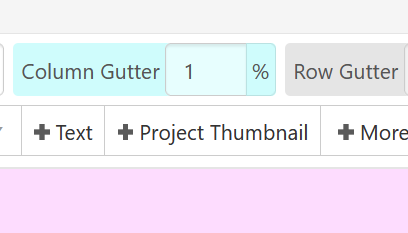
      image.png

      in the gridder,

      or in the gridder you can right click any image and link it:
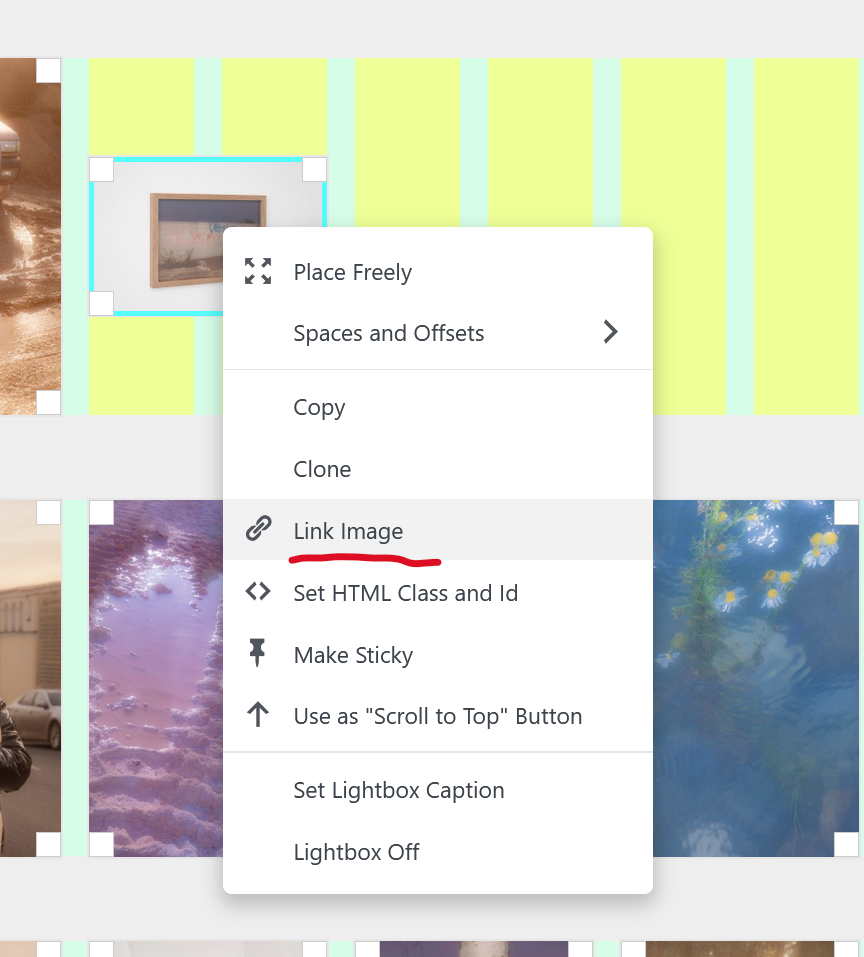
      image.png

      1 Reply Last reply
      0
      • D Offline
        D Offline
        Dawid
        wrote on last edited by
        #3

        Great! It works :) It would be wonderful if we could set some text elements as “fixed” and marquee! :D

        1 Reply Last reply
        0
        • arminunruhA Offline
          arminunruhA Offline
          arminunruh
          Global Moderator
          wrote on last edited by
          #4

          yes ! i will think about how to do that best

          1 Reply Last reply
          0
          • D Offline
            D Offline
            Dawid
            wrote on last edited by
            #5

            Thank you!

            1 Reply Last reply
            0
            • C Offline
              C Offline
              commonera
              wrote on last edited by
              #6

              I am also desperate for the ability to have a fixed element above the others.

              1 Reply Last reply
              0
              • arminunruhA Offline
                arminunruhA Offline
                arminunruh
                Global Moderator
                wrote on last edited by
                #7

                you can go to Lay Options

                enable "Activate Fixed Header"

                then in Lay Options, in the submenu page "Fixed Header" you can set a page where its layout will be on top of everything on your website :D

                1 Reply Last reply
                0
                • C Offline
                  C Offline
                  commonera
                  wrote on last edited by commonera
                  #8

                  This works, but it's for the entire site. Let's say for instance I have 5 different projects that I want to use the scroll slider on. Each needs to have a different fixed header to introduce the project (or at least to contain a link to an overlay). That's what I'm trying to achieve.

                  Could it be possible to create a fixed header with 5 rows, each row has a specific CSS #id and then hide/show the relevant rows depending on the page?

                  1 Reply Last reply
                  0
                  • C Offline
                    C Offline
                    commonera
                    wrote on last edited by
                    #9

                    Update: my idea for a fixed header with multiple rows, each having a unique #id that can be hidden/shown depending on the page is a suitable solution for my needs for now.

                    1 Reply Last reply
                    0
                    • arminunruhA Offline
                      arminunruhA Offline
                      arminunruh
                      Global Moderator
                      wrote on last edited by
                      #10

                      ah yes very good!

                      Could it be possible to create a fixed header with 5 rows, each row has a specific CSS #id and then hide/show the relevant rows depending on the page?

                      using a body's slug, like .slug-home and your ids of your rows, you can write custom css to hide or show these rows

                      1 Reply Last reply
                      0
                      Reply
                      • Reply as topic
                      Log in to reply
                      • Oldest to Newest
                      • Newest to Oldest
                      • Most Votes


                      I also code custom websites or custom Lay features.
                      💿 Email me here: 💿
                      info@laytheme.com

                      Our Web Development company: 100k.studio

                      Want to tip me? https://www.paypal.com/paypalme/arminunruh

                      Before you post:
                      1. When using a WordPress Cache plugin, disable it or clear your cache.
                      2. Update Lay Theme and all Lay Theme Addons
                      3. Disable all Plugins
                      4. Go to Lay Options → Custom CSS & HTML, click "Turn Off All Custom Code", click "Save Changes"

                      This often solves issues you might run into

                      When you post:
                      1. Post a link to where the problem is
                      2. Does the problem happen on Chrome, Firefox, Safari or iPhone or Android?
                      3. If the problem is difficult to explain, post screenshots / link to a video to explain it
                      Online Users
                      M
                      michael_vvc
                      S
                      smartin
                      T
                      timk
                      Forgot your key, lost your files, need a previous Lay Theme or Addon version? Go to www.laykeymanager.com
                      laytheme.com
                      • Login

                      • Don't have an account? Register

                      • Login or register to search.
                      • First post
                        Last post
                      0
                      • Recent
                      • Tags
                      • Popular
                      • Users
                      • Search