turn off overlay in mobile view
-
im glad it works!!
-
-
hello! why would you want to do that?
-
Hi! Because it keeps on preloading on mobile and blocking the content underneath it, even the menu. So when people visit the web on mobile they cannot access to anything other than the overlay page and think its broke or something. Its been really usefull the preload for the desktop version because its a display of the general info of the project, so I want them to see that when they visit the front page, but I dont need it on the mobile. So I guess my question is: could I only leave the preload of the overlay on desktop and off on mobile?
-
oh!
do you have a link for me so i can check it out please? -
so i understood you wanted to turn off the page overlay feature for mobile.
but i see you dont mean this.you mean you want to turn off the overlays getting preloaded for mobile
So when people visit the web on mobile they cannot access to anything other than the overlay page and think its broke or something.
the overlays being preloaded for mobile shouldn't interfere with any other functionality. thats why it would be super useful for me to take a look at ur site to see whats going on
you can also send it to my email if u want: info@laytheme.com
-
Hi! Yes, I just want to turn off the overlays getting preloaded for mobile.
Perfect, I really appreciate it, this is my website: https://proyectopiranha.com/
-
ahh now i understand!
you're using the setting that makes the overlay show up

preopen you mean, not preload.
what you could do is you could simply turn off the background:
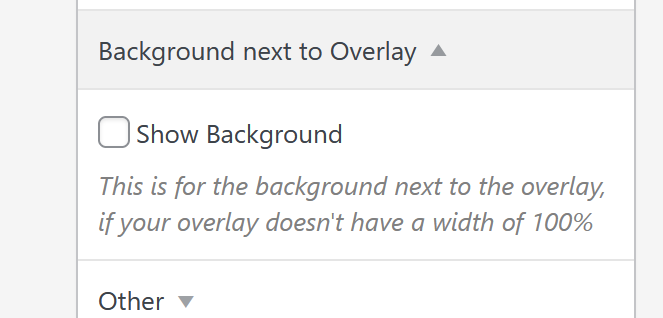
just uncheck "show background"i think you probably have a transparent background enabled. this makes it so you have to click the background to close the page overlay, only afterwards you can click other links on your website.
-
it seems that, on pages like this:
https://proyectopiranha.com/editorial/your overlay shows up and thus, the overlay background,
but you hide the overlay using css.
but you didnt hide the overlay background using css.thats why on pages like that, you cant scroll or click anything, unless you click once to hide the transparent overlay background.
you could use this css:
body:not(.home) #lay-overlays{
display: none;
}
this will hide the overlays and overlay backgrounds on all pages except for home.
add this in:
lay options -> custom css & html -> custom css for desktopnow for mobile if you want to hide the overlay and the bg, everywhere, simply use:
#lay-overlays{
display: none;
}
add this in:
lay options -> custom css & html -> custom css for phone -
Hi! Thank you so much, it all worked our except for this piece of css:
body:not(.home) #lay-overlays{
display: none;
}because actually it hides the overlay everywhere.
I realize that when I tried the spanish home version that was not tag in that css code and it kept showing it everywhere, so I try adding it like a second piece of code like this:
body:not(.inicio) #lay-overlays{
display: none;
}changing the "home" slang for "inicio" and it started to hide it everywhere in the spanish version of the web too.
Let me know if i that makes sense.
Right now the code its not applied anywhere.
Thanks!
-
ah very good! try this:
body:not(.slug-inico) #lay-overlays{
display: none;
}
body:not(.slug-home) #lay-overlays{
display: none;
}
ital:

en:

this should hide all overlays, except for on the italian homepage and the english homepage
-
-
Can you please send:
- a link to this forum topic
- your website address
- /wp-admin/ username and password
to: info@laytheme.com

Hello! It looks like you're interested in this conversation, but you don't have an account yet.
Getting fed up of having to scroll through the same posts each visit? When you register for an account, you'll always come back to exactly where you were before, and choose to be notified of new replies (either via email, or push notification). You'll also be able to save bookmarks and upvote posts to show your appreciation to other community members.
With your input, this post could be even better 💗
Register Login