Skip to content
  • Recent
  • Tags
  • Popular
  • Users
  • Search
Skins
  • Light
  • Brite
  • Cerulean
  • Cosmo
  • Flatly
  • Journal
  • Litera
  • Lumen
  • Lux
  • Materia
  • Minty
  • Morph
  • Pulse
  • Sandstone
  • Simplex
  • Sketchy
  • Spacelab
  • United
  • Yeti
  • Zephyr
  • Dark
  • Cyborg
  • Darkly
  • Quartz
  • Slate
  • Solar
  • Superhero
  • Vapor

  • Default (No Skin)
  • No Skin
Collapse

Lay Theme Forum

  1. Home
  2. General Discussion
  3. turn off overlay in mobile view

turn off overlay in mobile view

Scheduled Pinned Locked Moved General Discussion
22 Posts 3 Posters 2.2k Views 2 Watching
  • Oldest to Newest
  • Newest to Oldest
  • Most Votes
Reply
  • Reply as topic
Log in to reply
This topic has been deleted. Only users with topic management privileges can see it.
  • arminunruhA Offline
    arminunruhA Offline
    arminunruh
    Global Moderator
    wrote on last edited by
    #12

    hello! why would you want to do that?

    1 Reply Last reply
    0
    • P Offline
      P Offline
      piranha
      wrote on last edited by
      #13

      Hi! Because it keeps on preloading on mobile and blocking the content underneath it, even the menu. So when people visit the web on mobile they cannot access to anything other than the overlay page and think its broke or something. Its been really usefull the preload for the desktop version because its a display of the general info of the project, so I want them to see that when they visit the front page, but I dont need it on the mobile. So I guess my question is: could I only leave the preload of the overlay on desktop and off on mobile?

      1 Reply Last reply
      0
      • arminunruhA Offline
        arminunruhA Offline
        arminunruh
        Global Moderator
        wrote on last edited by
        #14

        oh!
        do you have a link for me so i can check it out please?

        1 Reply Last reply
        0
        • arminunruhA Offline
          arminunruhA Offline
          arminunruh
          Global Moderator
          wrote on last edited by
          #15

          so i understood you wanted to turn off the page overlay feature for mobile.
          but i see you dont mean this.

          you mean you want to turn off the overlays getting preloaded for mobile

          So when people visit the web on mobile they cannot access to anything other than the overlay page and think its broke or something.

          the overlays being preloaded for mobile shouldn't interfere with any other functionality. thats why it would be super useful for me to take a look at ur site to see whats going on

          you can also send it to my email if u want: info@laytheme.com

          1 Reply Last reply
          0
          • P Offline
            P Offline
            piranha
            wrote on last edited by
            #16

            Hi! Yes, I just want to turn off the overlays getting preloaded for mobile.

            Perfect, I really appreciate it, this is my website: https://proyectopiranha.com/

            1 Reply Last reply
            0
            • arminunruhA Offline
              arminunruhA Offline
              arminunruh
              Global Moderator
              wrote on last edited by
              #17

              ahh now i understand!

              you're using the setting that makes the overlay show up

              image.png

              preopen you mean, not preload.

              what you could do is you could simply turn off the background:
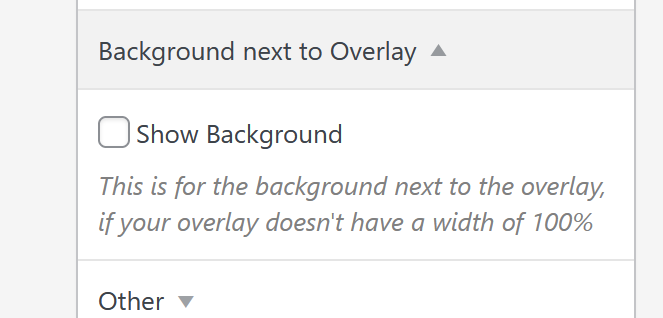
              image.png
              just uncheck "show background"

              i think you probably have a transparent background enabled. this makes it so you have to click the background to close the page overlay, only afterwards you can click other links on your website.

              1 Reply Last reply
              0
              • arminunruhA Offline
                arminunruhA Offline
                arminunruh
                Global Moderator
                wrote on last edited by
                #18

                it seems that, on pages like this:
                https://proyectopiranha.com/editorial/

                your overlay shows up and thus, the overlay background,
                but you hide the overlay using css.
                but you didnt hide the overlay background using css.

                thats why on pages like that, you cant scroll or click anything, unless you click once to hide the transparent overlay background.

                you could use this css:

                body:not(.home) #lay-overlays{
                display: none;
                }
                

                this will hide the overlays and overlay backgrounds on all pages except for home.
                add this in:
                lay options -> custom css & html -> custom css for desktop

                now for mobile if you want to hide the overlay and the bg, everywhere, simply use:

                #lay-overlays{
                display: none;
                }
                

                add this in:
                lay options -> custom css & html -> custom css for phone

                1 Reply Last reply
                0
                • P Offline
                  P Offline
                  piranha
                  wrote last edited by piranha
                  #19

                  Hi! Thank you so much, it all worked our except for this piece of css:

                  body:not(.home) #lay-overlays{
                  display: none;
                  }

                  because actually it hides the overlay everywhere.

                  I realize that when I tried the spanish home version that was not tag in that css code and it kept showing it everywhere, so I try adding it like a second piece of code like this:

                  body:not(.inicio) #lay-overlays{
                  display: none;
                  }

                  changing the "home" slang for "inicio" and it started to hide it everywhere in the spanish version of the web too.

                  Let me know if i that makes sense.

                  Right now the code its not applied anywhere.

                  Thanks!

                  1 Reply Last reply
                  0
                  • arminunruhA Offline
                    arminunruhA Offline
                    arminunruh
                    Global Moderator
                    wrote last edited by
                    #20

                    ah very good! try this:

                    body:not(.slug-inico) #lay-overlays{
                    display: none;
                    }
                    body:not(.slug-home) #lay-overlays{
                    display: none;
                    }
                    

                    ital:
                    image.png

                    en:
                    d966955e-89f2-400b-beb1-ea069629046f-image.png

                    this should hide all overlays, except for on the italian homepage and the english homepage

                    1 Reply Last reply
                    0
                    • P Offline
                      P Offline
                      piranha
                      wrote last edited by
                      #21

                      Hi! Thanks for the quick response.

                      I tried it but it looks like it just hides them everywhere. Could you check that for me?

                      Maybe its my cache, but I did try it on incognito mode and still no luck.

                      1 Reply Last reply
                      0
                      • arminunruhA Offline
                        arminunruhA Offline
                        arminunruh
                        Global Moderator
                        wrote last edited by
                        #22

                        Can you please send:

                        • a link to this forum topic
                        • your website address
                        • /wp-admin/ username and password
                          to: info@laytheme.com

                        1 Reply Last reply
                        0
                        Reply
                        • Reply as topic
                        Log in to reply
                        • Oldest to Newest
                        • Newest to Oldest
                        • Most Votes


                        I also code custom websites or custom Lay features.
                        šŸ’æ Email me here: šŸ’æ
                        info@laytheme.com

                        Our Web Development company: 100k.studio

                        Want to tip me? https://www.paypal.com/paypalme/arminunruh

                        Before you post:
                        1. When using a WordPress Cache plugin, disable it or clear your cache.
                        2. Update Lay Theme and all Lay Theme Addons
                        3. Disable all Plugins
                        4. Go to Lay Options → Custom CSS & HTML, click "Turn Off All Custom Code", click "Save Changes"

                        This often solves issues you might run into

                        When you post:
                        1. Post a link to where the problem is
                        2. Does the problem happen on Chrome, Firefox, Safari or iPhone or Android?
                        3. If the problem is difficult to explain, post screenshots / link to a video to explain it
                        Online Users
                        F
                        fernandol97
                        A
                        alasdair17
                        Forgot your key, lost your files, need a previous Lay Theme or Addon version? Go to www.laykeymanager.com
                        laytheme.com
                        • Login

                        • Don't have an account? Register

                        • Login or register to search.
                        • First post
                          Last post
                        0
                        • Recent
                        • Tags
                        • Popular
                        • Users
                        • Search