Scroll on hover for mobile images not sizing consistently
-
On first load to my site, images sizes are showing as desired, however on refresh or navigating back, it is loading with smaller sized images (before it was full screen, but it seems to have now switched to smaller size after some tweaking). See examples below


Also related, is that the images only start showing once the top project has scrolled out of the top of the screen. Is there a way to adjust this?
This is all on mobile and related to "show image on scroll for touch devices".
Thanks
-
Hey, okay, thanks for the heads-up. I will work on this, I wrote it down.
-
sorry, I haven't gotten around yet to fixing this.
-
So about this one issue:
The timing of when the image appears on scroll is controlled by a setting in Lay Options → Imagehover → Scroll Trigger Y (Phone) (and there's a separate one for Desktop).
This value is the Y-position (in pixels, measured from the top of the viewport) at which a link's text needs to be in order to trigger its hover image. So if it's set to, say, 500px, the image only shows once the link's text has scrolled up to within 500px of the top of the screen.
If you want the image to appear earlier (e.g. as soon as the top project is in view), set this to a higher value — try something close to your viewport height (e.g. 700 or 900). If you want it to appear later, lower the value.
Try a few values and see what feels right for your layout.
-
about the other issue, do you see how the images are being sized?
In Lay Options - image hover add-on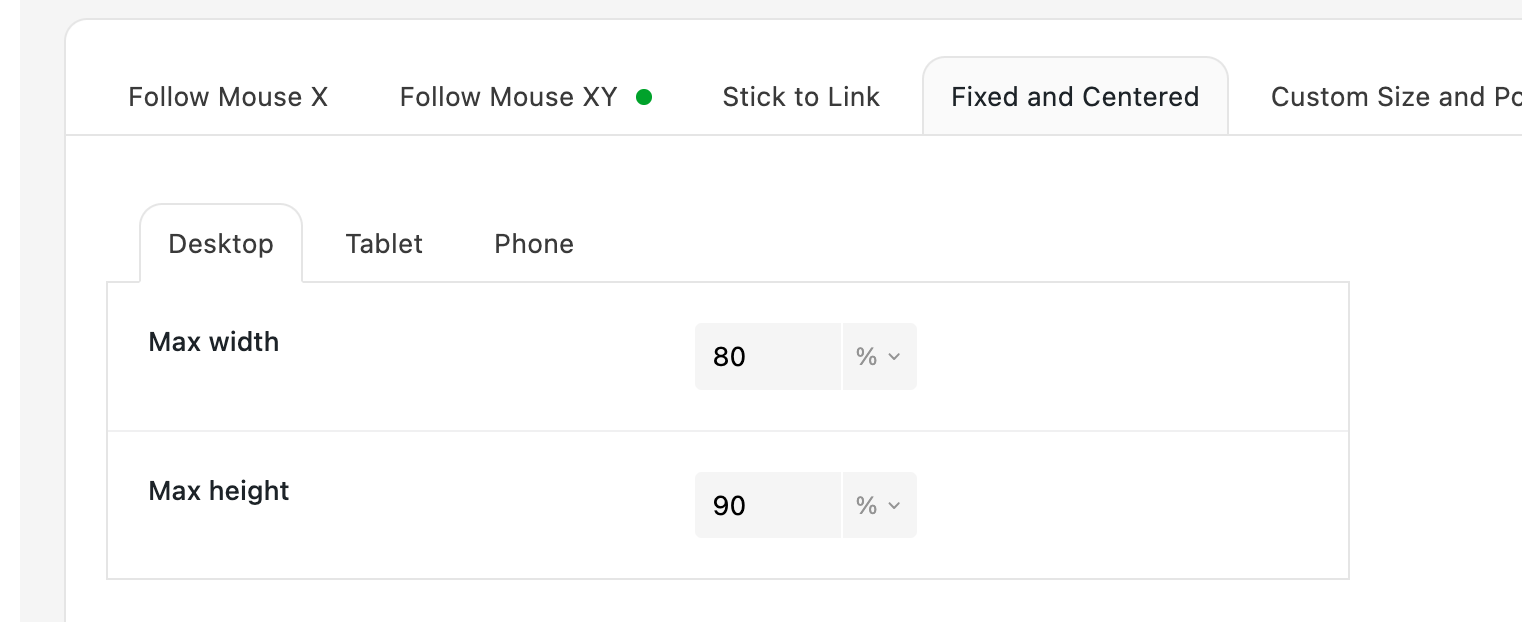
You actually only size max width and max height.
Do you mean that portrait images have a different width than landscape images?
Or do you mean actually the same image gets a different size when you refresh or come back to the page?
