Skip to content
  • Recent
  • Tags
  • Popular
  • Users
  • Search
Skins
  • Light
  • Brite
  • Cerulean
  • Cosmo
  • Flatly
  • Journal
  • Litera
  • Lumen
  • Lux
  • Materia
  • Minty
  • Morph
  • Pulse
  • Sandstone
  • Simplex
  • Sketchy
  • Spacelab
  • United
  • Yeti
  • Zephyr
  • Dark
  • Cyborg
  • Darkly
  • Quartz
  • Slate
  • Solar
  • Superhero
  • Vapor

  • Default (No Skin)
  • No Skin
Collapse

Lay Theme Forum

  1. Home
  2. Addons
  3. Scroll on hover for mobile images not sizing consistently

Scroll on hover for mobile images not sizing consistently

Scheduled Pinned Locked Moved Addons
5 Posts 2 Posters 133 Views 2 Watching
  • Oldest to Newest
  • Newest to Oldest
  • Most Votes
Reply
  • Reply as topic
Log in to reply
This topic has been deleted. Only users with topic management privileges can see it.
  • S Offline
    S Offline
    sebjx
    wrote on last edited by sebjx
    #1

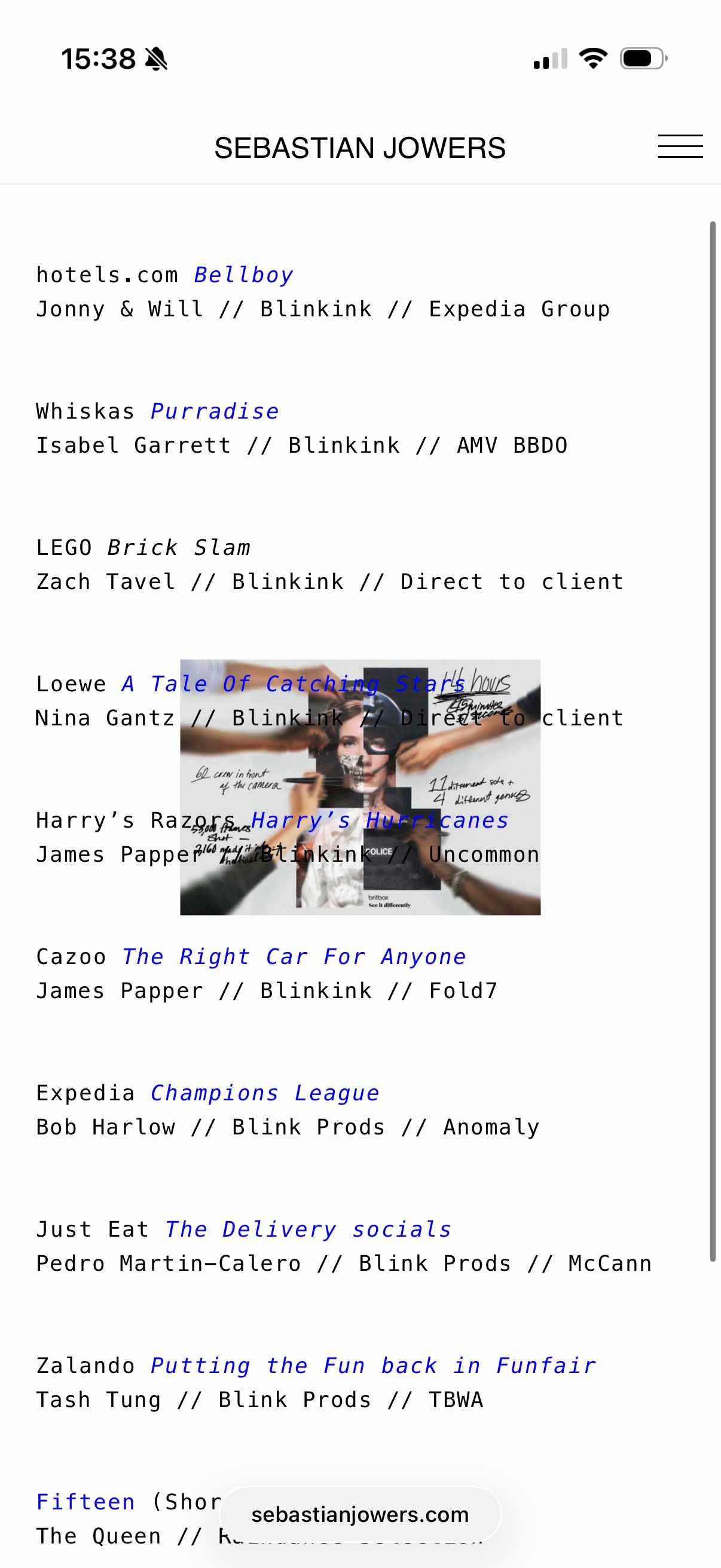
    On first load to my site, images sizes are showing as desired, however on refresh or navigating back, it is loading with smaller sized images (before it was full screen, but it seems to have now switched to smaller size after some tweaking). See examples below

    IMG_7730 copy.jpg

    IMG_7731 copy.jpg

    Also related, is that the images only start showing once the top project has scrolled out of the top of the screen. Is there a way to adjust this?

    This is all on mobile and related to "show image on scroll for touch devices".

    Thanks

    1 Reply Last reply
    0
    • arminunruhA Offline
      arminunruhA Offline
      arminunruh
      Global Moderator
      wrote on last edited by
      #2

      Hey, okay, thanks for the heads-up. I will work on this, I wrote it down.

      1 Reply Last reply
      0
      • arminunruhA Offline
        arminunruhA Offline
        arminunruh
        Global Moderator
        wrote last edited by
        #3

        sorry, I haven't gotten around yet to fixing this.

        1 Reply Last reply
        0
        • arminunruhA Offline
          arminunruhA Offline
          arminunruh
          Global Moderator
          wrote last edited by
          #4

          So about this one issue:

          The timing of when the image appears on scroll is controlled by a setting in Lay Options → Imagehover → Scroll Trigger Y (Phone) (and there's a separate one for Desktop).

          This value is the Y-position (in pixels, measured from the top of the viewport) at which a link's text needs to be in order to trigger its hover image. So if it's set to, say, 500px, the image only shows once the link's text has scrolled up to within 500px of the top of the screen.

          If you want the image to appear earlier (e.g. as soon as the top project is in view), set this to a higher value — try something close to your viewport height (e.g. 700 or 900). If you want it to appear later, lower the value.

          Try a few values and see what feels right for your layout.

          1 Reply Last reply
          0
          • arminunruhA Offline
            arminunruhA Offline
            arminunruh
            Global Moderator
            wrote last edited by
            #5

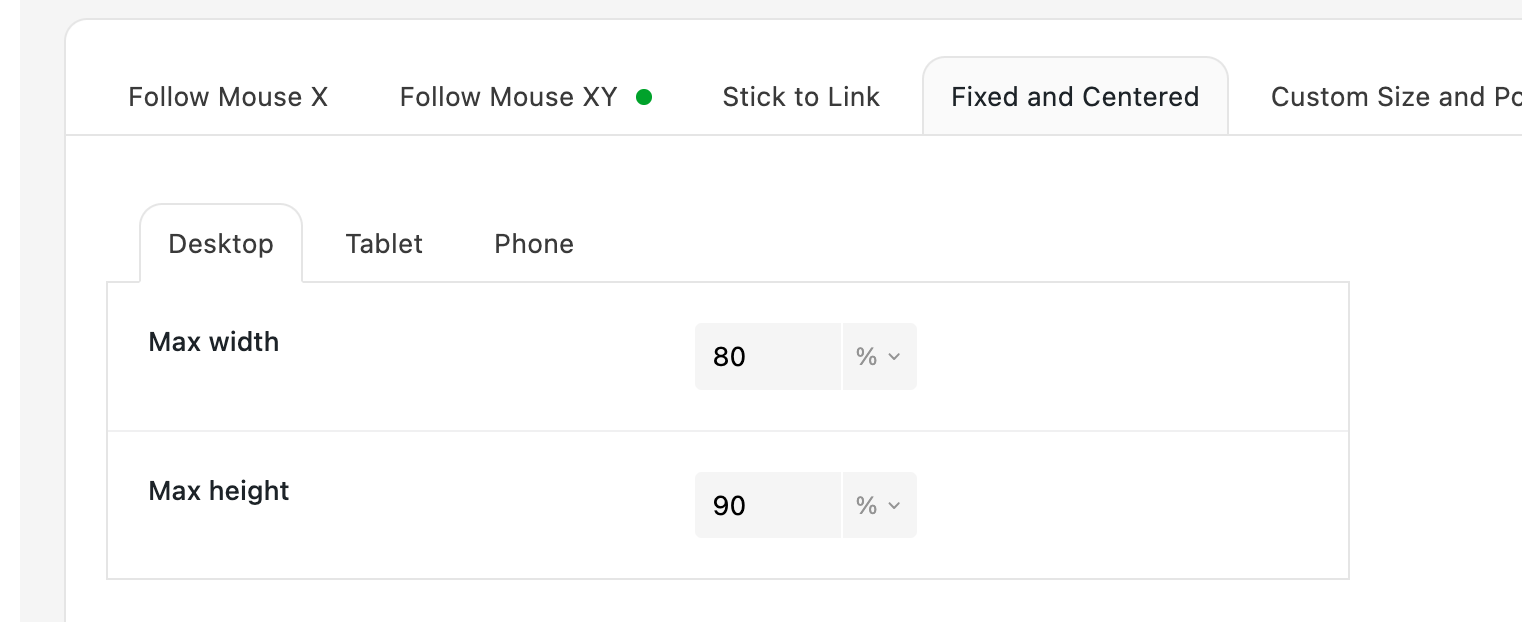
            about the other issue, do you see how the images are being sized?
            In Lay Options - image hover add-on
            grafik.png

            You actually only size max width and max height.

            Do you mean that portrait images have a different width than landscape images?
            Or do you mean actually the same image gets a different size when you refresh or come back to the page?

            1 Reply Last reply
            0
            Reply
            • Reply as topic
            Log in to reply
            • Oldest to Newest
            • Newest to Oldest
            • Most Votes


            For paid 1-on-1 Lay Theme Coaching, contact Audrey (audrey@cyberslayers.work) or me (info@laytheme.com).

            We also code custom websites or bespoke Lay features. Drop me a line at info@laytheme.com or check out my work at arminunruh.com.

            Want to support my work? paypal.me/arminunruh

            Before you post:
            1. When using a WordPress Cache plugin, disable it or clear your cache.
            2. Update Lay Theme and all Lay Theme Addons
            3. Disable all Plugins
            4. Go to Lay Options → Custom CSS & HTML, click "Turn Off All Custom Code", click "Save Changes"

            This often solves issues you might run into

            When you post:
            1. Post a link to where the problem is
            2. Does the problem happen on Chrome, Firefox, Safari or iPhone or Android?
            3. If the problem is difficult to explain, post screenshots / link to a video to explain it
            Online Users
            Forgot your key, lost your files, need a previous Lay Theme or Addon version? Go to www.laykeymanager.com
            laytheme.com
            • Login

            • Don't have an account? Register

            • Login or register to search.
            • First post
              Last post
            0
            • Recent
            • Tags
            • Popular
            • Users
            • Search