Skip to content
  • Recent
  • Tags
  • Popular
  • Users
  • Search
Skins
  • Light
  • Brite
  • Cerulean
  • Cosmo
  • Flatly
  • Journal
  • Litera
  • Lumen
  • Lux
  • Materia
  • Minty
  • Morph
  • Pulse
  • Sandstone
  • Simplex
  • Sketchy
  • Spacelab
  • United
  • Yeti
  • Zephyr
  • Dark
  • Cyborg
  • Darkly
  • Quartz
  • Slate
  • Solar
  • Superhero
  • Vapor

  • Default (No Skin)
  • No Skin
Collapse

Lay Theme Forum

  1. Home
  2. General Discussion
  3. Full screen carousel + image quality

Full screen carousel + image quality

Scheduled Pinned Locked Moved General Discussion
5 Posts 2 Posters 140 Views 2 Watching
  • Oldest to Newest
  • Newest to Oldest
  • Most Votes
Reply
  • Reply as topic
Log in to reply
This topic has been deleted. Only users with topic management privileges can see it.
  • L Offline
    L Offline
    lauramas
    wrote last edited by
    #1

    hihi,
    i have a couple of questions: im using since a while a full screen carousel for my website's intro and its quite buggy atm, the slides are timed strangely, evern when i change the timing to slower they go really fast and they are a bit glitchy. Also the quality of the image is not very sharp as well, is there a way to improve that? website is lauramas.com

    another question is regarding the overall scrolling in between website sections, sometimes when the color in the background is black for example, i change the color of section to white but with the scrolling down there is a glitch of the color underneath. like on this page for example: https://lauramas.com/marinerofthemountains/

    thank you 🙏🏼

    1 Reply Last reply
    0
    • arminunruhA Offline
      arminunruhA Offline
      arminunruh
      Global Moderator
      wrote last edited by arminunruh
      #2

      hey about the second issue:

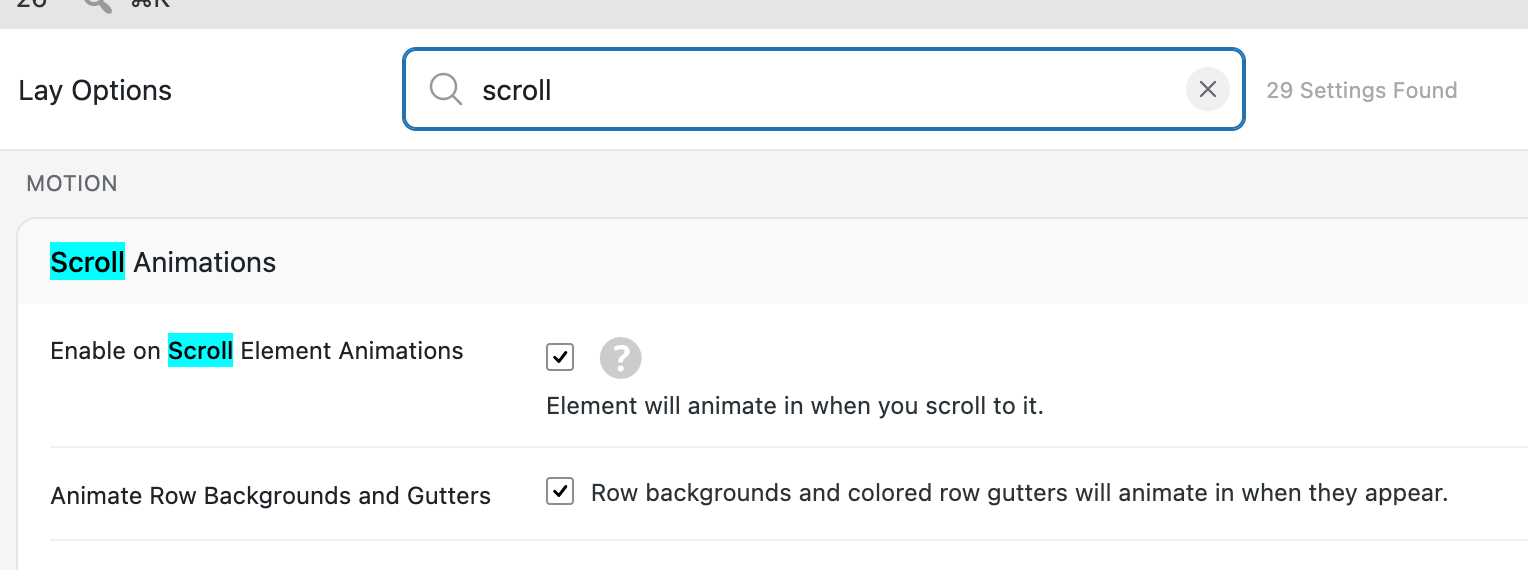
      grafik.png

      turn off "Animate Row Backgrounds and Gutters"

      1 Reply Last reply
      0
      • arminunruhA Offline
        arminunruhA Offline
        arminunruh
        Global Moderator
        wrote last edited by
        #3

        about the images in the slideshow:

        https://lauramas.com/wp-content/uploads/2026/07/8-1-3840x1960.webp

        seems like the originals quality is not so good no? thats why i think

        1 Reply Last reply
        0
        • L Offline
          L Offline
          lauramas
          wrote last edited by
          #4

          cool, thank you 🙏🏼 the quality of the image which was been uploaded is higher than what it appears on the caroussel at least, especially for the first image. i've had this problem since a while now and tried many different quality/compression options, but it seems like it might be the image compression from the plugin itself

          1 Reply Last reply
          0
          • arminunruhA Offline
            arminunruhA Offline
            arminunruh
            Global Moderator
            wrote last edited by
            #5

            hey, did you read the text underneath where you set the image quality? Only changing the image quality doesn't do anything. You actually need to regenerate the images for the quality change to take effect. If you read that text or you set the image quality, you will see how to do that

            1 Reply Last reply
            0
            Reply
            • Reply as topic
            Log in to reply
            • Oldest to Newest
            • Newest to Oldest
            • Most Votes


            We also code custom websites or bespoke Lay features. Drop me a line at info@laytheme.com or check out my work at arminunruh.com.

            Want to support my work? paypal.me/arminunruh

            Before you post:
            1. When using a WordPress Cache plugin, disable it or clear your cache.
            2. Update Lay Theme and all Lay Theme Addons
            3. Disable all Plugins
            4. Go to Lay Options → Custom CSS & HTML, click "Turn Off All Custom Code", click "Save Changes"

            This often solves issues you might run into

            When you post:
            1. Post a link to where the problem is
            2. Does the problem happen on Chrome, Firefox, Safari or iPhone or Android?
            3. If the problem is difficult to explain, post screenshots / link to a video to explain it
            Online Users
            Forgot your key, lost your files, need a previous Lay Theme or Addon version? Go to www.laykeymanager.com
            laytheme.com
            • Login

            • Don't have an account? Register

            • Login or register to search.
            • First post
              Last post
            0
            • Recent
            • Tags
            • Popular
            • Users
            • Search