Full screen carousel + image quality
-
hihi,
i have a couple of questions: im using since a while a full screen carousel for my website's intro and its quite buggy atm, the slides are timed strangely, evern when i change the timing to slower they go really fast and they are a bit glitchy. Also the quality of the image is not very sharp as well, is there a way to improve that? website is lauramas.comanother question is regarding the overall scrolling in between website sections, sometimes when the color in the background is black for example, i change the color of section to white but with the scrolling down there is a glitch of the color underneath. like on this page for example: https://lauramas.com/marinerofthemountains/
thank you 🙏🏼
-
hey about the second issue:
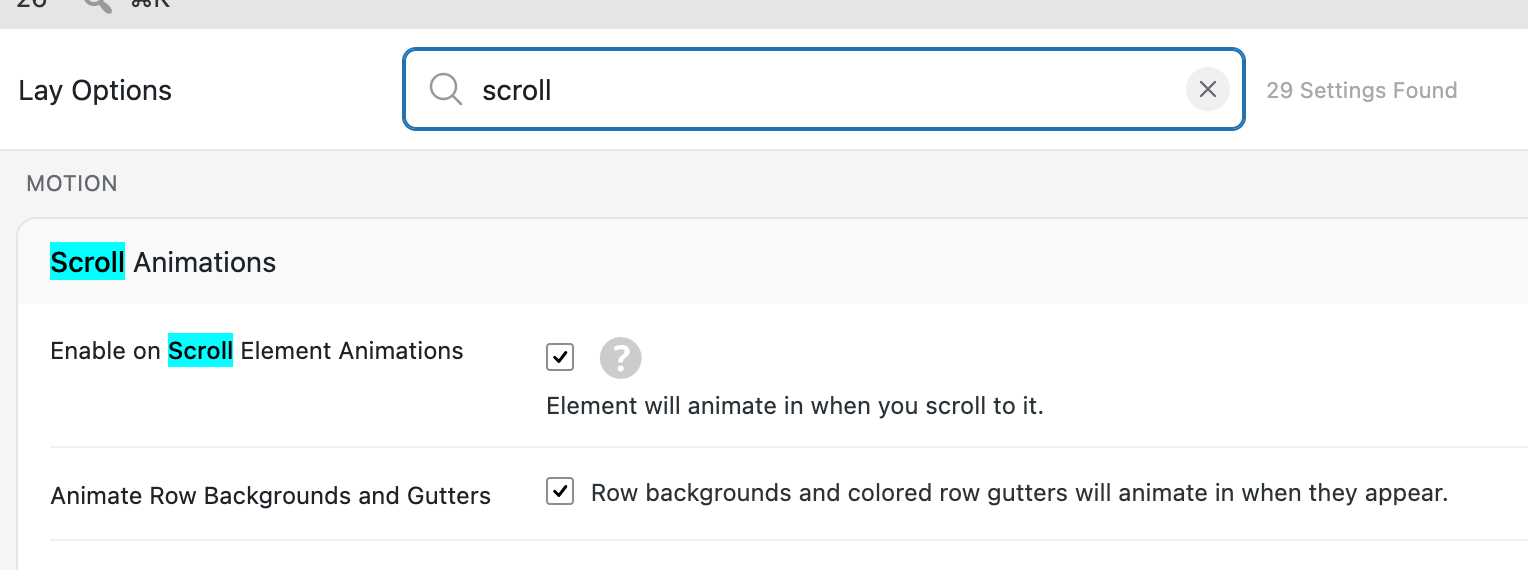
turn off "Animate Row Backgrounds and Gutters"
-
about the images in the slideshow:
https://lauramas.com/wp-content/uploads/2026/07/8-1-3840x1960.webp
seems like the originals quality is not so good no? thats why i think
-
cool, thank you 🙏🏼 the quality of the image which was been uploaded is higher than what it appears on the caroussel at least, especially for the first image. i've had this problem since a while now and tried many different quality/compression options, but it seems like it might be the image compression from the plugin itself
-
hey, did you read the text underneath where you set the image quality? Only changing the image quality doesn't do anything. You actually need to regenerate the images for the quality change to take effect. If you read that text or you set the image quality, you will see how to do that

Hello! It looks like you're interested in this conversation, but you don't have an account yet.
Getting fed up of having to scroll through the same posts each visit? When you register for an account, you'll always come back to exactly where you were before, and choose to be notified of new replies (either via email, or push notification). You'll also be able to save bookmarks and upvote posts to show your appreciation to other community members.
With your input, this post could be even better 💗
Register Login