Skip to content
  • Recent
  • Tags
  • Popular
  • Users
  • Search
Skins
  • Light
  • Brite
  • Cerulean
  • Cosmo
  • Flatly
  • Journal
  • Litera
  • Lumen
  • Lux
  • Materia
  • Minty
  • Morph
  • Pulse
  • Sandstone
  • Simplex
  • Sketchy
  • Spacelab
  • United
  • Yeti
  • Zephyr
  • Dark
  • Cyborg
  • Darkly
  • Quartz
  • Slate
  • Solar
  • Superhero
  • Vapor

  • Default (No Skin)
  • No Skin
Collapse

Lay Theme Forum

  1. Home
  2. General Discussion
  3. bar to separate menu elements

bar to separate menu elements

Scheduled Pinned Locked Moved General Discussion
11 Posts 4 Posters 832 Views 2 Watching
  • Oldest to Newest
  • Newest to Oldest
  • Most Votes
Reply
  • Reply as topic
Log in to reply
This topic has been deleted. Only users with topic management privileges can see it.
  • emgeofficeE
    emgeofficeE
    emgeoffice
    wrote on last edited by
    #2

    Have you added it via css?

    1 Reply Last reply
    • E
      E
      emmapasteur
      wrote on last edited by
      #3

      I tried yes... but as i said i can't manage to center it between the words

      1 Reply Last reply
      • arminunruhA
        arminunruhA
        arminunruh
        Global Moderator
        wrote on last edited by arminunruh
        #4
        <script>
        (function () {
        	var lists = document.querySelectorAll('nav.laynav.primary > ul');
        	for (var i = 0; i < lists.length; i++) {
        		var ul = lists[i];
        		// collect the real menu items (excluding dividers)
        		var items = [];
        		for (var c = 0; c < ul.children.length; c++) {
        			var child = ul.children[c];
        			if (child.tagName === 'LI' && !child.classList.contains('lay-menu-divider')) {
        				items.push(child);
        			}
        		}
        		// insert a divider before every menu item except the first
        		for (var j = 1; j < items.length; j++) {
        			var prev = items[j].previousElementSibling;
        			if (prev && prev.classList.contains('lay-menu-divider')) {
        				continue; // divider already there
        			}
        			var divider = document.createElement('li');
        			divider.className = 'lay-menu-divider';
        			divider.setAttribute('aria-hidden', 'true');
        			ul.insertBefore(divider, items[j]);
        		}
        	}
        })();
        </script>
        
        <style>
        /* Vertical divider line between menu items (JS-inserted <li>) */
        nav.laynav.primary > ul > li.lay-menu-divider {
        	display: inline-block;
        	vertical-align: middle;   /* vertically centered on the menu line */
        	width: 1px;               /* line thickness */
        	height: 15px;             /* line height */
        	margin: 0 2px;           /* space left/right → breathing room from the text */
        	padding: 0;
        margin-top: 5px;
        	background-color: #000;   /* black */
        }
        </style>
        

        copy this and put it into "html at bottom"

        1 Reply Last reply
        • arminunruhA
          arminunruhA
          arminunruh
          Global Moderator
          wrote on last edited by
          #5

          then you can adapt the CSS so the line has the right height and spacing.
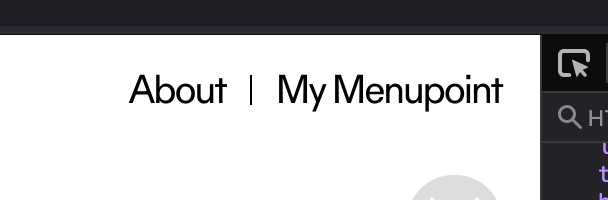
          grafik.png

          Try to adapt the CSS using maybe ChatGPT or Gemini or something if you need help with that

          1 Reply Last reply
          • E
            E
            emmapasteur
            wrote on last edited by
            #6

            I can't find the "html at bottom" window you are talking about... thank you very much for your help

            1 Reply Last reply
            • arminunruhA
              arminunruhA
              arminunruh
              Global Moderator
              wrote on last edited by
              #7

              I changed the code a little bit. I had one or two things that were not optimal yet. You can copy the code again from my post above.

              You will find it in Lay Options . Custom HTML and CSS, and I think it's the very last text box at the bottom.

              1 Reply Last reply
              • E
                E
                emmapasteur
                wrote on last edited by
                #8

                Thank you so much.

                1 Reply Last reply
                • arminunruhA
                  arminunruhA
                  arminunruh
                  Global Moderator
                  wrote on last edited by
                  #9

                  you're welcome! <3

                  1 Reply Last reply
                  • E
                    E
                    eduardsales
                    wrote last edited by
                    #10

                    hi @arminunruh , thanks for the code provided, it worked really well on the menu. I edited it a bit as the lines were appearing with a kind of padding on top, dded a line at the end, kind of "closing" the menu and also added one of these to the site title.

                    Is there a way I Could fix the submenu to make it look like the menu ( inside "boxes"?)

                    I attach an image and the code I've used.

                    Thanks in advance,

                    Eduard

                    Captura de pantalla 2026-11-10 a les 20.29.07.png

                    <script>
                    (function () {
                    var lists = document.querySelectorAll('nav.laynav.primary > ul');

                    for (var i = 0; i < lists.length; i++) {
                        var ul = lists[i];
                        var items = [];
                    
                        // Collect real menu items
                        for (var c = 0; c < ul.children.length; c++) {
                            var child = ul.children[c];
                    
                            if (child.tagName === 'LI' &&
                                !child.classList.contains('lay-menu-divider')) {
                                items.push(child);
                            }
                        }
                    
                        // Insert dividers between menu items
                        for (var j = 1; j < items.length; j++) {
                            var prev = items[j].previousElementSibling;
                    
                            if (prev && prev.classList.contains('lay-menu-divider')) {
                                continue;
                            }
                    
                            var divider = document.createElement('li');
                            divider.className = 'lay-menu-divider';
                            divider.setAttribute('aria-hidden', 'true');
                    
                            ul.insertBefore(divider, items[j]);
                        }
                    
                        // Add final divider
                        if (items.length > 0) {
                            var last = items[items.length - 1];
                            var next = last.nextElementSibling;
                    
                            if (!next || !next.classList.contains('lay-menu-divider')) {
                                var finalDivider = document.createElement('li');
                                finalDivider.className = 'lay-menu-divider';
                                finalDivider.setAttribute('aria-hidden', 'true');
                    
                                ul.insertBefore(finalDivider, last.nextSibling);
                            }
                        }
                    }
                    

                    })();
                    </script>

                    <style>
                    nav.laynav.primary > ul > li.lay-menu-divider {
                    display: inline-block !important;
                    vertical-align: top;
                    position: relative;
                    top: -16px;
                    width: 1px;
                    height: 46px;
                    margin: 0px;
                    padding: 0;
                    background-color: #000;
                    }

                    /* Site Title - left vertical line */
                    .sitetitle-txt-inner:not(.laybutton)::before {
                    content: "";
                    position: absolute;
                    left: -30px;
                    top: -16px;
                    width: 1px;
                    height: 46px;
                    background-color: #000;
                    }

                    </style>

                    1 Reply Last reply
                    • arminunruhA
                      arminunruhA
                      arminunruh
                      Global Moderator
                      wrote last edited by
                      #11

                      hey i would recommend that you connect your claude or chatgpt if you have that to your laytheme using AI Mode:

                      https://laytheme.com/tutorials/ai-mode/#connect-to-claude-codex

                      then let it just code the menu and submenu for you exactly as you want it.
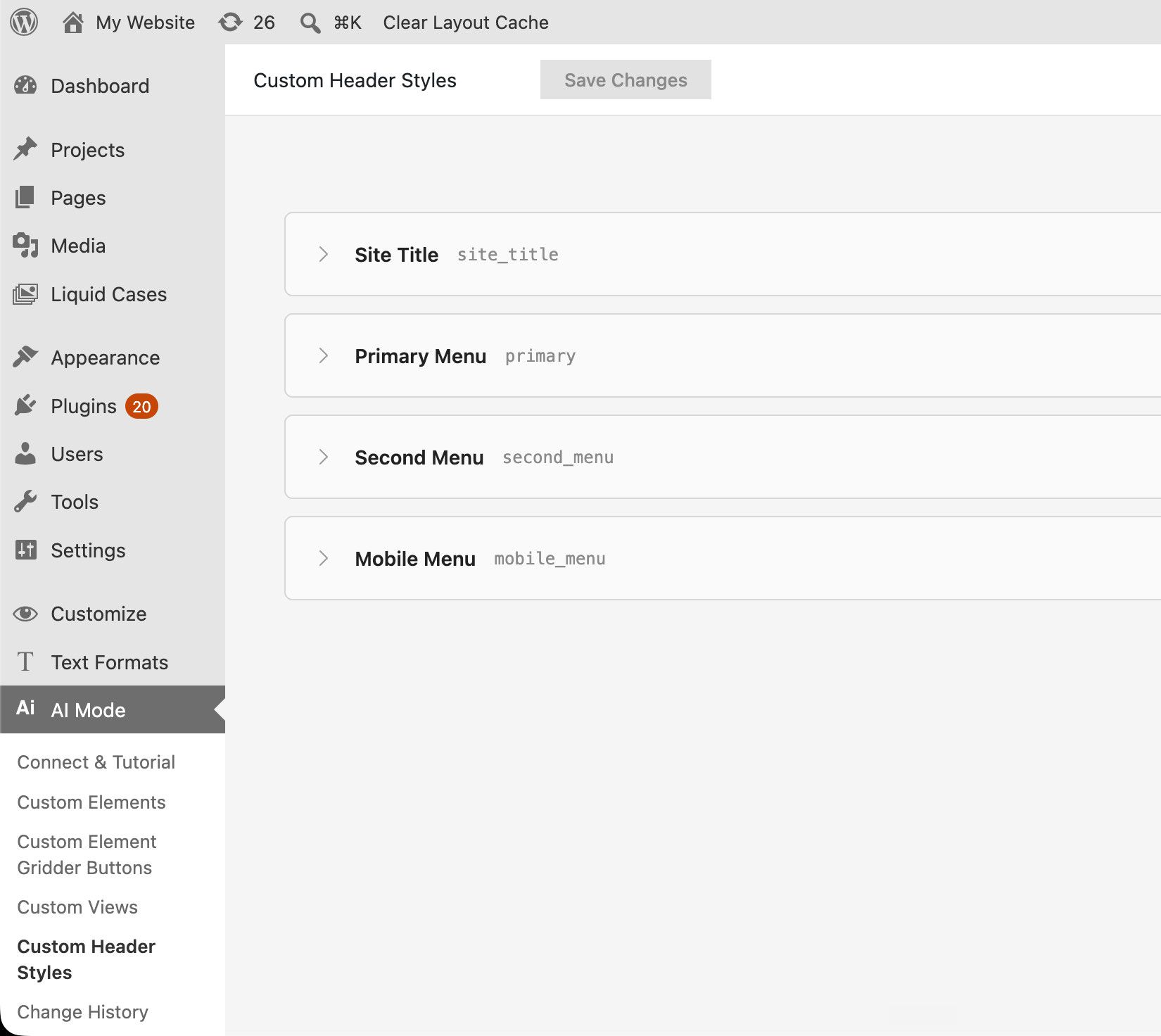
                      grafik.jpeg

                      ai mode was made exactly for things like this

                      1 Reply Last reply

                      Hello! It looks like you're interested in this conversation, but you don't have an account yet.

                      Getting fed up of having to scroll through the same posts each visit? When you register for an account, you'll always come back to exactly where you were before, and choose to be notified of new replies (either via email, or push notification). You'll also be able to save bookmarks and upvote posts to show your appreciation to other community members.

                      With your input, this post could be even better 💗

                      Register Login
                      Reply
                      • Reply as topic
                      Log in to reply
                      • Oldest to Newest
                      • Newest to Oldest
                      • Most Votes


                      Online Users
                      Forgot your key, lost your files, need a previous Lay Theme or Addon version? Go to www.laykeymanager.com
                      laytheme.com
                      • Login

                      • Don't have an account? Register

                      • Login or register to search.
                      • First post
                        Last post
                      0
                      • Recent
                      • Tags
                      • Popular
                      • Users
                      • Search