Skip to content
  • Recent
  • Tags
  • Popular
  • Users
  • Search
Skins
  • Light
  • Brite
  • Cerulean
  • Cosmo
  • Flatly
  • Journal
  • Litera
  • Lumen
  • Lux
  • Materia
  • Minty
  • Morph
  • Pulse
  • Sandstone
  • Simplex
  • Sketchy
  • Spacelab
  • United
  • Yeti
  • Zephyr
  • Dark
  • Cyborg
  • Darkly
  • Quartz
  • Slate
  • Solar
  • Superhero
  • Vapor

  • Default (No Skin)
  • No Skin
Collapse

Lay Theme Forum

  1. Home
  2. General Discussion
  3. Get an image to pop up when I mouse over a word (text)?

Get an image to pop up when I mouse over a word (text)?

Scheduled Pinned Locked Moved General Discussion
9 Posts 3 Posters 2.7k Views 1 Watching
  • Oldest to Newest
  • Newest to Oldest
  • Most Votes
Reply
  • Reply as topic
Log in to reply
This topic has been deleted. Only users with topic management privileges can see it.
  • M
    M
    maxbale
    wrote on last edited by
    #1

    In the body of my text I want an image to p0p up when you hover your mouse over a certain word. Is it possible? How I can do this?

    1 Reply Last reply
    0
    • mariusjopenM
      mariusjopenM
      mariusjopen
      Global Moderator
      wrote on last edited by
      #2

      Hi Maxbale!

      I just explained this a couple of days ago.

      have a look here:

      http://laythemeforum.com/topic/1568/adding-text-slide/4

      But use the updated code:

      .button-hide {
          display: none;
      }
      
      .button-show {
          display: block !important;
      }
      
      <script>
      jQuery(document).on("click", ".button", function(event) {
      	 jQuery(".button-hide").toggleClass("button-show");
      });
      </script>
      

      I hope you will figure it out :-)

      Best!

      Marius

      www.mariusjopen.world

      B 1 Reply Last reply
      0
      • B
        B
        bd
        wrote on last edited by
        #3
        This post is deleted!
        1 Reply Last reply
        0
        • mariusjopenM mariusjopen

          Hi Maxbale!

          I just explained this a couple of days ago.

          have a look here:

          http://laythemeforum.com/topic/1568/adding-text-slide/4

          But use the updated code:

          .button-hide {
              display: none;
          }
          
          .button-show {
              display: block !important;
          }
          
          <script>
          jQuery(document).on("click", ".button", function(event) {
          	 jQuery(".button-hide").toggleClass("button-show");
          });
          </script>
          

          I hope you will figure it out :-)

          Best!

          Marius

          B
          B
          bd
          wrote on last edited by
          #4

          @mariusjopen

          Hi Marius

          I've just tried this but am not having any luck. It's as if I've done nothing at all. Any ideas?

          Thanks

          Bryn

          1 Reply Last reply
          0
          • mariusjopenM
            mariusjopenM
            mariusjopen
            Global Moderator
            wrote on last edited by
            #5

            Hi @bd
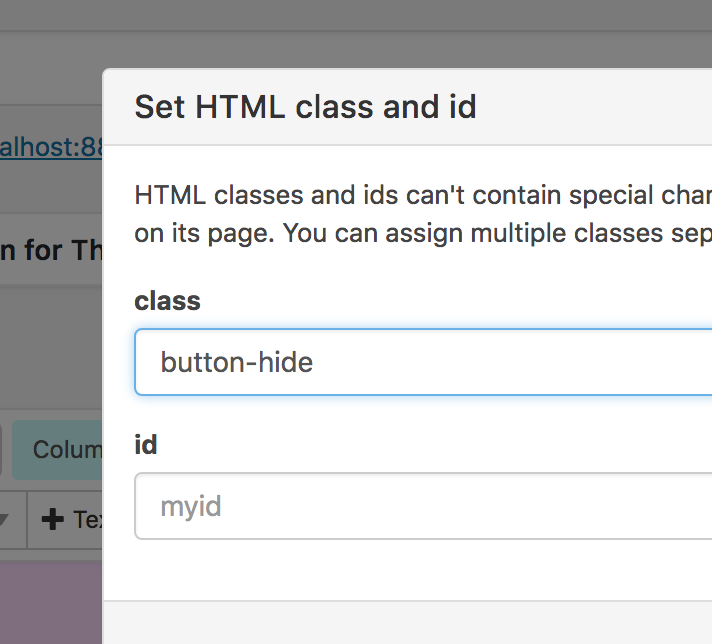
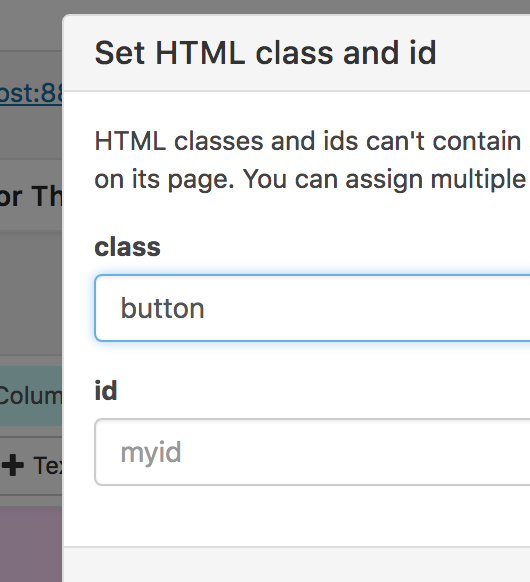
            did you give the element the class button?

            All the best!

            Marius

            www.mariusjopen.world

            B 1 Reply Last reply
            0
            • mariusjopenM mariusjopen

              Hi @bd
              did you give the element the class button?

              All the best!

              Marius

              B
              B
              bd
              wrote on last edited by
              #6

              @mariusjopen

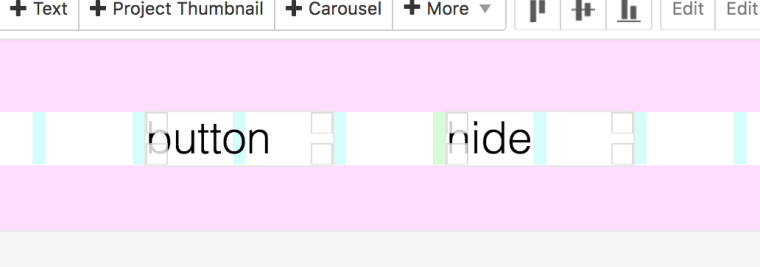
              I did give the button and hide classes as per the older thread you linked to.

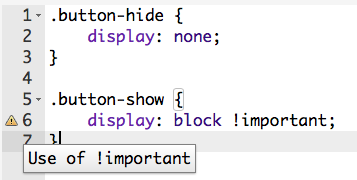
              Sorry I know nothing about code and maybe stupidly trying to do this without learning much. I did notice in my custom CSS/HTML that I'm getting an error for the use of !important; , and {event) is not highlighting like it has with your screenshots, could this have something to do with it?

              Here's screenshots of what I have.
              1_1517370446908_Screen Shot 2018-01-31 at 2.42.25 pm.png
              0_1517370446907_Screen Shot 2018-01-31 at 2.42.34 pm.png

              Thanks for your help!

              1 Reply Last reply
              0
              • mariusjopenM
                mariusjopenM
                mariusjopen
                Global Moderator
                wrote on last edited by
                #7

                Hi @bd

                maybe it got a bit confusing.

                Have a closer look here:
                2_1517544490655_Bildschirmfoto 2018-02-02 um 02.07.37.png 1_1517544490655_Bildschirmfoto 2018-02-02 um 02.07.31.png 0_1517544490655_Bildschirmfoto 2018-02-02 um 02.07.21.png

                I hope that works out!

                Best!

                Marius

                www.mariusjopen.world

                B 1 Reply Last reply
                0
                • mariusjopenM mariusjopen

                  Hi @bd

                  maybe it got a bit confusing.

                  Have a closer look here:
                  2_1517544490655_Bildschirmfoto 2018-02-02 um 02.07.37.png 1_1517544490655_Bildschirmfoto 2018-02-02 um 02.07.31.png 0_1517544490655_Bildschirmfoto 2018-02-02 um 02.07.21.png

                  I hope that works out!

                  Best!

                  Marius

                  B
                  B
                  bd
                  wrote on last edited by
                  #8

                  Thanks @mariusjopen

                  That solved my problem, but then made me realise what I actually want to do is a bit more complicated and may not be possible with the gridder (having a menu that brings up an image in the same place as you hover over the items). I think I'll have to find someone with more knowledge than I have to sort it for me!

                  1 Reply Last reply
                  0
                  • mariusjopenM
                    mariusjopenM
                    mariusjopen
                    Global Moderator
                    wrote on last edited by
                    #9

                    Hi @bd

                    have a look here then:
                    http://laythemeforum.com/topic/987/images-appear-on-link-hover-ii/3

                    http://laythemeforum.com/topic/616/images-appear-on-link-hover/12

                    But probably you have to come up with your own solution about this :-/

                    Good luck and many wishes!

                    Marius

                    www.mariusjopen.world

                    1 Reply Last reply
                    0

                    Hello! It looks like you're interested in this conversation, but you don't have an account yet.

                    Getting fed up of having to scroll through the same posts each visit? When you register for an account, you'll always come back to exactly where you were before, and choose to be notified of new replies (either via email, or push notification). You'll also be able to save bookmarks and upvote posts to show your appreciation to other community members.

                    With your input, this post could be even better 💗

                    Register Login
                    Reply
                    • Reply as topic
                    Log in to reply
                    • Oldest to Newest
                    • Newest to Oldest
                    • Most Votes


                    Online Users
                    L
                    lukas123
                    Forgot your key, lost your files, need a previous Lay Theme or Addon version? Go to www.laykeymanager.com
                    laytheme.com
                    • Login

                    • Don't have an account? Register

                    • Login or register to search.
                    • First post
                      Last post
                    0
                    • Recent
                    • Tags
                    • Popular
                    • Users
                    • Search