Skip to content
  • Recent
  • Tags
  • Popular
  • Users
  • Search
Skins
  • Light
  • Brite
  • Cerulean
  • Cosmo
  • Flatly
  • Journal
  • Litera
  • Lumen
  • Lux
  • Materia
  • Minty
  • Morph
  • Pulse
  • Sandstone
  • Simplex
  • Sketchy
  • Spacelab
  • United
  • Yeti
  • Zephyr
  • Dark
  • Cyborg
  • Darkly
  • Quartz
  • Slate
  • Solar
  • Superhero
  • Vapor

  • Default (No Skin)
  • No Skin
Collapse

Lay Theme Forum

  1. Home
  2. General Discussion
  3. Render fonts

Render fonts

Scheduled Pinned Locked Moved General Discussion
3 Posts 2 Posters 688 Views 1 Watching
  • Oldest to Newest
  • Newest to Oldest
  • Most Votes
Reply
  • Reply as topic
Log in to reply
This topic has been deleted. Only users with topic management privileges can see it.
  • D
    D
    dnlbrv
    wrote on last edited by dnlbrv
    #1

    Hello,

    I have detected a nuance regarding the display of fonts. The fonts look slightly thicker than the originals. I have "fixed" it with css:

    body {
    -webkit-font-smoothing: antialiased;
    Text-rendering: optimizeLegibility;
    }

    Is posible view the fonts with custom css in the Text Formats section?

    I think is more good the render with custom css, is more similar to the original font, but to work fine in the Text Formats section I need view the render font equal.

    The render font with custom css:

    0_1490266580347_Screen Shot 2017-03-23 at 11.55.04.png

    The render font with lay theme:

    0_1490266607233_Screen Shot 2017-03-23 at 11.54.56.png

    The render font with lay theme in Text Formats section:
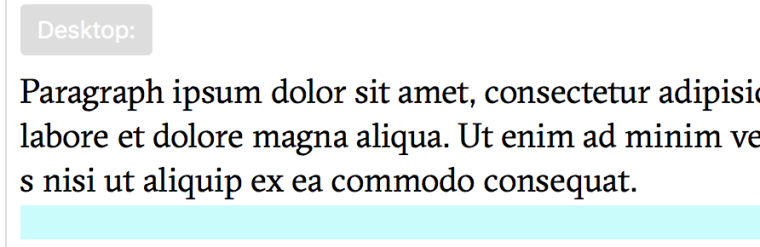
    0_1490266073628_03 with Text Formats render.png

    Thanks a lot!

    1 Reply Last reply
    0
    • mariusjopenM
      mariusjopenM
      mariusjopen
      Global Moderator
      wrote on last edited by
      #2

      Hi dnlbrv,

      thank you fro writing us!

      Indeed this is a great way to make fonts look much nicer.

      body {
      -webkit-font-smoothing: antialiased;
      Text-rendering: optimizeLegibility;
      }
      

      Until now it is not embedded in the Backend but we will consider implementing it in the future.

      Thank you for sharing your ideas!

      All the best!

      Marius

      www.mariusjopen.world

      1 Reply Last reply
      0
      • D
        D
        dnlbrv
        wrote on last edited by
        #3

        Hey!
        much better this way:

        body, html {
        -webkit-font-smoothing: antialiased;
        text-rendering: optimizeSpeed;
        }

        optimizeLegibility cause a tremble effect when reloaded the page.

        Great theme!

        1 Reply Last reply
        0

        Hello! It looks like you're interested in this conversation, but you don't have an account yet.

        Getting fed up of having to scroll through the same posts each visit? When you register for an account, you'll always come back to exactly where you were before, and choose to be notified of new replies (either via email, or push notification). You'll also be able to save bookmarks and upvote posts to show your appreciation to other community members.

        With your input, this post could be even better 💗

        Register Login
        Reply
        • Reply as topic
        Log in to reply
        • Oldest to Newest
        • Newest to Oldest
        • Most Votes


        Online Users
        Forgot your key, lost your files, need a previous Lay Theme or Addon version? Go to www.laykeymanager.com
        laytheme.com
        • Login

        • Don't have an account? Register

        • Login or register to search.
        • First post
          Last post
        0
        • Recent
        • Tags
        • Popular
        • Users
        • Search