Skip to content
  • Recent
  • Tags
  • Popular
  • Users
  • Search
Skins
  • Light
  • Brite
  • Cerulean
  • Cosmo
  • Flatly
  • Journal
  • Litera
  • Lumen
  • Lux
  • Materia
  • Minty
  • Morph
  • Pulse
  • Sandstone
  • Simplex
  • Sketchy
  • Spacelab
  • United
  • Yeti
  • Zephyr
  • Dark
  • Cyborg
  • Darkly
  • Quartz
  • Slate
  • Solar
  • Superhero
  • Vapor

  • Default (No Skin)
  • No Skin
Collapse

Lay Theme Forum

  1. Home
  2. General Discussion
  3. Project thumbnails same height

Project thumbnails same height

Scheduled Pinned Locked Moved General Discussion
4 Posts 2 Posters 16 Views 2 Watching
  • Oldest to Newest
  • Newest to Oldest
  • Most Votes
Reply
  • Reply as topic
Log in to reply
This topic has been deleted. Only users with topic management privileges can see it.
  • A Offline
    A Offline
    Aleksandar
    wrote last edited by
    #1

    Hi Armin,

    maybe this has already been asked and answered somewhere. If so, I’d appreciate a link.

    Otherwise, my question is:

    how can I make all project thumbnails the same height, even if the titles have different lengths? Sometimes the titles are one line, sometimes two lines, which makes the thumbnails different heights. Since I’m using a background color for the entire project thumbnail, it would be great if they were all the same height.

    Is there a way to do this with custom CSS? I just can’t figure it out. I’ve tried all sorts of things, but nothing seems to work. :-/

    All best
    Aleks

    1 Reply Last reply
    0
    • arminunruhA Offline
      arminunruhA Offline
      arminunruh
      Global Moderator
      wrote last edited by
      #2

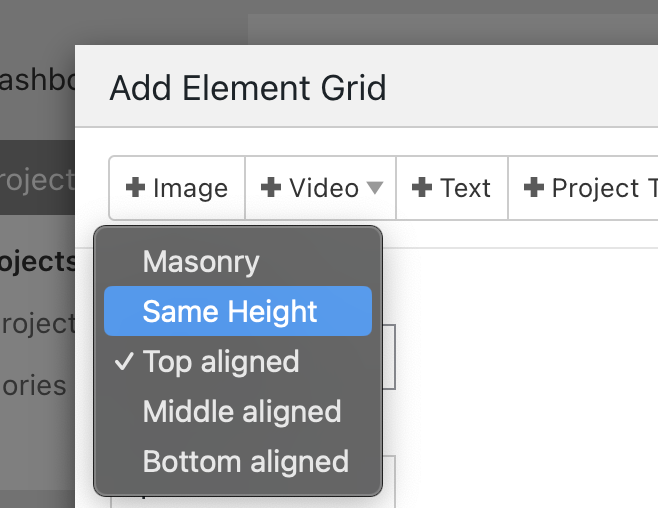
      Screenshot 2025-12-23 at 08.56.26.png

      hey at the moment, only the elementgrid has the same height setting layout type.

      if you want to use the thumbnailgrid and have images be the same height, you could use:
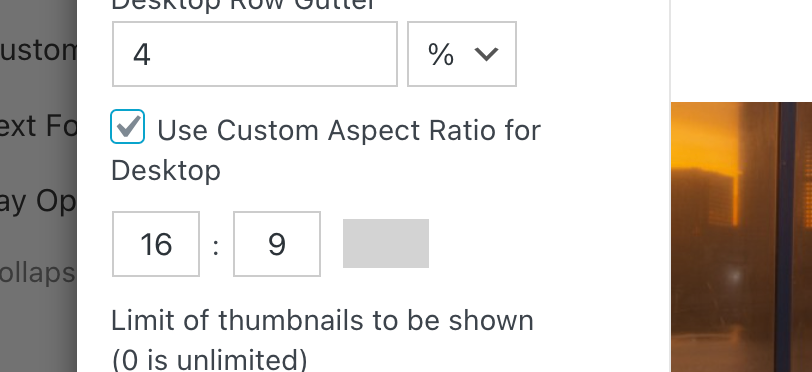
      Screenshot 2025-12-23 at 08.57.22.png

      making the images be the same aspect ratio will of course also make them the same height

      1 Reply Last reply
      0
      • arminunruhA Offline
        arminunruhA Offline
        arminunruh
        Global Moderator
        wrote last edited by
        #3

        if the issue is just that your project titles are different lengths, you could try:

        use a smaller font size, or in textformats, use a vw font size which scales with the browser width:

        Screenshot 2025-12-23 at 08.59.51.png

        (clicking px will make it vw)

        OR,
        this css will make the title get ... instead of a linebreak

        .thumbnail-wrap .title{
        overflow: hidden;
        text-overflow: ellipsis;
        white-space: nowrap;
        }
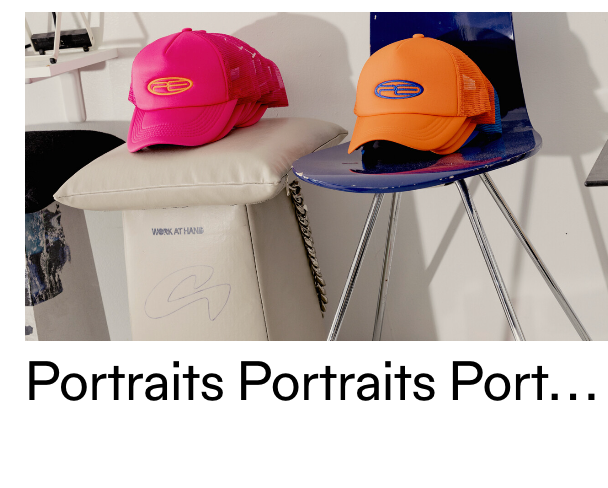
        Screenshot 2025-12-23 at 09.02.12.png

        PS:
        please always post a link to where the issue is, so next time i can more easily check out what solution would fit your situation best instead of suggesting 3 different solutions :D:D

        1 Reply Last reply
        0
        • A Offline
          A Offline
          Aleksandar
          wrote last edited by
          #4

          Hey Armin, thank you very much! Last CSS version is completely fine! Thank you very much! And YES, next time I'm posting a link. :-)

          Merry Christmas and guten Rutsch! :-D

          1 Reply Last reply
          0
          Reply
          • Reply as topic
          Log in to reply
          • Oldest to Newest
          • Newest to Oldest
          • Most Votes


          I also code custom websites or custom Lay features.
          💿 Email me here: 💿
          info@laytheme.com

          Our Web Development company: 100k.studio

          Want to tip me? https://www.paypal.com/paypalme/arminunruh

          Before you post:
          1. When using a WordPress Cache plugin, disable it or clear your cache.
          2. Update Lay Theme and all Lay Theme Addons
          3. Disable all Plugins
          4. Go to Lay Options → Custom CSS & HTML, click "Turn Off All Custom Code", click "Save Changes"

          This often solves issues you might run into

          When you post:
          1. Post a link to where the problem is
          2. Does the problem happen on Chrome, Firefox, Safari or iPhone or Android?
          3. If the problem is difficult to explain, post screenshots / link to a video to explain it
          Online Users
          F
          fernandol97
          Forgot your key, lost your files, need a previous Lay Theme or Addon version? Go to www.laykeymanager.com
          laytheme.com
          • Login

          • Don't have an account? Register

          • Login or register to search.
          • First post
            Last post
          0
          • Recent
          • Tags
          • Popular
          • Users
          • Search