Skip to content
  • Recent
  • Tags
  • Popular
  • Users
  • Search
Skins
  • Light
  • Brite
  • Cerulean
  • Cosmo
  • Flatly
  • Journal
  • Litera
  • Lumen
  • Lux
  • Materia
  • Minty
  • Morph
  • Pulse
  • Sandstone
  • Simplex
  • Sketchy
  • Spacelab
  • United
  • Yeti
  • Zephyr
  • Dark
  • Cyborg
  • Darkly
  • Quartz
  • Slate
  • Solar
  • Superhero
  • Vapor

  • Default (No Skin)
  • No Skin
Collapse

Lay Theme Forum

  1. Home
  2. General Discussion
  3. Split screen / no scrolling on the right side

Split screen / no scrolling on the right side

Scheduled Pinned Locked Moved General Discussion
6 Posts 2 Posters 114 Views 2 Watching
  • Oldest to Newest
  • Newest to Oldest
  • Most Votes
Reply
  • Reply as topic
Log in to reply
This topic has been deleted. Only users with topic management privileges can see it.
  • J Offline
    J Offline
    joaflo17
    wrote on last edited by
    #1

    hi there,
    I am currently working on a split-screen website and having two problems that I cannot resolve.

    Problem 1 – Fixed element at the top:
    I would still like to have a fixed element at the top of the viewport (graphic design/illustration).
    However, since the left side is already my “footer area,” I don't know how to create an extra menu bar at the top (because I already a menu bar on the bottom)

    Problem 2 – Scrolling on only one side:
    Currently, only the left side can be scrolled; the right side remains static.
    However, I would like both sides to be able to scroll independently of each other.
    Also my other page "info" isn´t scrollable anymore

    would be happy for some help

    (https://joannafloesserco-vqws6c6m65.live-website.com)

    1 Reply Last reply
    0
    • arminunruhA Offline
      arminunruhA Offline
      arminunruh
      Global Moderator
      wrote on last edited by
      #2

      you need to use the exact css i provided in the tutorial.
      i think you used 100% width for both the footer and the normal grid

      this results in one of them overlaying the other, so only one is scrollable

      1 Reply Last reply
      0
      • arminunruhA Offline
        arminunruhA Offline
        arminunruh
        Global Moderator
        wrote on last edited by
        #3

        about the fixed element:

        i think inside of these containers, fixed doesnt work. this is just due to how css works, you cant put fixed elements in any container

        however, you can use the "fixed header" feature
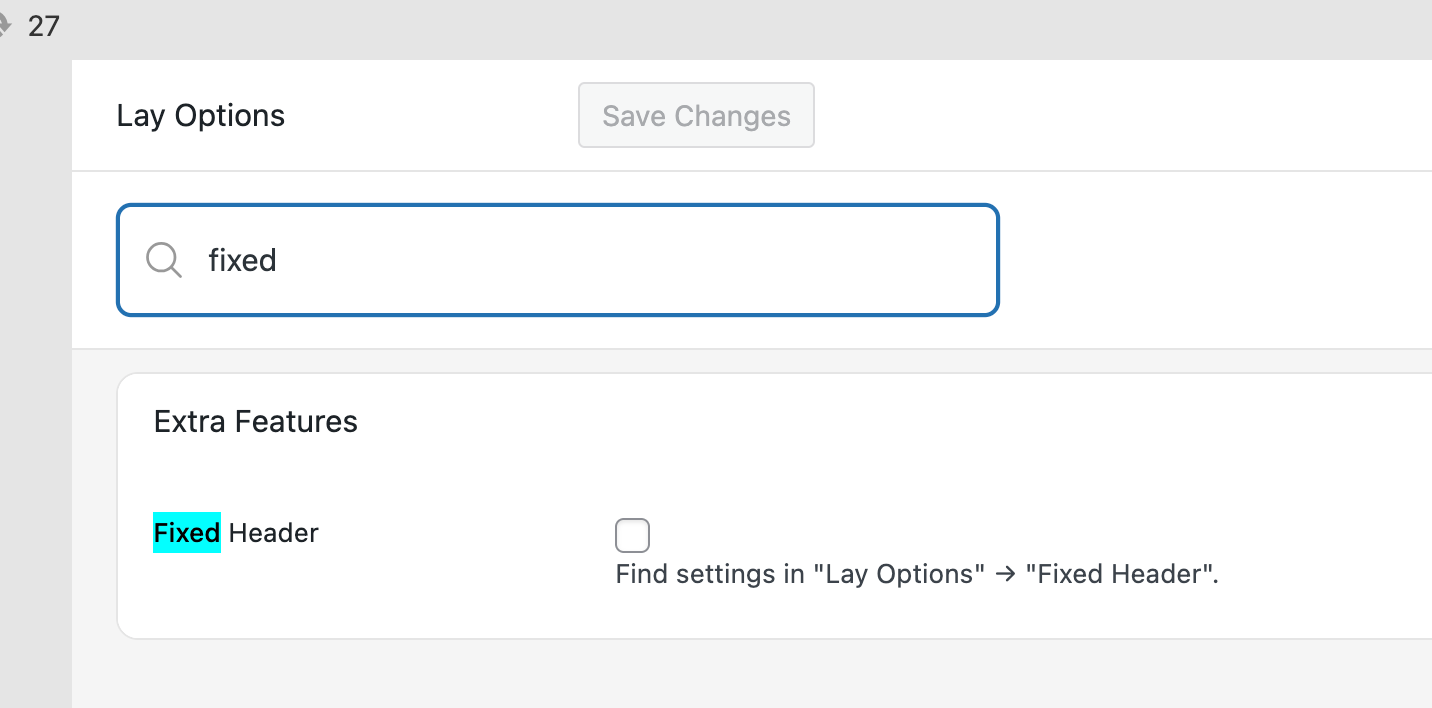
        Screenshot 2025-12-30 at 10.30.03.png

        enable it in lay options.
        then in lay options -> fixed header

        you can choose a page to act as your fixed overlay

        J 1 Reply Last reply
        0
        • J Offline
          J Offline
          joaflo17
          wrote last edited by
          #4

          Thanks a lot for your reply! Scrolling is now possible, but both sides are the wrong size. At 50%, they are only half their size. That's why I changed it to 100%. Do you know what the problem is?

          1 Reply Last reply
          0
          • arminunruhA arminunruh

            about the fixed element:

            i think inside of these containers, fixed doesnt work. this is just due to how css works, you cant put fixed elements in any container

            however, you can use the "fixed header" feature
            Screenshot 2025-12-30 at 10.30.03.png

            enable it in lay options.
            then in lay options -> fixed header

            you can choose a page to act as your fixed overlay

            J Offline
            J Offline
            joaflo17
            wrote last edited by
            #5
            This post is deleted!
            1 Reply Last reply
            0
            • arminunruhA Offline
              arminunruhA Offline
              arminunruh
              Global Moderator
              wrote last edited by
              #6

              hello!

              i dont really understand what you mean with:
              "At 50%, they are only half their size. That's why I changed it to 100%"

              If you use the splitscreen type of layout, the left half needs to be 50% and the right 50%

              or 20% and 80%

              they always need to be 100% width combined.

              if you have two sides that are both 100% width, it doesn't make sense :D

              1 Reply Last reply
              0
              Reply
              • Reply as topic
              Log in to reply
              • Oldest to Newest
              • Newest to Oldest
              • Most Votes


              I also code custom websites or custom Lay features.
              💿 Email me here: 💿
              info@laytheme.com

              Our Web Development company: 100k.studio

              Want to tip me? https://www.paypal.com/paypalme/arminunruh

              Before you post:
              1. When using a WordPress Cache plugin, disable it or clear your cache.
              2. Update Lay Theme and all Lay Theme Addons
              3. Disable all Plugins
              4. Go to Lay Options → Custom CSS & HTML, click "Turn Off All Custom Code", click "Save Changes"

              This often solves issues you might run into

              When you post:
              1. Post a link to where the problem is
              2. Does the problem happen on Chrome, Firefox, Safari or iPhone or Android?
              3. If the problem is difficult to explain, post screenshots / link to a video to explain it
              Online Users
              Forgot your key, lost your files, need a previous Lay Theme or Addon version? Go to www.laykeymanager.com
              laytheme.com
              • Login

              • Don't have an account? Register

              • Login or register to search.
              • First post
                Last post
              0
              • Recent
              • Tags
              • Popular
              • Users
              • Search