Laytheme crops my 16:9 videos
-
Dear @caromo
Thank you for the clear testing 👍
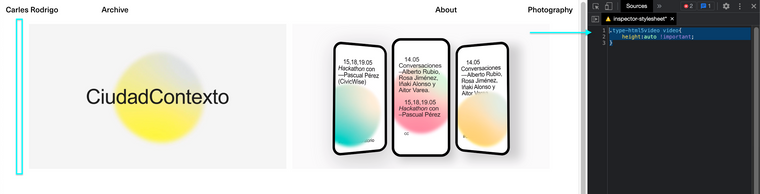
I recreated your video on my test site:You can see that if the video has enough room it will be the correct ratio but if needed it will crop to fit it's spacing within a Gridder Layout. I will forward to Armin to make sure this if this intended or not ✅
Best wishes & thank you for supporting Lay Theme @caromo ✨
Richard
-
-
-
-
-
@Richard, thank you for your answer!
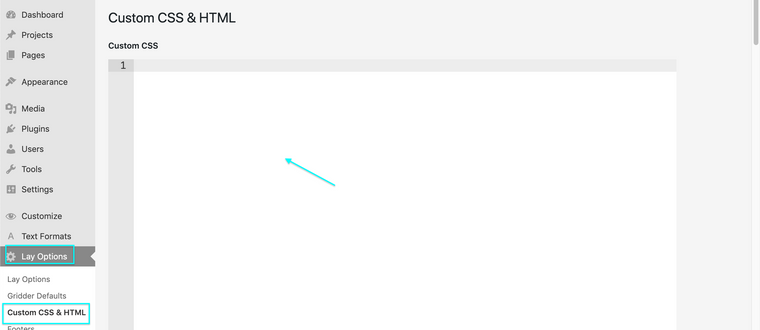
Well it works, but the space of the video is the same as before, so you can see under the video a blank space and the sound control is when it was placed without this code...
Is a bit weird...
-
hey!
so it seems that wordpress gets the wrong sizes for videos sometimes.
is there any way you can export that video again and use a different size, like the aspect ratio can stay the same but try and export the video with a different width, maybe a standard one like 1280px.
or try and convert the video somehow.i think the issue is with the video file itself.
-
-
-


Hello! It looks like you're interested in this conversation, but you don't have an account yet.
Getting fed up of having to scroll through the same posts each visit? When you register for an account, you'll always come back to exactly where you were before, and choose to be notified of new replies (either via email, or push notification). You'll also be able to save bookmarks and upvote posts to show your appreciation to other community members.
With your input, this post could be even better 💗
Register Login