Skip to content
  • Recent
  • Tags
  • Popular
  • Users
  • Search
Skins
  • Light
  • Brite
  • Cerulean
  • Cosmo
  • Flatly
  • Journal
  • Litera
  • Lumen
  • Lux
  • Materia
  • Minty
  • Morph
  • Pulse
  • Sandstone
  • Simplex
  • Sketchy
  • Spacelab
  • United
  • Yeti
  • Zephyr
  • Dark
  • Cyborg
  • Darkly
  • Quartz
  • Slate
  • Solar
  • Superhero
  • Vapor

  • Default (No Skin)
  • No Skin
Collapse

Lay Theme Forum

  1. Home
  2. Bug Reports
  3. Different elements not working

Different elements not working

Scheduled Pinned Locked Moved Bug Reports
6 Posts 2 Posters 82 Views
  • Oldest to Newest
  • Newest to Oldest
  • Most Votes
Reply
  • Reply as topic
Log in to reply
This topic has been deleted. Only users with topic management privileges can see it.
  • alvarodozeA Offline
    alvarodozeA Offline
    alvarodoze
    wrote on last edited by
    #1

    Hi Laytheme team,
    Website: https://georginanorris.com/
    Link problem: https://drive.google.com/file/d/1WZ1e3k7CM-AjB2-AvRyjKK2YBihLxBj2/view?usp=sharing

    I was working on a custom cursor - it all was working fine - until suddenly the website crashed.

    1- Arrows in the carrousel not showing correctly (glitching)
    2- When scroll to the project index it crash and send you to the carrrousel.
    3 - The 2 first projects cannot be selected nor image is shown...
    4- The custom icon for the Full screen slider addon are not working...
    5-Why is the last project higlight it in grey..?

    Any ideas - thoughts...?

    Super Thanks

    1 Reply Last reply
    0
    • RichardR Offline
      RichardR Offline
      Richard
      Global Moderator
      wrote on last edited by
      #2

      Dear @alvarodoze

      Is there anyway to see the page in question? currently its the "see you soon" landing page.

      The behaviour in the video was very glitchy as you say - can we make sure that this is not caused by:

      Wordpress, Lay Theme & Laytheme's Addons are all up to date ?

      Any custom CSS or JS that may interfere is temporarily removed.

      Any third-party plugins are de-activated to see if this resolves the issue.


      Talk soon & best wishes
      Richard
      1 Reply Last reply
      0
      • alvarodozeA Offline
        alvarodozeA Offline
        alvarodoze
        wrote on last edited by alvarodoze
        #3

        Hi Richard. Thank you for your answer.
        Yes sorry, I hide it. You can find the website here.
        https://georginanorris.com/category/home/
        It seems to work now, I delete all the cookies form the browser and works.

        -What I can still see is that the custom cursor of Full Screen Slider is not showing
        -The last project is grey is the Project Index

        Thank you.

        1 Reply Last reply
        0
        • RichardR Offline
          RichardR Offline
          Richard
          Global Moderator
          wrote on last edited by
          #4

          Dear @alvarodoze

          Great to hear some issues were solved with the Cookies 🌻

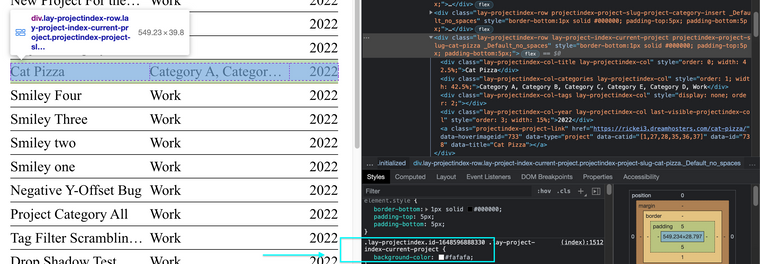
          The last project being grey indicates its the "current project"
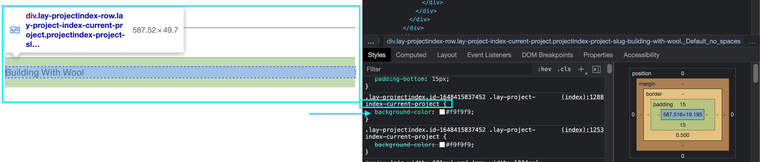
          Screen Shot 2022-03-30 at 12.31.19 PM.png

          I also have it:
          Screen Shot 2022-03-30 at 12.36.21 PM.png

          With the fullscreen slider is the custom cursor the yellow spray dot?


          Talk soon
          Richard
          alvarodozeA 1 Reply Last reply
          0
          • RichardR Richard

            Dear @alvarodoze

            Great to hear some issues were solved with the Cookies 🌻

            The last project being grey indicates its the "current project"
            Screen Shot 2022-03-30 at 12.31.19 PM.png

            I also have it:
            Screen Shot 2022-03-30 at 12.36.21 PM.png

            With the fullscreen slider is the custom cursor the yellow spray dot?


            Talk soon
            Richard
            alvarodozeA Offline
            alvarodozeA Offline
            alvarodoze
            wrote on last edited by
            #5

            Hi @Richard,

            • And is there any way you can uncheck the grey box and make it the same as the other one?
            • With the fullscreen slider I would like to have some custom arrows. That indicate you can scroll up or down and the spray dot when you hover each project.

            Thank you

            1 Reply Last reply
            0
            • RichardR Offline
              RichardR Offline
              Richard
              Global Moderator
              wrote on last edited by
              #6

              Dear @alvarodoze

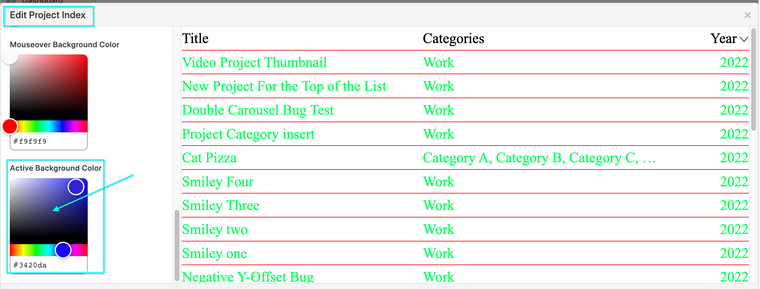
              " is there any way you can uncheck the grey box and make it the same as the other one?"

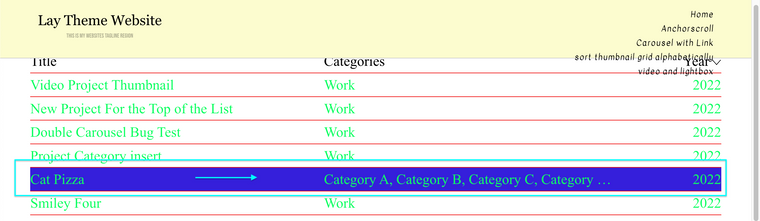
              This is defined by the Active Background Color setting when editing a Project index:

              Settings:
              Screen Shot 2022-04-03 at 6.49.15 PM.png

              Result:
              Screen Shot 2022-04-03 at 6.48.49 PM.png

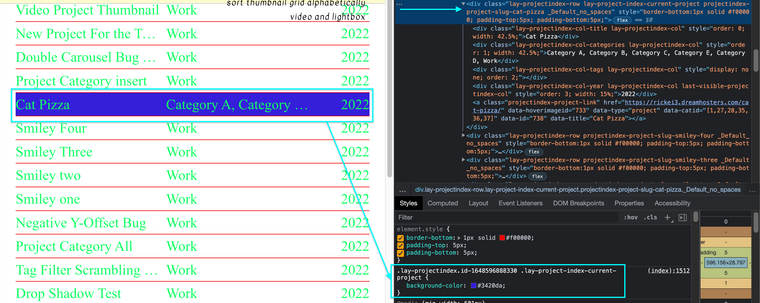
              Code:
              Screen Shot 2022-04-03 at 6.50.23 PM.png

              .lay-project-index-current-project {
                 background-color: #3420da;
              }
              

              "With the fullscreen slider I would like to have some custom arrows" ... "That indicate you can scroll up or down"

              Do the following settings help you?
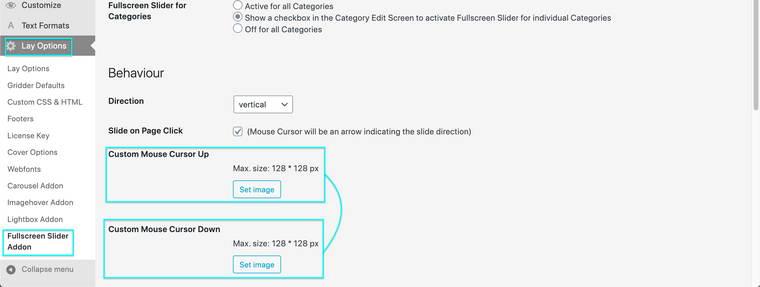
              Screen Shot 2022-04-03 at 6.57.01 PM.png

              http://laythemeforum.com:4567/topic/5190/svg-cursors-fix/2


              "the spray dot when you hover each project."

              A custom cursor on hover, do any of these links help?

              • http://laythemeforum.com:4567/topic/5169/custom-cursor-issues
              • http://laythemeforum.com:4567/topic/5121/css-custom-cursor-issue
              • http://laythemeforum.com:4567/topic/824/custom-cursor-pointer/8

              Best wishes ✨
              Richard

              1 Reply Last reply
              0
              Reply
              • Reply as topic
              Log in to reply
              • Oldest to Newest
              • Newest to Oldest
              • Most Votes


              I also code custom websites or custom Lay features.
              šŸ’æ Email me here: šŸ’æ
              info@laytheme.com

              Our Web Development company: 100k.studio

              Want to tip me? https://www.paypal.com/paypalme/arminunruh

              Before you post:
              1. When using a WordPress Cache plugin, disable it or clear your cache.
              2. Update Lay Theme and all Lay Theme Addons
              3. Disable all Plugins
              4. Go to Lay Options → Custom CSS & HTML, click "Turn Off All Custom Code", click "Save Changes"

              This often solves issues you might run into

              When you post:
              1. Post a link to where the problem is
              2. Does the problem happen on Chrome, Firefox, Safari or iPhone or Android?
              3. If the problem is difficult to explain, post screenshots / link to a video to explain it
              Online Users
              E
              emresenoglu
              D
              Dawid
              P
              patl
              Forgot your key, lost your files, need a previous Lay Theme or Addon version? Go to www.laykeymanager.com
              laytheme.com
              • Login

              • Don't have an account? Register

              • Login or register to search.
              • First post
                Last post
              0
              • Recent
              • Tags
              • Popular
              • Users
              • Search