Skip to content
  • Recent
  • Tags
  • Popular
  • Users
  • Search
Skins
  • Light
  • Brite
  • Cerulean
  • Cosmo
  • Flatly
  • Journal
  • Litera
  • Lumen
  • Lux
  • Materia
  • Minty
  • Morph
  • Pulse
  • Sandstone
  • Simplex
  • Sketchy
  • Spacelab
  • United
  • Yeti
  • Zephyr
  • Dark
  • Cyborg
  • Darkly
  • Quartz
  • Slate
  • Solar
  • Superhero
  • Vapor

  • Default (No Skin)
  • No Skin
Collapse

Lay Theme Forum

  1. Home
  2. General Discussion
  3. category filter for news
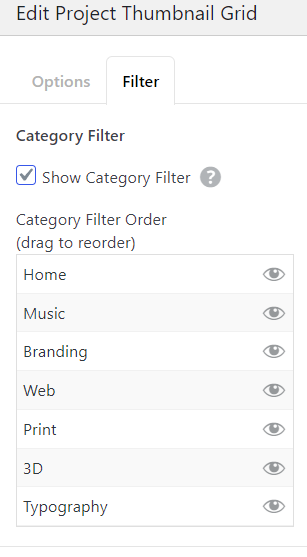
category filter for news

Scheduled Pinned Locked Moved General Discussion
13 Posts 7 Posters 610 Views 1 Watching
  • Oldest to Newest
  • Newest to Oldest
  • Most Votes
Reply
  • Reply as topic
Log in to reply
This topic has been deleted. Only users with topic management privileges can see it.
  • arminunruhA Offline
    arminunruhA Offline
    arminunruh
    Global Moderator
    wrote on last edited by
    #3

    ah yea? mmh
    i haven't really planned it mmh :O
    im writing it down, not sure if and when i will work on it!

    panteleyP 1 Reply Last reply
    0
    • arminunruhA arminunruh

      ah yea? mmh
      i haven't really planned it mmh :O
      im writing it down, not sure if and when i will work on it!

      panteleyP Offline
      panteleyP Offline
      panteley
      wrote on last edited by panteley
      #4

      @arminunruh

      Would have been amazing if possible šŸ˜… , but yeah go with your priorities. šŸ‘Š

      1 Reply Last reply
      0
      • T Offline
        T Offline
        tinjessen
        wrote on last edited by
        #5

        I would, too, appreciate this function very much. ;-)

        1 Reply Last reply
        0
        • A Offline
          A Offline
          alasdair17
          wrote on last edited by alasdair17
          #6

          hey, you can achieve this quite well by utilising news categories, the expand/collapse row feature and creating separate news elements. I just figured it out earlier. Let me know if you need further help.

          C 1 Reply Last reply
          1
          • C Offline
            C Offline
            chris.vuko
            wrote on last edited by
            #7

            @arminunruh Would love to have this feature too! šŸ˜

            1 Reply Last reply
            1
            • C Offline
              C Offline
              chris.vuko
              wrote on last edited by
              #8

              @alasdair17 But thanks for the tip, it's actually an okayish workaround!

              1 Reply Last reply
              0
              • A alasdair17

                hey, you can achieve this quite well by utilising news categories, the expand/collapse row feature and creating separate news elements. I just figured it out earlier. Let me know if you need further help.

                C Offline
                C Offline
                CineST
                wrote on last edited by
                #9

                @alasdair17 Hi Alasdair, I'd be really interested in how to implement your "work around", could you explain with some more detail? Very much appreciated!

                A 1 Reply Last reply
                0
                • C CineST

                  @alasdair17 Hi Alasdair, I'd be really interested in how to implement your "work around", could you explain with some more detail? Very much appreciated!

                  A Offline
                  A Offline
                  alasdair17
                  wrote on last edited by
                  #10

                  @CineST hey sorry for the late reply.

                  So what to do is:

                  Create your news categories so you have for example: "news 1", "news 2" and "news 3".

                  Create your news posts and assign them to the one of the news categories.

                  Create a new page and add 4 new blank rows.

                  Right click on row 2 and choose "collapse row", repeat this for rows 3 and 4. It should now say "collapsed" on rows 2, 3 and 4.

                  Go to More > News Element and at the top left of the dialog box choose "news 1" category - this will only show news from the "news 1" category. Drop this news element in the second row.

                  Repeat this step again but choose "news 2" from the categories dropdown this time and drop it into the third row.

                  Repeat again but choose "news 3" and drop into the fourth row.

                  Now create a text box and type in "news 1", highlight "news 1" and click the upward and downward arrow box (expand/ collapse row link) - this is along the top of the dialog box and to the left of the font name.

                  The expand row box dialog box will open up and then select "row 2" - you will know its been selected when it becomes a light violet colour. Also in this box tick "collapse other rows". Click Save and then Ok. Drop this text box into the first row.

                  Now create another text box and type in "news 2" and repeat the same steps but select "row 3" this time and again drop it beside the first text box in the first row.

                  Create another text box and type in "news 3" and repeat the same steps but this time select "row 4" and finally drop the textbox beside the other two textboxes on the first row.

                  Publish/Update the page and you should have a simple news category filter system :)

                  An extra tip would be to change the row gutters between the collapsed rows to 0 so when you filter them they show up in the same place.

                  Of course you can also call your news categories anything and the textboxes too can be something different - "news 1, news 2, news 3" are just examples.

                  Lastly, when you are in the expand/row collpase dialog box you can play around with the replacement text and the speed of which they open too.

                  Hope that helps!

                  Cheers!

                  1 Reply Last reply
                  1
                  • M Offline
                    M Offline
                    mariajover
                    wrote last edited by
                    #11

                    Hey! Any updates on this? I've done it before using the expand/collapse row feature, but this time I think it might be too much trouble for the client, because they'd have to add new categories manually :/ Thanks!

                    1 Reply Last reply
                    0
                    • arminunruhA Offline
                      arminunruhA Offline
                      arminunruh
                      Global Moderator
                      wrote last edited by
                      #12

                      Hey Maria! Sry about the delay, been travelling. I can start working on this soon!

                      M 1 Reply Last reply
                      0
                      • arminunruhA arminunruh

                        Hey Maria! Sry about the delay, been travelling. I can start working on this soon!

                        M Offline
                        M Offline
                        mariajover
                        wrote last edited by
                        #13

                        @arminunruh thankssss!! šŸ™

                        1 Reply Last reply
                        0
                        Reply
                        • Reply as topic
                        Log in to reply
                        • Oldest to Newest
                        • Newest to Oldest
                        • Most Votes


                        I also code custom websites or custom Lay features.
                        šŸ’æ Email me here: šŸ’æ
                        info@laytheme.com

                        Our Web Development company: 100k.studio

                        Want to tip me? https://www.paypal.com/paypalme/arminunruh

                        Before you post:
                        1. When using a WordPress Cache plugin, disable it or clear your cache.
                        2. Update Lay Theme and all Lay Theme Addons
                        3. Disable all Plugins
                        4. Go to Lay Options → Custom CSS & HTML, click "Turn Off All Custom Code", click "Save Changes"

                        This often solves issues you might run into

                        When you post:
                        1. Post a link to where the problem is
                        2. Does the problem happen on Chrome, Firefox, Safari or iPhone or Android?
                        3. If the problem is difficult to explain, post screenshots / link to a video to explain it
                        Online Users
                        Forgot your key, lost your files, need a previous Lay Theme or Addon version? Go to www.laykeymanager.com
                        laytheme.com
                        • Login

                        • Don't have an account? Register

                        • Login or register to search.
                        • First post
                          Last post
                        0
                        • Recent
                        • Tags
                        • Popular
                        • Users
                        • Search

