Sorry for taking so long in replying to your posts! Thank you for your work and considering my feedback. I really appreciate! Have a nice weekend!
 E
E
emgeoffice
@emgeoffice
Posts
-
handling of changes in mobile menu layouts within updates -
bar to separate menu elementsHave you added it via css?
-
handling of changes in mobile menu layouts within updates… at least I was able to re-create the old design with some trying. I just did not realise first that it worked because it still looks off in the customiser while on the actual phone it appears as intended.
-
handling of changes in mobile menu layouts within updatesHi, I really appreciate the amount of time and care that is being invested into Lay Theme with every update. Nonetheless I really recommend to not change existing mobile menu designs with an update. It is a kind of surprising situation when the mobile menu suddenly looks different after an update. ✌️
-
gridder background image is "zooming in" on mobileAwesome, Armin! It worked. I checked everything but would have never found this reason. Thanks!
-
MP4 Videos don't work in Safari but do work in Chrome and FirefoxSorry to ask, but is it a problem with the autoplay that is activated in your video? I also wonder why autoplay is there as a CSS class. Is that a Lay thing?
If you open the video via link it does not work on Safari (macOS) while it should at least here if I am correct. It almost seems like the video is not available while all the images are listed in "sources".
https://www.mueller-brunke.com/wp-content/uploads/2018/11/Vignette1.mp4
-
gridder background image is "zooming in" on mobileI experience it on Safari on iOS. It is not visible to me on small windows on desktop.
-
gridder background image is "zooming in" on mobileYeah, I have a link. :)
-
gridder background image is "zooming in" on mobileI experience a strange zoom on scroll on the gridder background image on mobile.
-
white space at top on safari - mobileI guess you would have to set this with a meta tag.
<meta name="theme-color" content="#000">
-
backdrop-filter blur issueThank you for your help so far! I have added "width: fit-content" and instead of the row I am now using the "stick" class on the button itself.
I also learned about the different implementation of backdrop-filter in Chromium. For the moment I am fine as it is working visually somehow on my site. I also do not plan to add many more features or content, so I think I am fine for the moment. Thanks again!
-
backdrop-filter blur issueI suddenly found the problem: I had to disable "revealing transition". Now it works on Chromium. Is that a bug or is that the correct behavior?
-
backdrop-filter blur issueThe Button element that is not working properly is on the legal page top left.
-
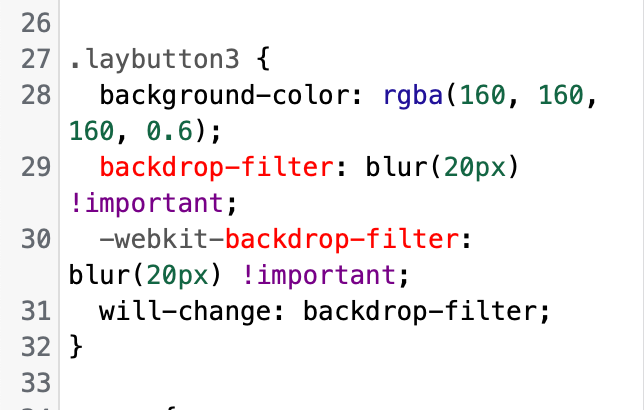
backdrop-filter blur issueI have it in custom CSS.
-
backdrop-filter blur issueHi there,
I have a problem with my buttons as I have a backdrop-filter (also webkit version) using custom CSS. It shows up in Safari, but in Chrome and Arc it does not load initially. However, when I inspect the button element it says that it is enabled. When I uncheck and re-check the rule it suddenly works.
Does anyone know what kind of problem I am running into?
Best,
Simon
-
Update to lawyer websiteThank you so much @arminunruh! The photos are by Peter Wolff.
I will see if I can make the "load more" button adaptive.
-
Update to lawyer websitea bigger update and revamp of a simple and small website for a lawyer made with lay theme including some custom css.
-
add date inside news elementThank you for your reply. If there is a wish list I would put it there. :D
-
add date inside news element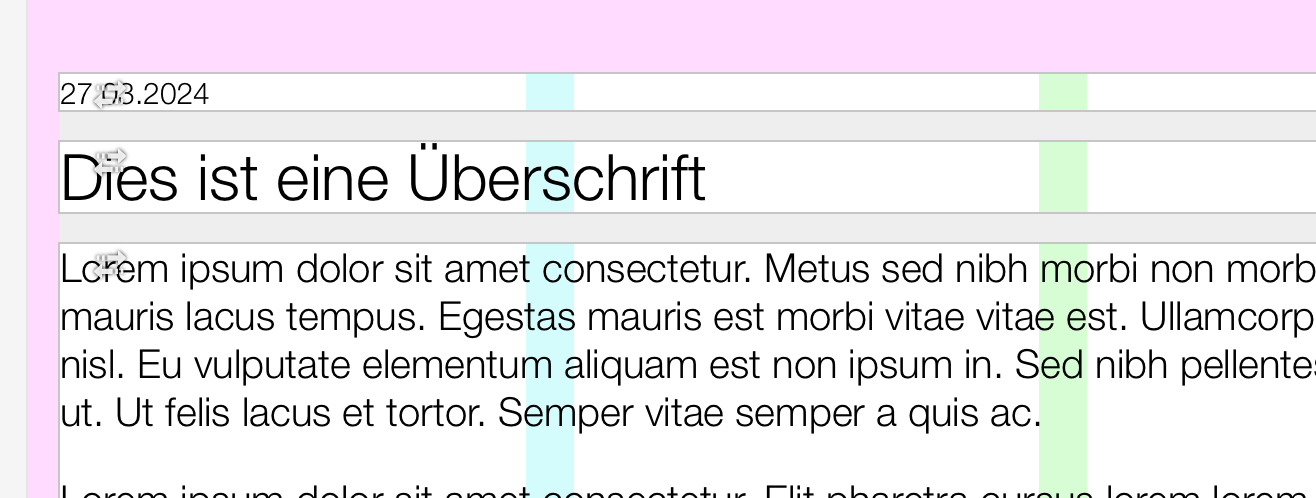
Like I want to this date above the heading to be added automatically somehow.
-
add date inside news elementIs it possible to add a date of the entry automatically inside the news element without having to add it manually as a text field? I do not mean the date in the news grid.